Renewals bill you after you forget them, and why “connect your bank” is not the answer
Subscriptions accumulate quietly. The video service that started as a free trial, the AI tool you meant to keep for a month, the domain you paid for a year ago, the gym you stopped visiting. Each one is small, but nobody really knows how much leaves every month or when the next charge lands. The card statement tells you after the money is gone.
So you look for a subscription manager and the first screen says “connect your bank”. The promise is that it will read your statements and find subscriptions for you; the price is handing your entire card and account history to a company you just met. Giving away two years of spending to tidy up ten subscriptions is a poor trade. And most of those links only support banks in a few countries, so from Korea or Japan they do not even work.
Apps that skip the bank link have their own traps. The free tier lets you add five subscriptions and then asks you to buy “Pro” for more, so the app you installed to cut subscriptions adds one. Some demand a login, and when the account policy changes later the list you typed disappears with it. Others merge several currencies into one headline number, and the exchange rate behind that number is whatever the app decided, not what your card will charge.
What you actually need is much simpler. A name, a price, a currency, a next renewal date, a cycle. Write those five down and days-until is arithmetic, and so are the monthly and yearly totals. If you pay in two currencies, the totals are two lines. Reminders are something your OS calendar already does well, so one calendar file is enough. None of that needs a bank, an account or a server.
What Subpad does
Subpad is a ledger for those five things. Search the templates for Netflix, Spotify, YouTube Premium, iCloud+, Adobe, ChatGPT, Claude, a domain or a mobile plan and the name, category and usual billing cycle are filled in; you type the price and next renewal. Anything not in the templates you type in yourself. Every row gets a brand tile built into the app, initials on a colour, and no logo is ever fetched from the internet.
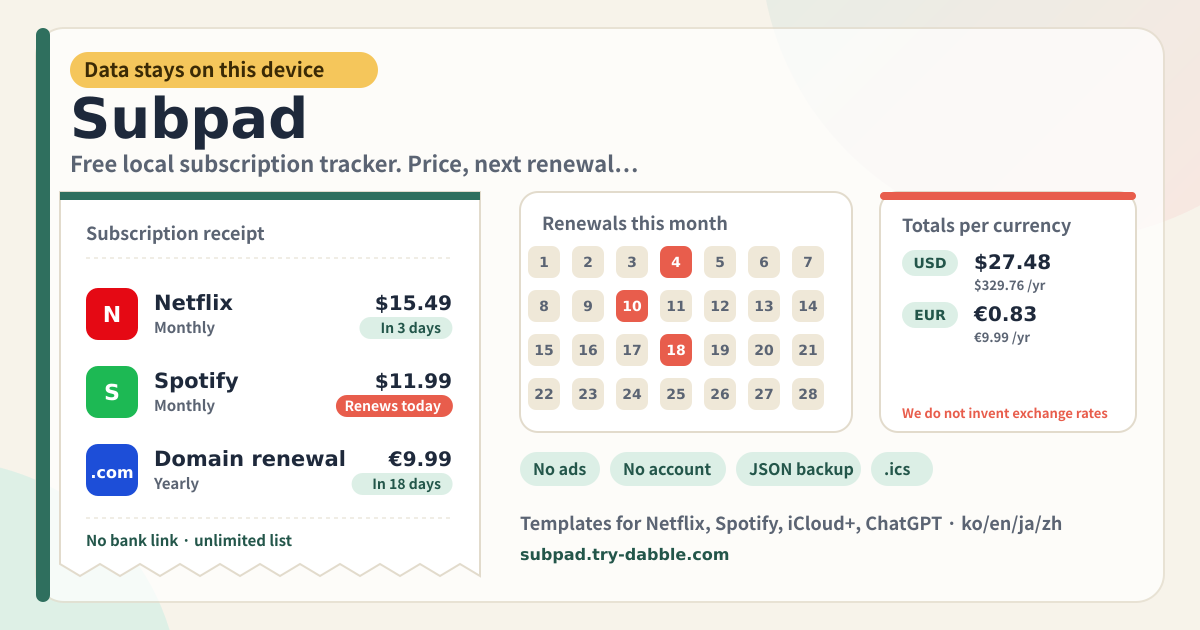
Each subscription in the list shows days until renewal, and past ones read “n days overdue”. The summary at the top shows how many renew within seven days and the monthly and yearly totals per currency. If you pay in won and dollars you get two lines, and the app never adds them into one. A note under the totals says so: totals stay in each currency, no invented exchange rates.
When a renewal comes around, press “Mark paid” or “Skip”. Both leave a row in the History tab and move the next renewal one cycle ahead; Mark paid also records the amount and currency. The list can be searched by name or notes, filtered by category, currency, cycle and window (next 7 days, next 30 days, overdue) and sorted by renewal, name or price. Cancelled subscriptions can be hidden or shown again.
The Backup tab exports subscriptions, payment history and categories as one JSON file and imports them back. Simple lists exported by other apps, such as a services array, are read too when the fields are obvious. The calendar (.ics) export on the same tab writes a file with a repeating event and a one-day reminder for every active subscription, and each row has its own “Calendar” button for a single one. Open the file and the calendar on iOS, Android, Mac or Windows does the reminding.
Banner, summary, list, history, backup
- Amber banner: data stays on this device, no bank link, no login, no ads, no invented exchange rates. It is at the top every time you open the app.
- Summary: renewals within 7 days (with overdue count), active subscriptions, monthly and yearly totals per currency.
- List: search, category / currency / cycle / window filters, sort, show cancelled. Each row has a tile, name, category, cycle, next date, price, days-until, and Mark paid / Skip / Edit / Calendar / Delete buttons.
- Add: “From template” opens the searchable service list, “Add subscription” a blank form. The form has name, price, currency (KRW, USD, EUR, JPY, CNY, TWD, HKD, GBP, SGD), next renewal, cycle (weekly, monthly, quarterly, yearly), category (you can add your own), status, website and notes.
- History tab: one row per paid or skipped renewal with service, due date and amount. Remove a row if it is wrong.
- Backup tab: Export JSON, Import JSON, Export calendar (.ics), default currency, Delete everything.
- Promise chips: No ads mid-use · Unlimited list · No bank link · No login wipe · JSON backup · Calendar export · Free forever · Data this device only · ko/en/ja/de.
- Footer: Privacy, Terms, Guide, try-dabble.com. The “Guide & Feedback” button at the bottom right opens this guide page in a new tab.
Where your data stays
Your subscription list, prices, renewal dates, payment history, categories and settings live only in this browser on this device. Nothing is sent to a server and nothing is tied to an account. The only network requests the app makes are for its own files and the try-dabble feedback widget; brand tiles are drawn inside the app. So export a JSON before you move to another device or reinstall. Clearing this browser’s site data removes the list with it.
I pay in several currencies. Why is there no single total?
Merging needs an exchange rate, and today’s rate is not next month’s billing-day rate, and the rate your card issuer applies is different again. A number the app decided would look precise and be wrong. So Subpad shows one line per currency and stops there. To see a single currency, use the currency filter on the list. If you want a rough combined figure, multiplying by a rate yourself is the honest way.
What exactly happens when I press “Mark paid”?
A row with the due date, amount and currency appears in the History tab, and that subscription’s next renewal moves forward by one cycle: a month for monthly, a year for yearly. One month after 31 January lands on 28 February (29 in a leap year). A long-overdue subscription only moves one cycle per press, so press as many times as you fell behind and the history stays honest. “Skip” moves the date the same way but records a skipped row without an amount. If you pressed by mistake, remove the row in History and edit the date back.
How do I get reminders?
Press “Export calendar (.ics)” on the Backup tab and a file downloads with a repeating event and a one-day-before reminder for every active subscription. Open it on iPhone or Android and you are asked to add it to your calendar; Mac and Windows behave the same. From then on the calendar app does the reminding, and Subpad runs no notification server. For a single subscription, use the “Calendar” button on its row. If you change a date or price, export again. A renewal date that has already passed is moved to its next occurrence when the file is written.
Can I import a list from another app?
JSON that Subpad exported is read as-is. JSON from other apps is mapped when the subscription array is called something like subscriptions, services or items and each entry uses common names such as name/title, price/amount, nextRenewal/nextBillingDate/renewalDate and cycle/billingCycle/period. Cycle spellings like “month”, “annual” or “매월” and dates like 2026/09/14 are read too. Unknown fields are ignored and rows without a name are skipped. A confirmation appears before import, and the file replaces the current list, so export first to be safe.
Is it free? Any ads, account or bank link?
Everything is free and there is no limit on how many subscriptions you keep: no five-item catalog lock, no “upgrade to Pro”. No ads, no account, no login, so no login can ever wipe the list. There is no bank, card or Plaid connection screen anywhere. The tool page loads no ad script; the domain serves an ads.txt only so the publisher record matches the rest of try-dabble. If you have thoughts, use “Send feedback” on this guide page. There is no separate feedback panel inside the app.