Taking an order over chat without missing a field
An order in a DM never arrives as an order. It arrives as “do you still have the blue one” and then, over the next two days, a size, a “can you send it to my mum”, a screenshot of a bank transfer and a question about Thursday. The only defence is to decide, before you sell anything, which fields make an order complete, and not to stop asking until every one of them is filled.
For a physical product there are six: who (the handle and a real name for the parcel), what (the exact item, as you list it), which (size, colour, option), where (the full address plus a phone number for the courier), paid (yes or no, and how much), and when (the day it must leave you). Keep a saved reply that asks for all six in one message; people answer a numbered list far more completely than a chatty question.
Confirm by echoing the whole order back in one message — item, option, address, price, ship date — and wait for a “yes” before you pack. That message is your receipt, and their correction is cheaper now than a return later. When money comes in, write down the amount and the sender’s name as it appears on the transfer, not just “paid”; matching payments to names is where an evening goes.
Six things per order, one docket each
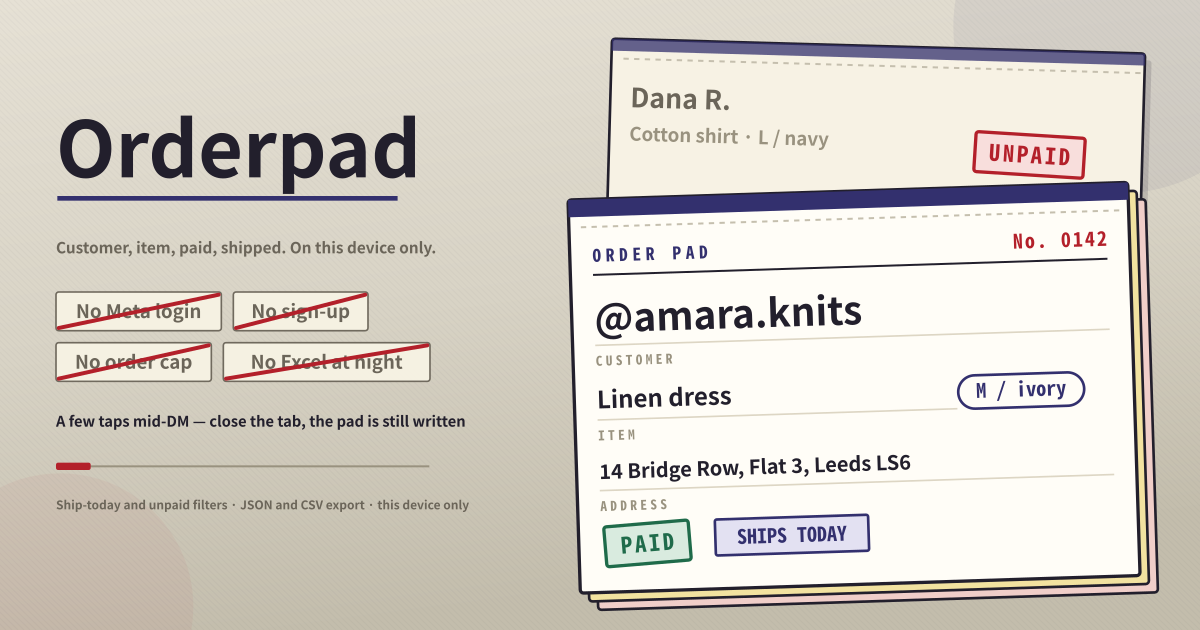
Orderpad keeps six things per order: the customer, the item, the size or option, the address, whether they paid, and the day it has to go out. Only the customer name is required, and the ship-by date is already set to today — so you can step out of the DM, type a name, tap once, and a docket exists. The rest gets filled in on that docket as more messages arrive.
The dockets stack like slips in a paper book: still to go out on top, and inside that, the ones whose date has already passed come first. Shipped dockets settle underneath and turn to the greyer copy stock.
Writing the docket while the chat is open
- Type the customer. An @handle or a real name — whatever you call them in the DM. That is the only required field.
- Put the item and the size or option in separate boxes. The option is ringed on the docket, so when you are packing you are not hunting for “M” inside a product name.
- Paste the address exactly as it arrived in the DM. Line breaks are kept, so there is no format to tidy up.
- If the money already landed, switch “already paid” on as you write it; otherwise tap it once on the docket later. Shipping works the same way — tap mark shipped when the parcel is gone and the docket settles to the bottom.
- The ship-by date is already today. If it goes out next week, change the date and nothing else.
- Four view tabs do the filtering: all, unpaid, ship today, shipped. “Ship today” also pulls in anything already past its date — an order you should have posted yesterday is today’s job. Each tab carries its count, so you can read it without opening it.
- One search box finds anything. It runs across the customer, the item, the option, the address and the docket number at once, so “dress” finds it and so does a street name.
- The pencil on a docket opens the same boxes in place. Changing a size or fixing an address never sends you to another screen.
- A cancelled order is binned after a confirmation. Nothing else ever disappears by itself.
- The export panel downloads the whole book as CSV or JSON, and a JSON export can be imported back. The CSV opens straight in Excel or Google Sheets.
Why the docket is written mid-reply
It gets used by people who sell through Instagram and WhatsApp DMs. Orders never arrive in one piece: the size comes first, the address later, the payment that evening. Left in the chat scroll it ends with a spreadsheet opened at eleven at night — and that is where an order goes missing.
So you write the docket in the same moment you reply. Next morning the ship-today tab is the pile to pack and the unpaid tab is the list of people to chase. That is the whole job.
Where the book stays
There is no Meta login: the app never connects an Instagram or WhatsApp account and never reads your messages. Every docket saves the moment you type and stays on this device only, with no server, no sync and no shared view for a team. Switching devices or clearing site data clears it, so export CSV or JSON of any book you cannot lose.
Do I have to connect my Instagram or WhatsApp account?
No. There is no Meta login at all. This app does not read your DMs and does not pull orders in automatically — you read the chat and write it down, the way you would on paper. In exchange there is no account to hand over, no permissions screen, and no integration to break when a platform policy changes.
Can a partner or an employee see the same book?
Not live. There is no server and no account, so two people watching one list at the same time is out of scope. If you need to hand it over, export JSON and let them import it — but from that point they are two separate copies and they do not merge back.