It started with “Simple app to track tax residency/days in-country” on r/dualcitizenshipnerds
The thread appeared on the r/dualcitizenshipnerds subreddit in 2026 under the title “Simple app to track tax residency/days in-country”. The wish was a plain one: an app that does nothing more than count the days spent in each country toward a residency threshold — with no account, no location tracking and no fixation on the 90-in-180 arithmetic of a visa calculator. It is a fair wish. The threshold and which days count are things an adviser or the tax authority has already said; what is missing is a place that remembers the dates and does the arithmetic.
Look at that category and a pattern repeats. StayLimit (staylimit.app) is a PWA in English only, wants a free account first, and its free tier stops at three countries. daysofstay.com no longer answers. The store apps — Immio, Tax Days, Sarmiza, Tax Resident — mostly lean on the phone’s location, or on a paid tier once you want more countries. For someone who wants to count two or three countries by hand, that is an account, a location permission or a payment before the first date is written down — and the marks on a calendar, for all their faults, never asked for any of it.
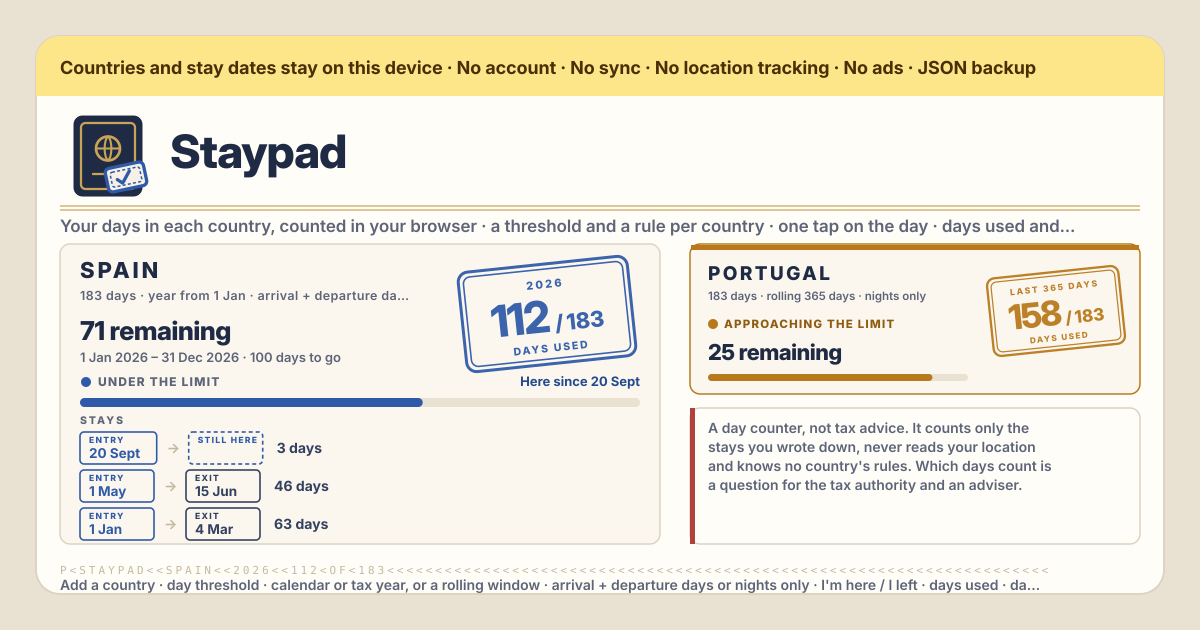
Staypad is that wish, answered as asked. One page per country, each with its own threshold and its own rule; tap “I’m here” on arrival and “I left” on departure, or write past stays in by their dates, and the stamp shows the days used this period against the threshold, with the line under it saying what remains — in the browser on this device, with no account, no country cap, no location permission and no server. The UI is in Korean, English, Japanese and German. Staypad is a day counter, not tax advice: it knows no country’s rules, you type the threshold, the period and which days count exactly as your adviser or that country’s tax authority gave them, and the app never says whether you are resident anywhere.
What Staypad does
“Your countries” is the top of the app: one passport page per country you need to count. On each page a tilted rubber stamp reads “days used / threshold”, with “days used” in small print under it. The stamp is stamp-blue while there is room, turns ochre and gives the page an amber border once the days used come within your warning distance of the limit, “Approaching the limit”, and turns red once “Limit reached”. Under the stamp the line reads “N remaining” or “N over the limit”, and if stays are written in ahead, “N planned ahead · N left after them”. The period line under that reads “1 Jan – 31 Dec · N days to go” for a year rule or “Last 365 days · start – today” for a rolling window, and a rolling window adds “The oldest counted day leaves the window on {date}”. Under the name sits the rule in one line, “183-day threshold · Year from 1 Jan · arrival and departure days count” — only what you picked, never a recommendation. The status line is one of “Here since {date}”, “Arrived today” and “Not here now”; “I’m here” opens a stay from today — one person is in one place, so a stay still open in another country is closed today — and “I left” ends it today.
“Add a country” opens a form. “Country” is the name in your own words, never looked up and never corrected. “Day threshold” starts at 183, and the hint under it says to write the number the rule gives, because 183 is a common residency test, not every country’s. “Counting period” is “Calendar or tax year” — with “The year starts on” as a month and a day, 1 January to begin with, and if the tax year starts on another day you pick that day — or “Rolling window”, with “Window length (days)” at 365 to begin with, counting the last N days ending today. “Which days count” is “Arrival and departure days both count” or “Only days that end there count (the departure day does not)”. “Warn me this many days before the limit” starts at 30, and 0 turns the warning off. “Note (optional)” is for where the rule came from, “adviser’s email, March”. “Save” and the page is there at once. Every page has “Edit” and “Delete”; Delete asks first, because the country’s stays go with it, and offers “Export JSON first”. There is no cap on the number of countries and no list to pick from: the app knows nothing but what you typed.
Under each page the “Stays” line up like entry and exit stamps: “Entry” date → “Exit” date or “still here”, the days that stay counts under the country’s rule, and a “planned” tag when the arrival has not come yet. “Add a stay” opens a small form: “Arrival”, “Departure” or the “Still here (no departure yet)” box, and a note. Two stays in the same country may not share a day and are refused with “Overlaps another stay in this country.”, but different countries may share a travel day — the day you leave one in the morning and land in another in the evening. Every stay has “Edit” and “Delete”; Delete asks first and offers “Export JSON first”. Below sits “Try a trip”, the card for before you book: pick a country, “Arrive” and “Leave”, and it answers as of the trip’s last day, “On {date} you would be at N of 183 in {country} — N left.” or “… N over the limit.”, then “The trip itself counts N days.” and “Without this trip: N.” Nothing is saved, so you can try dates as often as you like.
“Alerts” is off by default. Turning on “Tell me when a country gets near its limit” makes the browser ask for permission, and the state is written on the card, “Notification permission: granted”. An alert is shown once per country, per period and per level — first “Approaching the limit”, then “Limit reached” — and only while Staypad is open; nothing can wake a closed browser, so the numbers on the page are the record. “Send a test” shows what one looks like, and the card lists the countries near or over their limit right now as “{country}: 160 of 183”, or “Nothing is near its limit right now.” “Backup” at the bottom has “Export JSON”, which writes countries, stays and settings as one file; “Import JSON”, which replaces the list after one confirm and refuses a file from another app with “Not a Staypad backup file”; “Export CSV”, one row per stay — country, arrival, departure, days, note — for a spreadsheet or an adviser; and “Empty Staypad”, which wipes this browser after a confirm that also offers “Export JSON first”.
Your first week, step by step
You do not need to type in the whole year’s travel the first evening. One country and two past stays are enough to see whether the page earns its place on the home screen; the rest can follow the next day with the calendar or the flight emails open beside it. Write the threshold and the rule as your adviser or the tax authority gave them — the app cannot know them for you.
- Open https://staypad.try-dabble.com and pick your language at the top. Whatever you choose, the country names and notes are your own words and are never translated.
- Under “Your countries” press “Add a country”. Type the name, put the number the rule gives in “Day threshold” — the 183 it starts with is only a common test — pick a calendar year, a tax year starting on another day or a rolling window under “Counting period”, and under “Which days count” pick the one your adviser named. “Save”. Under the name the rule appears in one line, “183-day threshold · Year from 1 Jan · arrival and departure days count”. If a value is unsure, ask rather than guess, and fix it later with “Edit”.
- Put in the stays already behind you in this period: press “Add a stay” under the page, write “Arrival” and “Departure”, save. The stamp climbs at once and the line under it reads “N remaining”. Dates that overlap another stay in the same country will not save, so merge those stays into one or fix the dates.
- The next day you arrive somewhere, press “I’m here” on that country’s page. The status becomes “Arrived today”, the stay list gains “Entry {today’s date} → still here”, and from then on the stamp climbs by one each day. A stay still open in another country is closed today — one person is in one place.
- On the day you leave, press “I left”: the stay ends today and the status reads “Not here now”. Forgot? Open the stay’s “Edit” in the list and write the “Departure” by hand — the app never guesses where you were, so the dates are always yours to set. Two countries sharing the same travel day is fine.
- Before you book the next trip, put the country, “Arrive” and “Leave” into “Try a trip”. “On {date} you would be at N of 183 in {country} — N left.” answers as of the trip’s last day, and “Without this trip: N.” gives the comparison. Nothing is saved, so change the dates and try again. Once it is booked, write it in with “Add a stay” and it is counted separately as “planned”.
- If you want the browser to tell you, turn on “Tell me when a country gets near its limit” under “Alerts”, let the browser ask, and press “Send a test” — then read the card’s hint once: an alert shows only while Staypad is open. At the end of the week press “Export JSON” under “Backup”; that file is the only copy that exists outside this browser.
What it does not do, said plainly
Not tax advice, which is the part that matters most. Staypad knows no country’s rules: what the threshold is, when the year starts, whether arrival and departure days count or only the nights — every one of those is a value you typed, not something the app knows. The 183 it starts with is a common residency test, not every country’s; some tax years start on a day other than 1 January; some rules count any part of a day and others only the nights — which of those is your case is a question for that country’s tax authority and an adviser. Residency tests often have more to them than a day count, so the app never says whether you are resident anywhere or not, and the number on the stamp is nothing more than the stays you wrote down, counted under the rule you chose. It is not a visa calculator either: not a 90-in-180 visa calculator, and no visa rule of any kind is built in.
No location tracking. Staypad never reads where you are — it asks for no location permission, has no map and does not notice a border being crossed. A day counts only because you tapped that you had arrived or wrote the date down; if you forget, the day sits uncounted until you fix it. That is by design, not a gap: a counter that reads your location has to be trusted with it, and this one never needs to be. No push server, which is the honest part about alerts: an alert is something the open page shows, and there is no server of ours that could wake a closed browser. If a limit matters, look at the numbers on the page — they are the record. No country cap, no paid tier, no sync and no server: nobody can see your countries and your dates unless they hold your unlocked phone or the file you exported.
What stays on the device, and the backup
Everything stays in the browser on this device: every country with its rule, every stay with its dates and note, the alert switch and the language. The app requests nothing but its own files, so adding a country or pressing “I’m here” asks no server for anything, and once it has been opened it works offline as an installed PWA — the stamp updates in flight mode too. There is no account, no server of ours, no sync and no location permission; nothing about your travel leaves the device. The amber band at the top says the same thing in one line: your countries and your stay dates live in this browser on this device.
That also means the backup is yours to keep. “Export JSON” under “Backup” writes one small file with the countries, the stays and the settings, and “Import JSON” in another browser or on a new phone restores it after one confirm, replacing the list that is there — the dialog offers “Export JSON first” in case something is already on that device, and a file from another app is refused with “Not a Staypad backup file”. “Export CSV” writes one row per stay for a spreadsheet or an adviser. Clearing the browser’s site data removes the countries and the stays, which is why the export exists. Deleting a country removes its stays too, deleting one stay stops its days being counted, and “Empty Staypad” removes everything — all three behind a confirm that offers the same export. A new version never locks anyone out and never wipes what was saved; an older backup file still loads.
Is there a country cap or a paid tier?
No cap and no tiers. Every feature is open to everyone from the first tap, and you can add as many countries as you need to count, each with its own threshold and its own rule, because a country is a few lines of text and a stay is two dates. Nothing asks for a payment at the third country; there is no subscription, no premium, no in-app purchase and no ads on the tool. The only cost is the minute it takes to copy in the rule your adviser gave you.
Does it track my location?
No, in no form. Staypad asks for no location permission, has no map, does not guess where you are from your connection and does not notice a border being crossed. A day is counted for one reason only: you pressed “I’m here” on that country’s page, or you wrote the dates in with “Add a stay”. That leaves one job to you — tap on the day you arrive, or put the dates in later — and a day you forget sits uncounted until you fix it. A counter that reads your location has to be trusted with where you are; this one never needs to be.
Is this tax advice? Does it know my country’s rule?
No, on both counts. Staypad knows no country’s rules — there is no table of countries, no preset and no suggestion. The threshold, the start of the year or the window length, and which days count are values you typed, and the app only asks you to type them as your adviser or that country’s tax authority gave them. The 183 it starts with is a common residency test, not a recommendation; some tax years start on a day other than 1 January; some rules count any part of a day and others only the nights. Residency tests often have more to them than a day count. That is why the app never says whether you are resident anywhere or not, and why the honest line under its title says so itself. The stamp is the stays you wrote down, counted under the rule you chose, and what to do with that number is a conversation with an adviser.
How are days counted — arrival and departure, nights, the same day twice?
A country’s number is the count of distinct calendar days inside the current period that any stay in that country covers. A day is never counted twice — two stays touching the same day still make one day. Under “Arrival and departure days both count” a stay from the 10th to the 20th is 11 days; under “Only days that end there count (the departure day does not)” the departure day drops and it is 10, and a same-day trip is 0. A stay with no departure counts through today — whoever is there tonight is there at midnight. Days inside the period but after today are “planned”, not “used”, and are shown separately. Whichever rule you pick, stays in the same country may not overlap, but different countries may share a travel day — leave one in the morning, land in another in the evening, and that day can count on both pages. Which way is your case is for your adviser or that country’s tax authority to say, not the app.
What is a rolling window, and when do days drop out?
A “Rolling window” is the last N days ending today — “Window length (days)” 365 for the last twelve months, 180 for the last 180 days — and it slides forward by one day every day. Two things follow. First, there is no fresh start: an old day leaves the window each morning, and the page’s line “The oldest counted day leaves the window on {date}” tells you exactly when the oldest day now counted drops out. Second, there are no “planned” days: the window ends today, so a future stay is outside it, and “Try a trip” is the tool instead, answering as of the trip’s last day with the window moved up to that day. Whether a rolling window fits your case, and how long it is, is for your adviser or that country’s tax authority to say, not the app.
My tax year does not start on 1 January — what do I do?
Pick that day. In “Add a country” or “Edit”, keep “Counting period” on “Calendar or tax year” and set the month and day under “The year starts on” to the first day of your tax year. The page’s period line then runs from that date to the day before it a year later — “6 Apr – 5 Apr · N days to go” — and the rule line under the name reads “Year from {that day}”. On the first day of a new year the count starts again: at whatever the stays covering that day add up to, or at 0 if none does. The year that ended yesterday is not lost — the stays stay where they are, and if you need that year’s number the CSV has every date. It is true that some tax years start on a day other than 1 January, but when yours starts is for that country’s tax authority to say, not the app.
I forgot to tap “I left” — what now?
Write the stay’s departure by hand. On that country’s page, open “Edit” on the open stay in the “Stays” list — the one shown as “Entry {date} → still here” — untick “Still here (no departure yet)”, put the day you really left into “Departure” and save. The stamp corrects itself at once and the days counted in the meantime disappear. An open stay counts through today until you fix it, so if you notice days later the stamp was simply that much higher and is right again now. If you pressed “I’m here” in the next country, half the job is already done: one person is in one place, so that tap closed the open stay in the other country on that day — and if you really left earlier, move the departure back.
Can I log trips I am still planning?
Yes, in two ways. A trip you have booked goes in through “Add a stay” with its arrival and departure. Because the arrival has not come yet, the list tags it “planned”, and its days are kept out of “days used” and counted separately under the stamp as “N planned ahead · N left after them” — the stamp and the warning level look only at days up to today. When the arrival comes, the tag disappears on its own and the days move over one at a time. A trip you have not decided on goes into “Try a trip” instead: it shows the result as of the trip’s last day and “Without this trip: N.” without saving anything, so you can change the dates and compare. A rolling window has no planned days, because it ends today; there, “Try a trip” is the answer.
Will the alert fire if the tab is closed?
No. A Staypad alert is a notification the open page shows, after the browser has asked you for permission, when it sees a country come within your warning distance of its limit or reach it. It shows while Staypad is open in a tab or running as the installed app, once per country, per period and per level — first “Approaching the limit”, then “Limit reached”. It does not show from a closed tab, and there is no server of ours that could send it — Staypad has no push server, on purpose, because it has no server at all. That is why “Alerts” is off by default and why the card’s hint says so: nothing can wake a closed browser, so the numbers on the page are the record. If a limit matters, look at the page before you travel and put the trip into “Try a trip” before you book.
Can I move it to another phone? Does it work offline?
Moving is done with the JSON file. “Export JSON” under “Backup” downloads one file holding the countries, the stays and the settings. Get it to the new device any way you like — a cable, a message to yourself, a drive you already use — open Staypad there, press “Import JSON” — it asks you to confirm with “Replace” only if something is already on that device — and the list is restored exactly as it was. A file that is not a Staypad backup is refused with “Not a Staypad backup file”. There is no sync in the background, so export again whenever you want a fresh copy, and keep the old file: an older backup still loads in a newer app. The alert switch is a browser permission, so turn it on again on the new phone.
Offline, yes. Open it once with a connection and it installs as a PWA on Android or any browser; after that the country pages, “I’m here” and “I left”, the stays, “Try a trip” and the backup all work with no network, because nothing is fetched while you use it — you can tap on the plane before landing. A new version loads quietly the next time the page opens online, and your countries and stays are untouched by it. The one thing that is not about the network is the alert: online or offline, it only shows while Staypad is open.