It started with “is there an app that tells me which card to use?”
The question came from the r/CreditCardsIndia subreddit. Someone with a handful of cards asked whether any app would tell them, at the moment of paying, which card to use for this purchase — automatically, so they would not have to carry around in their head which card gives 10% on groceries but only up to a cap, which one has a quarterly milestone half done, and which one is 1.5% on everything. The answers were the tools people already use.
Look at the tools that came up and a pattern repeats. The web tools — CardPilot (cardpilot.in), CardSahayak SpendSmart, CardSavvy (card-savvy.com) — are English-only. Among the store apps, CardPointers keeps part of itself behind a paid Plus tier, and MaxRewards links your bank accounts, whose sync and re-authentication keep breaking. Either way you hand the app a bank login or pay for a tier, and the answer arrives as a verdict without the working.
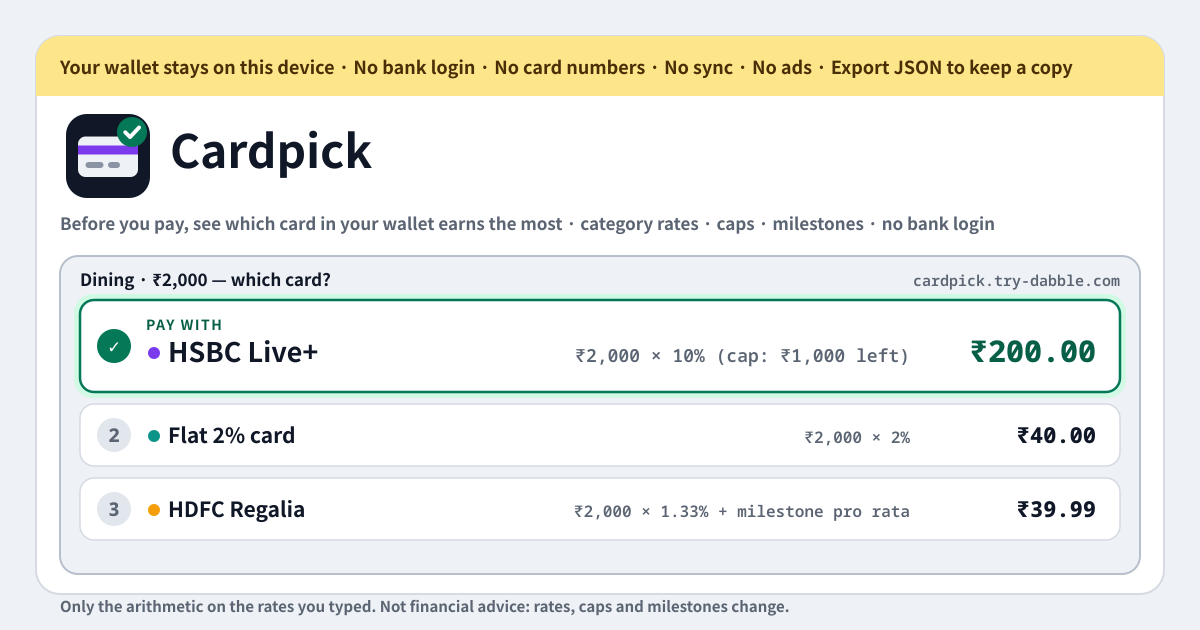
Cardpick is a different answer to that question. No bank link, no card numbers, no account. You type in your own cards’ rates, caps and milestones; from then on, each time you pick an amount and a category, every card lines up by what comes back, and how that number came about is written out like a receipt, in plain arithmetic. The UI comes in Korean, English, Japanese and German, and everything stays in the browser on this device. Cardpick is a calculator and nothing more: it never tells you which card to apply for, it does not know your bank’s real terms, and it is not financial advice.
What Cardpick does
You start by filling the wallet. A card is a nickname (a card number goes nowhere in this app), an optional issuer and a colour, a base rate for everything else, an optional annual fee with a note such as its waiver conditions, per-category rates each with a note of its own (“only via the bank’s shopping portal”), caps, milestones, and a free-text perks note for lounge access, a fuel surcharge waiver, insurance and the like. Sixteen categories are built in — groceries, dining, food delivery, fuel, online shopping, travel, utilities and bills, mobile and telecom, entertainment and streaming, pharmacy and health, electronics, apparel and department stores, insurance, rent, education, spending abroad — and you add your own for the merchants you actually use, such as Amazon, Swiggy or Coupang. Anything that fits no category is “everything else” and earns the base rate.
Then comes the pick. Type an amount and tap a category chip, and every card in the wallet lines up by what comes back. The best one is highlighted as “Pay with …”; the rest sit below it with their value and effective %. Each card shows how its number came about, laid out like a till receipt, so you can see why it is first rather than take it on trust. Once you have paid, press “Paid with this card” on that result and the purchase is added to that card’s cap usage and milestone progress.
Everything else helps you fill and keep the wallet. The points → % helper in the card editor turns “4 points per ₹150 at ₹0.50 a point” into 1.33%. An empty wallet offers “Load two example cards (INR)”, an HSBC Live+-style and an HDFC Regalia-style card, labelled as examples so you edit them rather than trust them. A currency selector (INR, USD, EUR, GBP, KRW, JPY, SGD, AUD, CAD, AED and more) formats every amount and value in the currency you pick; rates are percent everywhere. “Backup” exports JSON and imports it with a merge. Pick the language with ?lang=ko, ?lang=en, ?lang=ja or ?lang=de on the address, and add it to the home screen to install it as a PWA that works offline.
How the ranking math works
The base is one line: amount × rate = value. If the card has a rate for the category you tapped, that rate is used; otherwise the base rate. Caps sit on top of that. When a cap that covers this category is nearly used up, only the part of the purchase that still fits under it earns the boosted rate and the rest drops to the base rate — or to nothing, if the capped rate was the base rate itself. A cap on the whole card puts a lid on the total that card can return for this purchase. The effective % is that value divided by the amount, and the value is what the cards are ranked by.
Milestones count towards the value even before they are done — pro rata. A milestone that pays a bonus worth ₹1,500 for spending ₹1,50,000 in the quarter is worth 1% of every purchase on the way there, so that is what Cardpick adds. A count milestone — N transactions of at least Z each — adds bonus ÷ N for each purchase that qualifies, and nothing for one below Z. When this purchase would complete a milestone, the result says so. A milestone already met adds nothing more, because the bonus is already yours.
Take an example. An HSBC Live+-style card gives 10% on dining, food delivery and groceries with a combined cashback cap of ₹1,000 a month and 1.5% on everything else; an HDFC Regalia-style card gives 4 points per ₹150 at ₹0.50 a point, about 1.33% (these figures are examples, and banks change them whenever they like). A ₹2,000 dinner on a fresh month: Live+ ₹200, Regalia ₹26.67. With ₹940 of the cap already used this month, only ₹60 of cashback is left, so only ₹600 of the dinner earns 10% and the other ₹1,400 earns 1.5%, or ₹21: ₹81 in total, still ahead. With the cap fully used, the whole ₹2,000 earns 1.5% on Live+, ₹30, and a flat 2% card wins with ₹40. Those three lines are exactly what the receipt prints.
Caps and milestones
A cap covers one category, several, or the whole card. It comes in two kinds: a cap on the reward earned (₹1,000 of cashback a month) or a cap on the spend that earns the boosted rate (the first ₹5,000 of fuel). Its period is a month, a quarter or a year. Each cap has a “used so far” field where you type the number the bank app shows, and when the calendar turns to the next month, quarter or year the usage resets to zero by itself. How the bank counts towards the cap — by transaction date or statement date, with or without tax — Cardpick does not know, so if you are unsure, put it in the note next to the cap.
Milestones come in two shapes. The spend kind is “spend X in the period and get a bonus worth Y”; the count kind is “make N transactions of at least Z each in the period and get a bonus”. The bonus is entered as what it is worth to you in money — a voucher, points or miles, whatever they are worth to you. Each milestone shows its progress; the spend or the count so far is typed by hand or built up with “Paid with this card”. When the period ends the progress starts again from zero, just like a cap. If the annual fee is waived on “₹X of spend in the year”, that is a spend milestone too, with the fee as the bonus value.
“Paid with this card”
Cardpick imports no transactions. It is not connected to the bank, so it has no way of knowing what you paid for — one tap stands in for that. Once you have paid, press “Paid with this card” under that card on the result screen: the amount is added to the usage of every cap covering that category (the reward earned for a reward cap, the amount for a spend cap), and the spend or count of any milestone moves up one step. From the next pick on, that card is calculated with the smaller remaining cap.
If you forgot to tap, or paid somewhere without opening the app, edit the usage and progress by hand on the card in the wallet. The number the bank app shows is always the truth, so when the two disagree, change Cardpick to match the bank. Lining the two up once or twice a month is enough. Cardpick only tracks what you told it — and knowing before you pay that a cap is nearly full is the whole point of the button.
Where the wallet lives, and backups
Card nicknames, rates, caps, milestones, notes — everything sits in this browser on this device and nowhere else. There is no account, no server of ours and no sync; the app never contacts a server with your wallet, never talks to a bank, and there is no field for a card number to begin with. No ads on the tool UI, no in-app purchase, as many cards as you like.
“Export JSON” under “Backup” writes the whole wallet — cards, categories, caps, milestones, usage — into one file that is made on this device and leaves only as a download. “Import JSON” merges rather than replaces: cards are matched by nickname, and when the same nickname exists on both sides the more recently edited copy wins. That is how you move to a new phone or another browser, or fold the wallets of two devices into one.
A new version of the app never shows an “update required” wall and never wipes the wallet. Deleting a card asks first, and reminds you there is no copy anywhere else.
Does it connect to my bank or read my transactions?
No — never, and that is the point of it. Cardpick takes no bank login, has no field for a card number and no account. All it knows is the nicknames and numbers you typed. Cap usage and milestone progress move only when you tap “Paid with this card” or type a number on the card in the wallet. The problem the bank-linking apps have — a sync that breaks and asks you to authenticate again — cannot happen here, because there is nothing linked.
Is this financial advice? Will it tell me which card to apply for?
No, on both counts. Cardpick does arithmetic on the numbers you typed and nothing else. It does not rate cards, does not suggest applying for one, and does not know your bank’s real terms — excluded merchants, minimum amounts, when the reward posts, what changed this month. Enter a rate wrongly and the answer is wrong by the same amount. The result means “if these numbers are right, this card gives the most back”, no more, and the screen says so. The actual terms are the bank’s to confirm.
Does it work for cards outside India — my country’s cards?
Any card, any currency. The thread it started from was Indian and the example cards are in INR, but all Cardpick knows is the shape — rates, caps, milestones — and that shape is the same on a card from anywhere. Switch the currency to KRW, JPY, EUR or USD and amounts and values come out in it; the sixteen built-in categories are deliberately generic, and your local merchants — Coupang, Rakuten, Rewe, Tesco — go in as custom categories. If your bank wants “₩300,000 of spend last month” before the perks apply, that is a monthly spend milestone.
My card gives points, not cashback — what do I enter?
Use the points → % helper in the card editor: enter “how many points per how much” and “how much a point is worth”, and it gives you a percentage. 4 points per ₹150 at ₹0.50 a point is 1.33%. What a point is worth depends on how you actually redeem — statement credit, vouchers, a transfer to miles — so pick the one you use and put it in the note so you remember. A milestone bonus paid in points goes in the same way: not as a number of points but as what it is worth to you in money. That is what puts it on the same scale as a cashback card.
What happens when the month ends? How does it know how much of my cap I have used?
When the calendar turns — month, quarter or year, whichever period the cap or milestone was given — its usage and progress reset to zero on their own; there is nothing to press. How much you have used within the period is something Cardpick cannot find out, so you tell it: tap “Paid with this card” each time you pay, or type the number the bank app shows onto the card in the wallet. If your bank counts by statement cycle and that differs from the calendar month, Cardpick does not know that either; go by the bank app’s number and note the cycle on the card.
How is it different from CardPilot, CardSahayak, CardSavvy, CardPointers or MaxRewards? Is it free?
Three things. First, nothing is linked: it does not attach to your bank accounts the way MaxRewards does, and with no card numbers and no account there is no sync to break and nothing to re-authenticate. Second, the working is shown: instead of a verdict, every card lists amount × rate, the part that still fits under a cap and the pro-rata bonus like a receipt, so you can check the number yourself. Third, the UI comes in Korean, Japanese and German as well as English, and it works for any card in any currency, not only Indian ones. And it is free: no paid tier like CardPointers Plus, no account, no login, no subscription, no in-app purchase, no ads on the tool UI, no limit on the number of cards. There is also something those tools do that Cardpick does not: it has no database of cards, so you type your own terms, and it never recommends a new card.