It started with “track my cards in one place”
Someone on Reddit's r/debtfree was "looking for an app that can track my cards in one place… balances, utilization, bills, statement closing dates, and due dates."
Similar tools are mostly English only or want you to link your bank. Cyclepad opens in a browser and works only from the numbers you type in, with no bank login and no account. Everything is saved in this browser on this device. The interface is in Korean, English, Japanese and German.
Your first card takes three fields
- Add card → type a Nickname (e.g. Blue travel card), the Credit limit and the Payment due day (1–31), then Save.
- More details (optional) holds the statement closing day, current balance, issuer, last 4 digits, currency and colour. Each card can have its own currency.
- If your card is due a number of days after the statement closes, pick Days after the statement closes and enter the days and the closing day.
- Only the last 4 digits are accepted. A fifth digit, or anything that looks like a full card number in any field, is refused.
Reading utilization and the countdowns
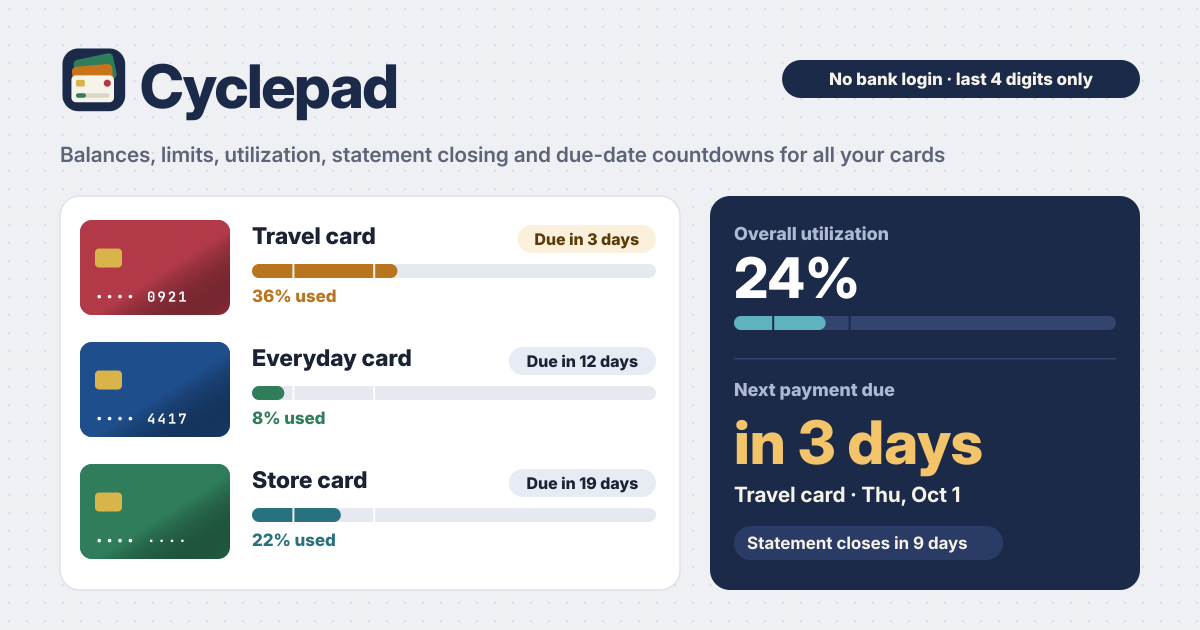
- Utilization = balance ÷ limit. The bar is green under 10 %, teal under 30 % and ochre above. The two ticks on the bar mark 10 % and 30 %.
- Overall utilization in the Overview is the sum of all balances ÷ the sum of all limits. Cards in different currencies are totalled per currency.
- Badges such as Due in 3 days and Closes in 12 days count down every day. Days 29, 30 and 31 fall on the last day of shorter months, and Feb 29 in a leap year counts too.
- Home lists cards with the soonest due date first. Cards due within 7 days get an ochre edge and a Due soon label; change the window (1–14 days) under Reminders.
Balances, statements and payments
- Tap the balance (or Update balance) and the number field opens ready to type. Type the new amount and press Enter — two taps. Earlier balances stay in Balance history with a small line chart.
- Statement takes the statement balance for the coming due date and an optional minimum payment. Amounts can be typed as 1,234.56 or 1.234,56.
- Record payment has Full and Minimum buttons and, by default, also lowers the current balance by the amount. A part payment shows as Partly paid or Minimum paid.
- Once the statement is paid in full the card shows Paid and counts down to its next due date. After a due date passes it moves on by itself as well. Undo in the notice takes back a mistake.
Reminders without a server
- Add dates to calendar (.ics) makes one file with each card's due date and closing date as monthly repeating events. Due dates remind you at 9:00 three days before and the day before. Open the file on your phone to add it to your calendar.
- Event titles carry the card nickname only, never an amount.
- Notify me while Cyclepad is open only works while the page is open. There is no background push, and on iPhone you need to add Cyclepad to the Home Screen first.
Backup and changing phones
- Export JSON saves a file; Import JSON on the new phone brings it back. The confirmation before an import offers Export JSON first.
- On a first visit, Show an example fills in three cards to look around; Delete everything clears them.
What Cyclepad does not do
- It does not connect to any bank or card issuer. Balances and dates are what you typed, so check real amounts and due dates with your issuer.
- Which card earns the most on a purchase is Cardpick's job, and splitting income into envelopes is Paypad's. Cyclepad keeps to balances and the payment calendar.
- No account, no sync and no ads on the tool. Your cards are never uploaded.
Is it free?
All of it is free. The number of cards, the calendar file and backup are not locked, and there is no sign-up or payment screen.
My card is due on the 31st. What happens in February?
It counts to the last day of that month (Feb 28, or Feb 29 in a leap year). The 30th works the same way, and the calendar file follows the same rule.
Does it work offline? Can I put it on my home screen?
Once opened, it opens without internet too. Use Add to Home Screen in your browser's menu to keep it like an app. Send feedback with the Guide & Feedback button at the bottom right.