How names leak into a chat box, and why an upload-to-anonymize tool is the same problem
The text you paste to be summarised is usually someone else’s: a customer email, meeting minutes, a colleague’s Slack thread, a support ticket. It carries names, phone numbers, sometimes a card number or an API key that landed there by accident. None of that is needed for the question you are asking; it is simply attached to the original. The moment you paste, that person’s details leave your device and sit in the records of a service you do not control. Even if the answer never repeats the name, the request already did.
So there are plenty of “anonymize before you paste” tools. A surprising number of them upload your text to their own server to do the work. To avoid sending personal details to the chat service, you send them to the anonymizer instead. That is one more recipient, not one fewer. Masking names is regular expressions and a short word list, and a browser can do it locally with no trouble. There is no reason for the text to go anywhere.
Automatic detection is a starting point, not a verdict. Emails and card numbers have a shape and are hard to miss, but a person’s name is a guess. Two capitalised words might be a company or a product, and a short form of address can slip past. That is why every hit is shown as a list you can uncheck row by row. Skimming that list before you paste takes ten seconds.
A restore map is convenient and dangerous at once. It pairs each placeholder with its original, which is useful when you want to turn [NAME_1] back into the real name inside the answer you got. Paste that same map into the chat and the whole exercise is undone. Keep it on this device and open it only at the last step, when the real names are needed. If you do not need it, the safest map is the one you never made.
Paste, skim, copy
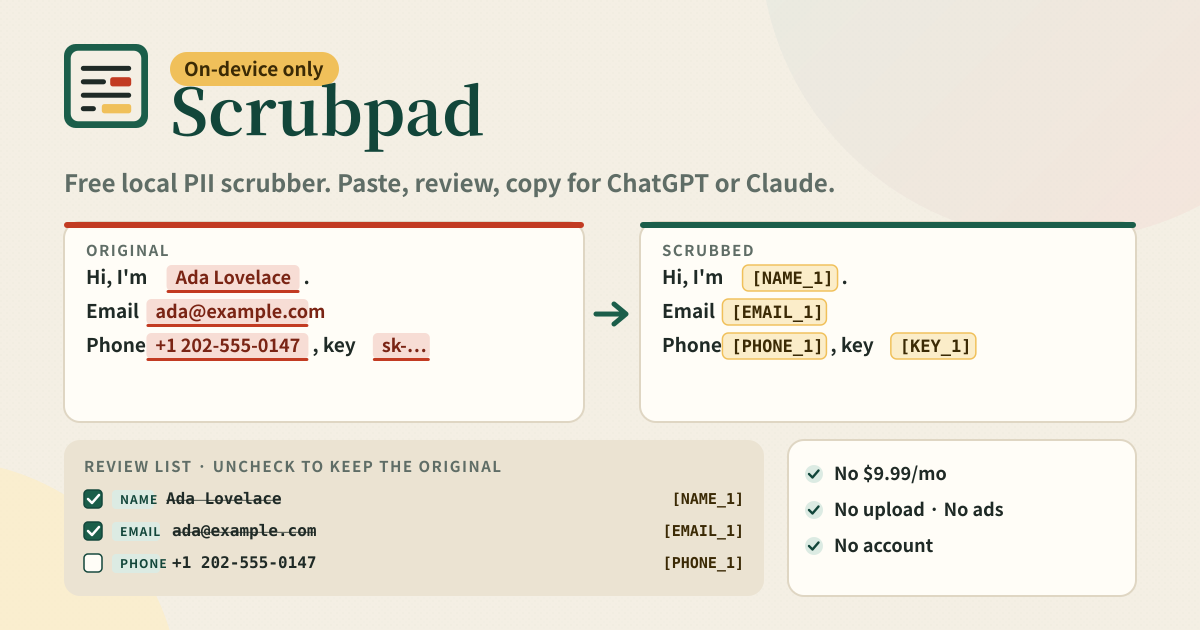
Scrubpad starts with the big box at the top of the page; there is no menu or tab in front of it. As you paste, this browser tab looks for emails, phone numbers (international, Korean, US, Italian, Japanese and Chinese forms), street addresses and postcodes, card numbers that pass the Luhn check, IPv4 and IPv6, OpenAI / AWS / GitHub / Slack / Google keys and Bearer tokens, and person names (English, Korean, Japanese and Chinese heuristics). The same person or the same email gets the same placeholder every time it appears: three mentions of “Ada Lovelace” become three [NAME_1], so the answer can still follow who is who.
Every hit is listed in the review list with a type badge, the original, its placeholder and how many times it appeared. Uncheck a row and that original stays in the text; the other placeholder numbers do not shift. Anything the detector cannot guess, such as a project codename or a company name, goes into “Your own words”. It is matched as a whole word regardless of case, becomes [WORD_1], and the list stays on this device for next time. The dictionary exports and imports as JSON.
Below that, original and scrubbed sit side by side, stacking on a narrow screen. Placeholders in the scrubbed pane are amber chips and the parts about to be replaced in the original are underlined in red, so the change is visible at a glance. When it looks right, press “Copy scrubbed” and paste into ChatGPT or Claude, or download it as .txt. If you want the restore map, it is just below with show, copy and download-as-JSON, and a warning that it contains the originals stays next to it.
Banner, paste box, review list, side by side, restore map, settings
- The amber strip at the top: a note that your data stays on this device and that scrubbing runs here too. Nothing is sent to a server.
- Paste box: the first card on the page. Scrub, Try a sample and Clear sit under it, with a line saying processing happens inside this tab.
- Review list: per row a checkbox, the type (Email, Phone, Card, IP, Key, Address, Name, Word), the original, the placeholder and a count. Check all / Uncheck all.
- Your own words: an input with Add, the words as chips with remove, and Export / Import dictionary (JSON).
- Original vs scrubbed: two panes side by side, stacked on a narrow screen. Copy scrubbed, Download scrubbed (.txt).
- Restore map (optional): show / hide, copy, download as JSON, and the warning that it contains the originals and should stay out of the chat.
- Settings: keep the last paste on this device on/off, Delete everything. At the bottom, Privacy, Terms, Guide and try-dabble.com links plus the promise chips.
Where your text stays
The pasted text, the detections, the scrubbed result, your custom words and your settings all live in this browser on this device. Scrubbing itself runs inside the tab, so once the page and its own files have loaded there is no network request caused by your text. There is no account, no sync and no analytics. By default the last paste stays on this device so it is still there next time; on a shared machine turn that off in Settings or press “Delete everything”. The downloaded .txt, restore map and dictionary files land in the browser’s downloads folder and are entirely in your hands from there.
Does it really upload nothing? How can I check?
Yes. Scrubbing runs inside this browser tab and the text is never transmitted. To check, open your browser’s developer tools on the Network tab and paste something: after the page first loads its own files and the try-dabble feedback widget, no new request appears. It works the same in airplane mode.
What if it misses a name, or flags something that is not one?
Both happen, because name detection is a guess. A wrong hit is fixed by unchecking its row in the review list; the original stays. A missed name goes into “Your own words”, becomes [WORD_n] right away, and stays in the dictionary so it is masked automatically in the next text too. Seeding the dictionary with the people and companies you handle often makes the review much faster.
Do I have to make a restore map?
No. It is hidden by default and nothing is generated until you press Show. Use it only when you need to turn [NAME_1] back into the real name inside an answer you received, and even then copy or download stays on this device. The map holds every original you scrubbed, so never paste it into the chat. If you do not need it, not making one is the safest option.
Is it free? Any ads or account?
Everything is free; there is no $9.99/month subscription or payment wall. No ads, no account, no login. The paste box is not tucked behind a menu; it is the first card on the page. If you have thoughts, use “Send feedback” on this guide page. There is no separate feedback panel inside the app.