It started with “App ideas” on r/adhdwomen
The thread appeared on the r/adhdwomen subreddit under the title “App ideas”. Among the wishes in it was one for an app that does nothing more than keep track of the home-exercise sheet from the physiotherapist — the paper hand-out with the stretches, the sets and the reps that goes up on the fridge and gets lost there — without making an account first. It is a fair wish: the therapist has already decided what to do and how often; what is missing is a place that says which of today’s sessions are still open and remembers which ones were done.
Look at that category and a pattern repeats. Physio Tracker is English-only. RepSheet is English and wants a sign-in before the first tick. PhysiApp only opens once a clinic has invited you with a code, so a programme you were handed on paper has no way in. For someone with six exercises and a follow-up in three weeks, that is a lot of setup and a lot of trust before a single box is ticked — and the paper on the fridge, for all its faults, never asked for any of it.
PTpad is that wish, answered as asked. You copy the exercises off the sheet in your own words, with their sets, reps, hold, side, times a day and days, and “Today’s page” lists the day’s exercises one line each with one box per session, so a tap marks one done — in the browser on this device, with no account, no clinic code, no exercise cap and no server. The UI is in Korean, English, Japanese and German. PTpad is a notebook and a checklist, not a medical device: it has no exercise library, no form or posture check and no AI, and it gives no advice. Do each exercise the way your therapist showed you, and if something hurts more than they said it should, stop and ask them.
What PTpad does
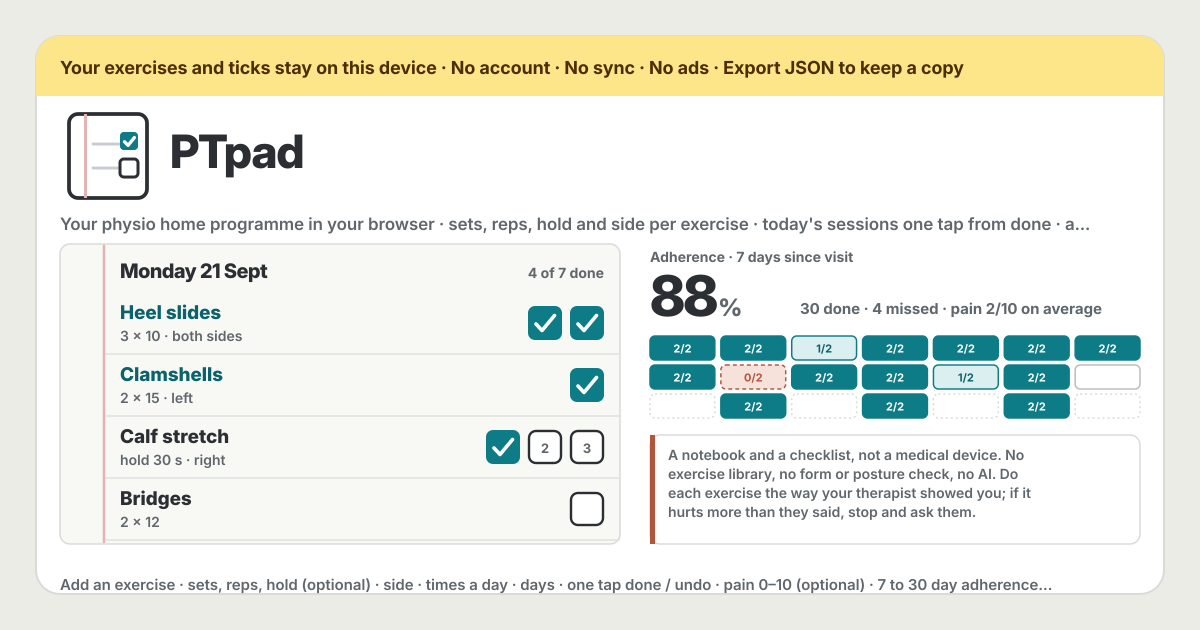
“Today’s page” is the top of the app: a ruled notebook page with a rose margin line, the day’s exercises one line each — the name as you wrote it and the prescription beside it, “3 × 10 · both sides” or “hold 30 s · right” — and, in a column down the right, one tick box per session, so an exercise you do twice a day has two boxes. Tap a box and it is done, stamped with the time, “done 08:12”; tap it again and the tick is gone. “Mark all N done” ticks whatever is still open that day in one go. The line above reads “2 of 6 done”, and on a past day “2 of 6 done · 4 missed”. The ‹ and › arrows step to earlier days, where a forgotten box can still be ticked, and to later days, which are read-only; “Back to today” returns. An exercise added today has no sessions on earlier days, so nothing is ever counted against you for a day before the exercise existed. Once at least one box on a line is ticked, an optional pain row 0 to 10 appears under that line — tap a number, tap it again to clear it — one pain note per exercise and day, and nothing more.
“My programme” is where the sheet is copied in. “Add an exercise” opens a form: “Exercise”, the name in your own words, never looked up and never corrected; “Sets (optional)”, “Reps (optional)” and “Hold, seconds (optional)”, where you type only the numbers the therapist gave you and leave the rest blank; “Side” as none, left, right or both; “Times a day” from one to four; “Days” as seven toggles shown Monday first with the “Every day” and “Mon–Fri” shortcuts; and a “Note (optional)” for the cue they gave you, “slow on the way down”. “Save exercise” puts it on today’s page at once. Every exercise has “Edit” and “Delete”; Delete asks first, and the dialog offers “Export JSON first”, because the exercise’s ticks and pain notes go with it. There is no cap on the number of exercises, and there is no library to pick from: the app knows nothing but what you typed.
“Between visits” looks back over 7, 14 or 30 days, or “Since visit” once a last-visit date is set — from the visit day through today, capped at 120 days. “Adherence” is done divided by done plus missed. Past days count done and missed; today counts only what is done, because an open box is not a miss until the day ends. Under it, for the days you noted a pain number, the mean, “Pain 3/10 on average · noted on 9 days”. “The sheet” is the paper hand-out drawn again: one row per exercise, one box per day, the count inside, “2/2” — full teal when every session was done, tinted when some were, dashed rust for a missed day and an outline for today. “Per exercise” has a bar per exercise with its pain mean, so you can see which one keeps slipping. “Visits” holds “Last visit (optional)” and “Next visit (optional)”, and the line under them reads “N days to your next visit”, “Your next visit is tomorrow”, “Your visit is today” or “Your next-visit date passed N days ago”; booking stays between you and the therapist. “Export CSV” writes one row per done session for the appointment; sessions you did not tick are not rows.
“Reminders” is off by default. Turning on “Nudge me in this browser at the times below” makes the browser ask for permission; the times under “Nudge at” are for the whole programme, up to four a day, 09:00 to begin with, not one per exercise. A nudge fires only while PTpad is open, in a tab or as the installed app, and only if sessions are still open that day — a day already ticked off stays quiet. “Send a test” shows what one looks like, and “Next nudge: 18:00” names the next time. The hint under the title is the one that matters: if it must not slip, keep an alarm in your phone’s Clock app as well. “Backup” at the bottom has “Export JSON”, which writes exercises, ticks, pain notes, visit dates and settings as one file, “Import JSON”, which replaces what is here after one confirm and refuses a file from another app, and “Empty PTpad”, which wipes this device after a confirm that also offers “Export JSON first”.
Your first week, step by step
You do not need to type in the whole sheet the evening you get it. Two exercises are enough to see whether the page earns its place on the home screen; the rest can follow the next morning, sheet in one hand and phone in the other.
- Open https://ptpad.try-dabble.com and pick your language at the top. Whatever you choose, the exercise names and notes are your own words and are never translated.
- Under “My programme” press “Add an exercise”. Type the name as it is written on the sheet, put the sets and reps in “Sets (optional)” and “Reps (optional)”, pick the side, and leave “Times a day” at one and “Days” at “Every day” if that is what the sheet says. “Save exercise”.
- Add a stretch next: leave sets and reps empty, put 30 in “Hold, seconds (optional)”, set “Times a day” to two and, if the therapist said weekdays only, press “Mon–Fri” — the row runs Monday first. On today’s page the line now reads “hold 30 s” with two boxes beside it.
- After the first session open “Today’s page” and tap the first box on each line you did. The box fills, “done 08:12” appears under the name, and the line above changes to “2 of 3 done”. Tapped the wrong one? Tap it again and the tick is gone.
- If something hurt, tap a number on the pain row that appeared under the line, 0 for none, 10 for the worst you can imagine. It is one note per exercise and day for you and your therapist; the app draws no conclusion from it. If it hurt more than they said it should, stop and ask them.
- In the evening, when the second session is done, “Mark all N done” ticks the boxes that are still open in one go. The morning you realise you never ticked yesterday, press ‹ once — yesterday’s boxes are still open, and a tick there corrects the count. › goes forward too, but a later day is read-only; “Back to today” returns.
- Put the date of the appointment you just had in “Last visit (optional)” under “Visits” and the next one in “Next visit (optional)”; “Between visits” gains a “Since visit” window and the line “N days to your next visit”. If you want the browser to nudge you, turn on “Nudge me in this browser at the times below” under “Reminders”, let the browser ask, set the times and press “Send a test” — then read the line under the title once: a nudge fires only while PTpad is open, so if it must not slip, keep an alarm in your phone’s Clock app as well.
- The evening before the appointment open “Between visits”, pick “Since visit”, and look at “The sheet”: it is the paper hand-out filled in, one row per exercise, one box per day. Press “Export CSV” if the therapist wants the detail, and “Export JSON” under “Backup” either way — that file is the only copy that exists outside this browser, and “Import JSON” brings it back anywhere.
What it does not do, said plainly
No exercise library. PTpad does not know what a “heel slide” is; the name is the string you typed, and the numbers beside it are the numbers you typed. It looks nothing up, suggests nothing, completes nothing and shows no video. No form or posture check: it never uses the camera, never watches a movement and never says a rep was wrong, because it has no way of knowing — that is what the therapist is for, and the app says so on screen. No AI: nothing summarises, predicts or interprets the pain numbers. No advice: the app never tells you to do more, do less, skip a day or stop; a missed box is a count, not a verdict, and a pain number is a note for the appointment, not a warning. And it is not a gym log: there are no weights, no records and no programme builder, only the sheet you were handed and the boxes beside it.
No push server, which is the honest part about reminders. A PTpad nudge is a notification the open page shows at a time you set; there is no server of ours that could wake a closed browser, and the app will not pretend otherwise. If the tab is closed, the installed app is not running or the phone has put the browser to sleep, nothing fires — which is why the line under the title says to keep an alarm in your phone’s Clock app as well if it must not slip. No clinic portal either: nobody can send a programme into PTpad, and nothing you tick leaves it; if the therapist wants to see how it went, you show them the sheet or hand over the CSV. And it is not a medical device: it is a notebook and a checklist you keep by hand, and every question about what to do, how hard, and what a pain means belongs with your physiotherapist or doctor.
What stays on the device, and the backup
Everything stays in the browser on this device: every exercise, every tick with the moment it was made, every pain number, the visit dates, the reminder switch and its times, and the language. The app requests nothing but its own files, so adding an exercise or ticking a box asks no server for anything, and once it has been opened it works offline as an installed PWA. There is no account, no clinic code, no server of ours and no sync; nothing about your programme leaves the device, and nobody can see it unless they hold your unlocked phone or the file you exported. The amber band at the top says the same thing in one line: your exercises and your ticks stay in this browser on this device.
That also means the backup is yours to keep. “Export JSON” under “Backup” writes one small file with the exercises, the ticks, the pain notes, the visit dates and the settings, and “Import JSON” in another browser or on a new phone restores it after one confirm, replacing what is there — the dialog offers “Export JSON first” in case something is already on that device, and a file from another app is refused rather than half-read. Clearing the browser’s site data removes the programme, which is why the export exists. Deleting an exercise removes its ticks and pain notes too, and “Empty PTpad” removes everything, both behind a confirm that offers the same export. A new version never locks anyone out and never wipes what was saved; an older backup file still loads.
Is there an exercise cap or a premium tier?
No cap and no tiers. Every feature is open to everyone from the first tap, and the programme holds as many exercises as the sheet lists, each with up to four sessions a day and its own days, because an exercise is a few lines of text and a tick is a few bytes. There is no subscription, no premium, no in-app purchase and no ads on the tool; the only cost is the minute it takes to copy an exercise off the sheet.
Will it remind me if the tab is closed?
No. A PTpad nudge is a notification that the open page shows at a time you set, after the browser has asked you for permission. It fires while PTpad is open in a tab or running as the installed app, and only if sessions are still open that day; it does not fire from a closed tab, and there is no server of ours that could send it — PTpad has no push server, on purpose, because it has no server at all. That is why “Reminders” is off by default, why the hint under its title says so, and why it asks you to keep an alarm in your phone’s Clock app as well if a session must not slip. Set the alarm there, and let PTpad be the page you tick when it rings.
Does it know my exercises or check my form?
No, on both counts. There is no exercise library: an exercise is the name you typed and the numbers you typed, and the app does not know whether “clamshell” is a hip exercise, a shellfish or a typo. It never opens the camera, never watches a movement and never scores a rep, and it has no AI that could guess. Everything it shows is a count of what you ticked and the numbers you noted. If you are unsure how an exercise should feel, how many to do or whether a pain is the expected kind, that is a conversation with your physiotherapist; take the sheet or the CSV with you and ask there. The app says so itself in the line under its title.
How is adherence counted?
Done divided by done plus missed, as a whole percent, over the 7, 14 or 30 days you picked or since your last visit. Past days count both: a session on a past day is done if its box is ticked and missed if it is not. Today counts only what is done — an open box is not a miss until the day ends, so this evening’s session does not count against you at noon. An exercise added today has no sessions on earlier days, and a day not in its days of the week has none either, so nothing is counted for a day the exercise was not due. “The sheet” shows the same count per exercise and day, “2/2” inside each box, full teal for a full day, tinted for a partial one, dashed rust for a missed one; “Per exercise” repeats the percentage per exercise. Tick a forgotten box on an earlier day and the numbers correct themselves.
Can I tick yesterday’s session that I forgot?
Yes. Press ‹ at the top of “Today’s page” to step back to yesterday, or further; the boxes of an earlier day stay open, so a tap ticks one exactly as it does today, and the tick is stored with the moment you pressed it — “done 08:05” the next morning, not the evening before. The pain row works there too. The summary line on a past day reads “2 of 6 done · 4 missed” and shrinks the missed count as you fill in; adherence and the sheet update at once. Later days are the other way round: › shows them read-only, because a session cannot be done before its day. “Back to today” returns you.
What does the pain number do?
It is a note, nothing more. Once at least one box on a line is ticked, a row of numbers from 0 to 10 appears under it — 0 for no pain, 10 for the worst you can imagine. Tap one to note it, tap it again to clear it; there is one pain number per exercise and day, not one per session. “Between visits” averages the days you noted, “Pain 3/10 on average · noted on 9 days”, shows a mean per exercise under “Per exercise”, and the CSV carries the number on each done session of that day. The app draws no conclusion from it: it does not warn, does not compare it to a threshold and does not tell you to stop or carry on. That judgement is your physiotherapist’s, which is exactly why the number is there — so you can show them how it went rather than remember it. If something hurts more than they said it should, stop and ask them.
Can I move it to a new phone or another browser?
Yes, with the JSON file. “Export JSON” under “Backup” downloads one file holding the exercises, the ticks, the pain notes, the visit dates and the settings. Get it to the new device any way you like — a cable, a message to yourself, a drive you already use — open PTpad there, press “Import JSON” and confirm with “Replace”; the programme is restored exactly as it was, over whatever was on that device. A file that is not a PTpad backup is refused. There is no sync in the background, so export again whenever you want a fresh copy, and keep the old file: an older backup still loads in a newer app. The reminder switch is a browser permission, so turn it on again on the new phone.
Does it work offline?
Yes. Open it once with a connection and it installs as a PWA on Android or any browser; after that “Today’s page”, the ticks, “Between visits” and the backup all work with no network, because nothing is fetched while you use it. A new version loads quietly the next time the page opens online, and your exercises and ticks are untouched by it. The one thing that is not about the network is the nudge: online or offline, it only fires while PTpad is open.
What is in the CSV?
“Export CSV” under “Between visits” writes one row per done session, oldest day first and in programme order within a day, with nine columns: date, session, exercise, sets, reps, hold_sec, side, done_at, pain. “session” is the session number within the day, 1 or 2 for an exercise you do twice; “exercise”, “sets”, “reps”, “hold_sec” and “side” are the prescription as you wrote it; “done_at” is the moment you tapped the box, so a tick filled in the next morning is visibly late; “pain” is the day’s pain number for that exercise, or empty if you noted none. Sessions you did not tick are not rows — a missed session is counted on screen, and a file should not invent entries. Any spreadsheet opens it, and it is the sheet to hand over at the appointment when the therapist asks how it has been going.