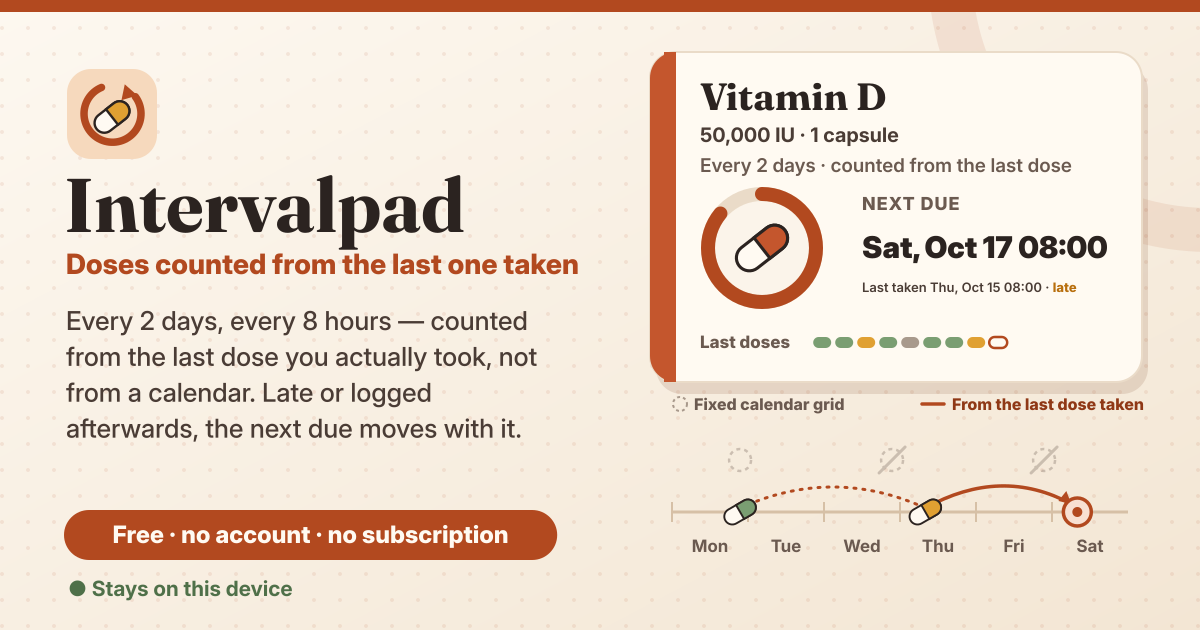
It started with “every 2 days from the last dose actually taken” on r/androidapps
The post appeared on the r/androidapps subreddit. Someone wrote: “I need an app for a medication taken every 2 days from the last dose actually taken, rather than being locked to a rigid, static calendar grid.” The wish list was precise: “logging a dose on an off-day automatically pushes the next due date forward”, and that should hold “even if the dose is logged retrospectively”. And one more line: they would “prefer an app that doesn’t have a subscription”. It is a fair request. Most reminder apps think in fixed days of the week or fixed dates; a medicine that is due two days after the last real dose does not fit that grid.
Look for one and the options sit mostly in the app stores. Dosecast can count an interval from the last dose; its cloud sync is part of the Pro version and needs a login, and some store reviews mention reminders that did not arrive. Medisafe and MyTherapy start with an install from the store. The closest tool on the web, TapPill, is English-only and asks for a free email account after three sessions. Each has its reasons, but a tool that counts “from the last dose” with no install, no account and no subscription, in Korean, English, Japanese and German, was hard to find.
Intervalpad does that one thing. Give each medicine an interval like “Every 2 days” or “Every 8 hours”, and the next due is always counted from the last dose you logged. The next due is never stored on its own; it is worked out from the log every time, so a late dose, an entry written afterwards or a deleted entry all put it right by themselves. It opens in the browser, with no account, no subscription and no ads in the tool, and the log stays in this browser on this device. It is not a medical device and gives no advice about any medicine or dose.
What Intervalpad does
- There are four tabs: “Today”, “Medicines”, “History” and “Settings”. “Today” has one card per medicine with its next due and a state such as “Due now” or “Overdue”.
- A medicine on “Every N days or hours” counts its next due from the last dose you logged. Every N days adds calendar days (keeping the clock time of the last dose, or a set due time); every N hours adds exact hours.
- An “As needed” medicine has no due at all; set a “Minimum gap between doses” and “Taken” stays locked until that much time has passed. A dose you really took can still be recorded with “Taken at another time…”, after a warning.
- Under each card, a “Last doses” strip colours each dose on time, late, early or skipped, and the “History” tab lists every entry by day so you can fix any of them.
- An amber band at the top says it plainly: the log lives only in this browser on this device, so save a backup file regularly.
How to use it, step by step
- Open https://intervalpad.try-dabble.com and pick your language at the top. Nothing to install, nothing to sign up for.
- Press “Add a medicine”, type the name and a “Dose note (optional)”. Under “Schedule” choose “Every N days or hours” and enter the interval, for example 2 and “days”.
- For every N days, choose the “Due time”: “Same time as the last dose” follows the clock time you took it, “At a set time” always lands on the same time, such as 09:00.
- Under “Starting point”, if you are already on it, use “My last dose was…” with the date and time of your last dose; for a new medicine use “First dose due…”. Save.
- When you take it, press “Taken” on its card under “Today”. The next due is recounted at once; if your thumb slipped, “Undo” takes it back.
- Took it but forgot to tap? Use “Taken at another time…” and enter the real date and time. There are “Now”, “1 hour ago” and “Yesterday, same time” shortcuts, and the new next due is shown before you save.
The rolling rule, with a worked example
Take one medicine set to “Every 2 days” with “Same time as the last dose”. There is one rule: next due = the last dose you logged + the interval.
- Monday 21:00, “Taken” → next due Wednesday 21:00.
- Wednesday evening slips by and you take it late on Thursday at 08:00, “Taken” → next due Saturday 08:00, not Friday 21:00. The schedule moves with you; the strip marks that dose “Late”.
- Another week: taken Monday 21:00, and again on Tuesday 21:00, an off day, but you forgot to log it. On Wednesday morning, “Taken at another time…” with Tuesday 21:00 recounts from Tuesday: next due Thursday 21:00, and History shows the entry as “logged later”.
- Delete that Tuesday entry (“History” → “Edit entry” → “Delete entry”) and the next due is counted again from the entry before, Monday: back to Wednesday 21:00.
- With “At a set time” at 09:00, a dose on Thursday at 21:30 puts the next due two days later on Saturday at 09:00. With “Every 8 hours”, a dose at 07:10 is next due at 15:10, exactly 8 hours later.
- Changing the interval later recounts the next due from the last dose you logged, too.
Skip
If you have decided to leave a dose out, for example on your doctor’s instructions, press “Skip”. A skip passes over the current due to the next slot after the moment you skip. Every 2 days, due Wednesday 21:00, skipped on Wednesday at 22:00: next due Friday 21:00. The slots are counted from the original due, not from when you pressed, so the clock time does not drift. If you later log a dose you actually took for that slot, the skip no longer changes anything and History marks it “replaced by a later dose”.
As-needed medicines: the minimum gap lock
For a medicine you take only when needed, like a painkiller, choose “As needed” under “Schedule” and set a “Minimum gap between doses”, say 6 hours. Until that much time has passed since the last dose, “Taken” on the card is locked and shows when it opens, for example “Locked until today 14:30”; 0 means no lock. The lock is on the “Taken” button only. If you really did take a dose, open “Taken at another time…” and enter the time: when it is closer than the gap you set, a warning such as “That is 2 h after the dose before — less than the 6 h minimum gap you set.” appears first, and the dose is recorded once you save after seeing it. A dose that really happened is never kept out of the log. Instead of the strip, the card shows “Doses per day, last 14 days” and the count in the last 24 h. The gap is a number you enter from your prescription or your doctor or pharmacist; Intervalpad never picks it for you.
The strip of last doses
The “Last doses” strip colours one compartment per dose as “On time”, “Late”, “Early” or “Skipped”. Below it a line such as “Last 30 days: 9 of 10 on time” and the average gap. What counts as on time comes from “Counts as overdue after” in Settings (15 or 30 minutes, 1, 3, 6 or 12 hours, 1 hour by default): it is when a card turns “Overdue”, and also how far from the due time a dose may be and still be on time.
History: edit and delete
- The “History” tab groups every taken and skipped entry by day, filtered to “All medicines” or one medicine. Entries written down afterwards carry “logged later”.
- Tap an entry to open “Edit entry” and change its time, its kind (taken or skipped) or its note. The next due is recounted on the spot.
- “Delete entry” asks once, then removes it; the next due is counted again from the entry before, and “Restore” in the short message that follows brings it back.
Reminders, honestly
Turn on “Notify me when a dose is due” in Settings and the browser asks for permission, then shows a notification at the due time. But it only sounds while Intervalpad is open, in a tab or as the installed app: a browser cannot wake a closed page. For a dose that must not be missed, set an alarm in your phone’s Clock app. Or press “Add next due to calendar (.ics)” on the card: it makes a calendar file with the next due and an alarm on the device, and your phone’s calendar does the reminding. The file holds that one due only, so add it again after you log the next dose and the due moves.
Backup, restore and CSV
- Your log is only in this browser on this device. Closing a private window, clearing browser data or a new phone would lose it, so press “Save backup (.json)” in Settings now and then.
- “Restore from backup…” merges and never wipes: it first shows what is new, adds only new medicines and entries, and leaves anything already here as it is. An empty file, one that is too big, not JSON, from another app, from a newer version or damaged is refused with the reason, and nothing is changed.
- “Export CSV” writes a spreadsheet file with one row per entry, for an appointment or your own records.
- After 10 changes, or 7 days of unsaved changes, a small backup reminder card shows on the Today tab. “Later” waits 3 days, and saving a backup clears it. Deleting a medicine or “Delete everything” offers “Save backup first”.
Privacy: the log never leaves the device
Medicine names, dose notes, intervals, every taken or skipped entry with its note, and settings are stored only in this browser on this device and are never uploaded or sent anywhere. There is no account and no login. Calendar (.ics), CSV and backup files are made and read on the device. Notifications are shown by the browser on this device; nothing is sent for them. The only network use is the anonymous counter of the shared Guide & Feedback button (app name, event name and UI language only), as in the other apps, and Cloudflare — never medicines or doses.
What it does not do
- Not a medical device: it is a log that counts your own interval from your last dose. Follow your prescription and your doctor or pharmacist.
- No drug database, no dose advice and no interaction checks; it never suggests an amount or an interval.
- Not a checklist for several times a day or set weekdays — Medpad is the one for that. Intervalpad is only about the interval from the last dose.
- No sync between devices and no login; move to another device with a backup file. And no reminder can sound while the page is closed.
What happens to the next due if I take it on an off day or late?
Press “Taken” when you take it, or enter the real time with “Taken at another time…”, and the next due is recounted as that time plus the interval. It is never tied to a fixed calendar grid.
Is there a subscription or a paid tier?
No. Everything is free, with no account and no limit on medicines or how far back the log goes. There are no ads in the tool.
Will I get a reminder when my phone is locked?
Not if Intervalpad is not open: a browser page cannot send reminders once it is closed. For a dose that must not be missed, use an alarm in your phone’s Clock app, or put an alarm in your calendar with “Add next due to calendar (.ics)” on the card.
How do I move my log to a new phone?
Press “Save backup (.json)” on the old device, move the file to the new one and press “Restore from backup…”. Restoring merges, so entries already on the new device stay.