It started with “Medication tracking app recommendations” on r/disability
The post appeared on the r/disability subreddit under the title “Medication tracking app recommendations”. Someone living with a disability asked which app people use to keep several medicines straight — not one pill a day but a handful at different times, some only on weekdays, with a refill that comes round every few weeks — and the answers pointed at the usual apps. It is a fair question: the medicines are already on the shelf; what is missing is a list that says what is due now and remembers what was taken.
Look at that category and a pattern repeats. Toobits is English-only. Toolenza speaks German and English, but its Korean and Japanese pages answer with a 404. Doctiplus is English. MyTherapy sends you to the app store first. And the complaints people bring against medication apps are always the same ones: reminders that go silent after an update or a permission change, ads next to the pill list, an account before the first pill, screens that take longer to understand than the medicines do, and a wipe with no export. For someone who takes four things a day, that is a lot of setup and a lot of trust before a single dose is ticked.
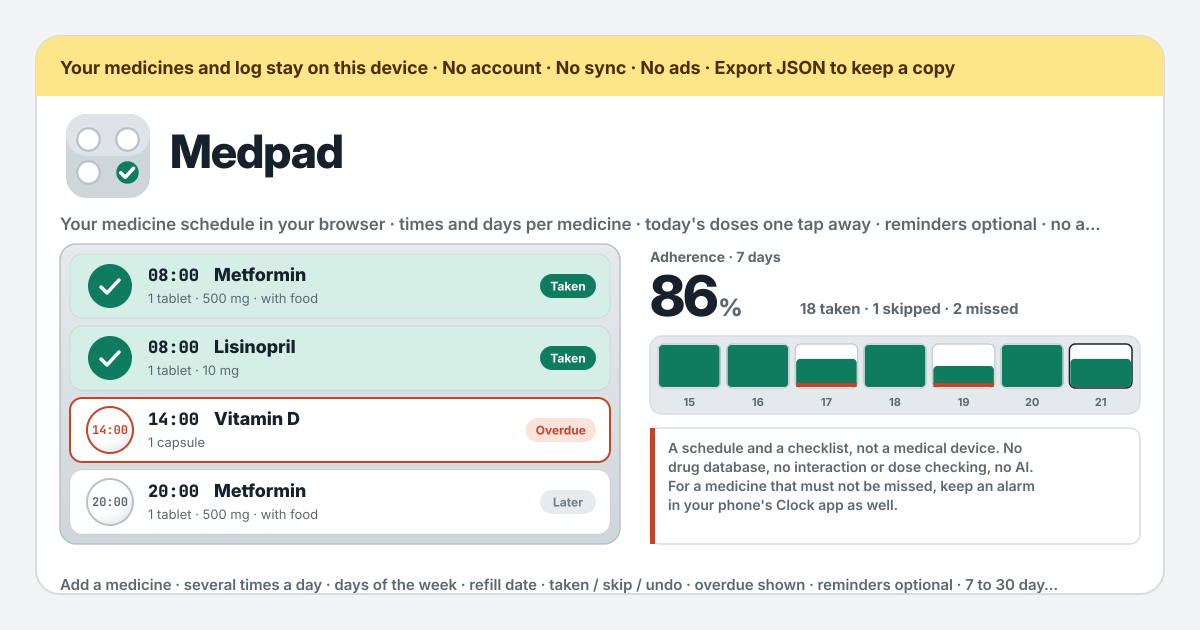
Medpad is a different answer to that question. You write each medicine down with its times and its days, and “Today” lists the day’s doses in order so a tap marks one “Taken” — in the browser on this device, with no account, no medicine cap and no server. The UI is in Korean, English, Japanese and German. And it is honest about the one thing a browser cannot promise: a reminder from Medpad fires only while Medpad is open, so for a dose that must not be missed the alarm in your phone’s Clock app stays the primary reminder. Medpad is a schedule and a checklist, not a medical device; it has no drug database, no interaction or dose checking and no AI, and it gives no advice.
What Medpad does
“Today” is the top of the page: the day’s doses in time order, one blister-style row per dose with the medicine, its dose note and its time. A row reads “Later” before its time, “Now” once the time has come, and “Overdue” once the grace has run out — 60 minutes by default, 15, 30, 60 or 120 under “Counts as overdue after”. One tap on “Taken” marks it, one tap on “Skip” marks it skipped, and the row then shows “Taken” or “Skipped” with the moment you pressed, “marked 08:05”; “Undo” takes the mark back. When more than one dose is due at once, “Mark all 2 due as taken” marks them in one go. The line above the rows reads “1 taken · 0 skipped · 1 overdue · 2 to go” and changes with every tap. The ‹ and › arrows step to earlier days, where you can still fill in a forgotten mark, and to later days, which are read-only and show “Scheduled”; “Back to today” returns. A medicine added this afternoon has no morning dose today and no doses on earlier days, so nothing is ever counted against you for a time before the medicine existed.
“My medicines” is where the schedule is written. “Add a medicine” opens a form: a “Name”, a “Dose note (optional)” that is free text and never interpreted — “1 tablet · 500 mg · with food” is for you, not for the app —, “Times” with a time field and “Add time” for as many times a day as you need, or one of the presets “Once · 08:00”, “Twice · 08:00 · 20:00” and “Three times · 08:00 · 14:00 · 20:00”, then “Days” as seven toggles shown Monday first with the “Every day” and “Mon–Fri” shortcuts, a “Refill by (optional)” date and a “Note (optional)”. From a week before the refill date the medicine carries a “Refill soon” badge, from that day on “Refill due”; nothing counts your pills, the date is the whole mechanism. Every medicine has “Edit” and “Delete”. Delete asks first, and the dialog offers “Export JSON first”, because the medicine’s log entries go with it.
“Adherence” looks back over 7, 14 or 30 days. The percentage is taken divided by taken plus skipped plus missed, and it counts only doses whose time has come — the hint under the title says it: “A time still ahead counts against nobody.” Below it a strip shows one compartment per day, filled to the share taken, with a coral floor on any day a dose was missed, and then a bar per medicine under “By medicine”, so you can see that the evening dose is the one that slips. “Export CSV” writes the log as one row per marked dose — date, time, medicine, dose, status, marked_at — for a spreadsheet or for the appointment; unmarked doses are not rows.
“Reminders” is off by default. Turning on “Notify me in this browser at each dose time” makes the browser ask for permission, and the state is always written out — “Notifications allowed”, “Notifications are blocked in the browser settings”, “Turning this on makes the browser ask for permission” or “This browser cannot show notifications”. “Send a test” shows what a reminder looks like, and the line “Next reminder: 20:00 · Metformin” names the time and the medicines. The hint under the title is the one that matters: a browser reminder only fires while Medpad is open, in a tab or as the installed app; for a medicine that must not be missed, keep an alarm in your phone’s Clock app as the primary reminder. “Backup” at the bottom has “Export JSON”, which writes medicines, log and settings as one file, “Import JSON”, which replaces what is here after one confirm, and “Empty Medpad”, which wipes this device after a confirm that also offers “Export JSON first”.
Your first week, step by step
You do not need to enter every medicine on the first evening. Two are enough to see whether the checklist earns its place on the home screen; the rest can come in as their boxes come off the shelf.
- Open https://medpad.try-dabble.com and pick your language at the top. Whatever you choose, the medicine names and dose notes are your own words and are never translated.
- Under “My medicines” press “Add a medicine”. Type the name as it is printed on the box, put whatever helps in “Dose note (optional)”, and press “Twice · 08:00 · 20:00” — the preset fills the times, “Every day” is already the days. “Save medicine”.
- Add the second one with its own days: type a time in the field and press “Add time”, then tap the day toggles — the row runs Monday first — or press “Mon–Fri” for a weekday-only medicine. If the pack will run out, set “Refill by (optional)” to the date on the prescription.
- At the first dose time open “Today”. The row that was “Later” now reads “Now”; press “Taken” once you have taken it and the row turns “Taken” with “marked 08:05”. When two are due together, “Mark all 2 due as taken” does both.
- Know the three buttons. “Taken” is what happened; “Skip” is a decision you made — the row reads “Skipped” and adherence counts it as not taken, but it is not a slip; and “Undo” takes either back when your thumb landed wrong. A dose you neither took nor skipped turns “Overdue” on its own once the grace has run out.
- The morning you realise you never ticked last night, press ‹ once. Yesterday’s rows are still open; mark the dose “Taken” and adherence corrects itself. › goes forward too, but a later day is read-only and shows “Scheduled”; “Back to today” returns.
- If you want the browser to nudge you, turn on “Notify me in this browser at each dose time” under “Reminders”, let the browser ask, and press “Send a test” to see it. Then read the line under the title once and act on it: a reminder fires only while Medpad is open, so for a dose that must not be missed, set the alarm in your phone’s Clock app as well and treat Medpad as the checklist.
- Before you close the tab press “Export JSON” under “Backup”. The file holds the medicines, the log and the settings; it is the only copy that exists outside this browser, and “Import JSON” brings it back anywhere.
What it does not do, said plainly
No drug database. Medpad does not know what “Metformin” is; the name is the string you typed, and the dose note is a note. It looks nothing up, completes nothing and corrects nothing. No interaction or dose checking: it will never tell you that two medicines should not be taken together or that a number looks high, because it has no idea what the numbers mean — that is the job of your doctor or pharmacist, and the app says so on screen. No AI: nothing summarises, suggests or predicts. No advice: the app never tells you to take, skip, move or stop anything; “Skip” is your decision, recorded, not a recommendation.
No push server, which is the honest part about reminders. A Medpad reminder is a notification the open page shows at a dose time; there is no server of ours that could wake a closed browser, and the app will not pretend otherwise. If the tab is closed, the installed app is not running or the phone has put the browser to sleep, nothing fires — which is why the line under the title says to keep an alarm in your phone’s Clock app for a medicine that must not be missed. And it is not a medical device: it is a schedule and a checklist you keep by hand, and decisions about taking a medicine belong with your doctor or pharmacist.
What stays on the device, and the backup
Everything stays in the browser on this device: every medicine, every mark with the moment it was made, the grace, the reminder switch and the language. The app requests nothing but its own files, so adding a medicine or ticking a dose asks no server for anything, and once it has been opened it works offline as an installed PWA. There is no account, no login, no server of ours and no sync; nothing about your medicines leaves the device, and nobody can see your list unless they hold your unlocked phone or the file you exported. The amber band at the top says the same thing in one line.
That also means the backup is yours to keep. “Export JSON” under “Backup” writes one small file with the medicines, the log and the settings, and “Import JSON” in another browser or on a new phone restores it after one confirm, replacing what is there — the dialog offers “Export JSON first” in case something is already on that device. Clearing the browser’s site data removes the list, which is why the export exists. Deleting a medicine removes its log entries too, and “Empty Medpad” removes everything, both behind a confirm that offers the same export. A new version never locks anyone out and never wipes what was saved; an older backup file still loads.
Is there a medicine cap? Is there a premium tier?
No cap and no tiers. Every feature is open to everyone from the first tap, and the list holds as many medicines as you take, each with as many times a day as it needs, because a medicine is a few lines of text and a mark is a few bytes. There is no subscription, no premium, no in-app purchase and no ads on the tool; the only cost is the minute it takes to write a medicine down.
Will it remind me if the tab is closed?
No. A Medpad reminder is a notification that the open page shows at a dose time, after the browser has asked you for permission. It fires while Medpad is open in a tab or running as the installed app; it does not fire from a closed tab, and there is no server of ours that could send it — Medpad has no push server, on purpose, because it has no server at all. That is why “Reminders” is off by default, why the hint under its title says so, and why the honest line under the app title asks you to keep an alarm in your phone’s Clock app for a medicine that must not be missed. Set the alarm there, and let Medpad be the list you tick when it rings.
Does it know my medicines or check interactions?
No, on both counts. There is no drug database: a medicine is the name you typed and the note you wrote, and the app does not know whether “Metformin” is a tablet, a syrup or a typo. It checks no interaction and no dose, it does not warn, and it has no AI that could guess. Everything it shows is a count of what you marked. If you have a question about what to take with what, or how much, that is a conversation with your doctor or pharmacist; take the CSV or the list with you and decide there. The app says so itself under “How it works”.
How is adherence counted?
Taken divided by taken plus skipped plus missed, as a whole percent, over the 7, 14 or 30 days you picked. Only doses whose time has come are in the sum: this evening’s 20:00 dose is not counted against you at noon, and a medicine added this afternoon has no morning dose today and none on earlier days. A dose is “missed” when it was never marked and the grace ran out — 60 minutes by default, 15 to 120 under “Counts as overdue after”. “Skip” counts as not taken, because you did not take it, but it is your decision on the record rather than a slip. The strip shows one compartment per day filled to the share taken, with a coral floor on a day with a miss, and “By medicine” repeats the percentage per medicine. Fill in a forgotten mark on an earlier day and the numbers correct themselves.
Can I mark yesterday’s dose that I forgot to tick?
Yes. Press ‹ at the top of “Today” to step back to yesterday, or further; the rows of an earlier day stay open, so “Taken”, “Skip” and “Undo” work there exactly as they do today, and the mark is stored with the moment you pressed it — “marked 08:05” the next morning, not 20:00 the night before. Adherence and the strip update at once. Later days are the other way round: › shows them read-only as “Scheduled”, because a dose cannot be taken before its day. “Back to today” returns you.
Can I move it to a new phone or another browser?
Yes, with the JSON file. “Export JSON” under “Backup” downloads one file holding the medicines, the log and the settings. Get it to the new device any way you like — a cable, a message to yourself, a drive you already use — open Medpad there, press “Import JSON” and confirm with “Replace”; the list is restored exactly as it was, over whatever was on that device. There is no sync in the background, so export again whenever you want a fresh copy, and keep the old file: an older backup still loads in a newer app. The reminder switch is a browser permission, so turn it on again on the new phone.
Does it work offline?
Yes. Open it once with a connection and it installs as a PWA on Android or any browser; after that “Today”, the marks, the adherence and the backup all work with no network, because nothing is fetched while you use it. A new version loads quietly the next time the page opens online, and your medicines and marks are untouched by it. The one thing that is not about the network is the reminder: online or offline, it only fires while Medpad is open.
What is in the CSV?
“Export CSV” under “Adherence” writes one row per marked dose, oldest first, with six columns: date, time, medicine, dose, status, marked_at. “medicine” and “dose” are the medicine’s current name and dose note as you wrote them; “status” is taken or skipped; “marked_at” is the moment you pressed the button, so a mark filled in the next morning is visibly late. Unmarked doses are not rows — a missed dose is counted on screen, and a file should not invent entries. Any spreadsheet opens it, and it is the sheet to hand over at an appointment when someone asks how it has been going.