Sets, PRs and macro targets: a worked example
Gymac is a small journal that keeps a gym workout log and daily macros on one screen. Pick a day in the date strip at the top and that day’s workouts and meals follow below. In the Workout card, start a session, type an exercise name (say Bench Press) and set rows appear; type the weight and reps straight into each row. Add set copies the previous set’s numbers, a wrong number is fixed by retyping the cell, and a session, exercise or set is removed with the icon on its row.
The Strength card scans every session and shows, per exercise, the heaviest set and the estimated 1RM (Epley: weight × (1 + reps / 30)). Unfold an exercise to see every set by date. The Targets card turns sex, age, height, weight and activity into a Mifflin–St Jeor BMR and a daily calorie figure, then suggests protein at 2.0 g per kg, fat at 25 % of calories and carbs as the rest. Use suggested copies that into My targets, and all four numbers can be overwritten. The Daily macros card adds up the day’s entries and fills calorie, protein, carb and fat bars against those targets.
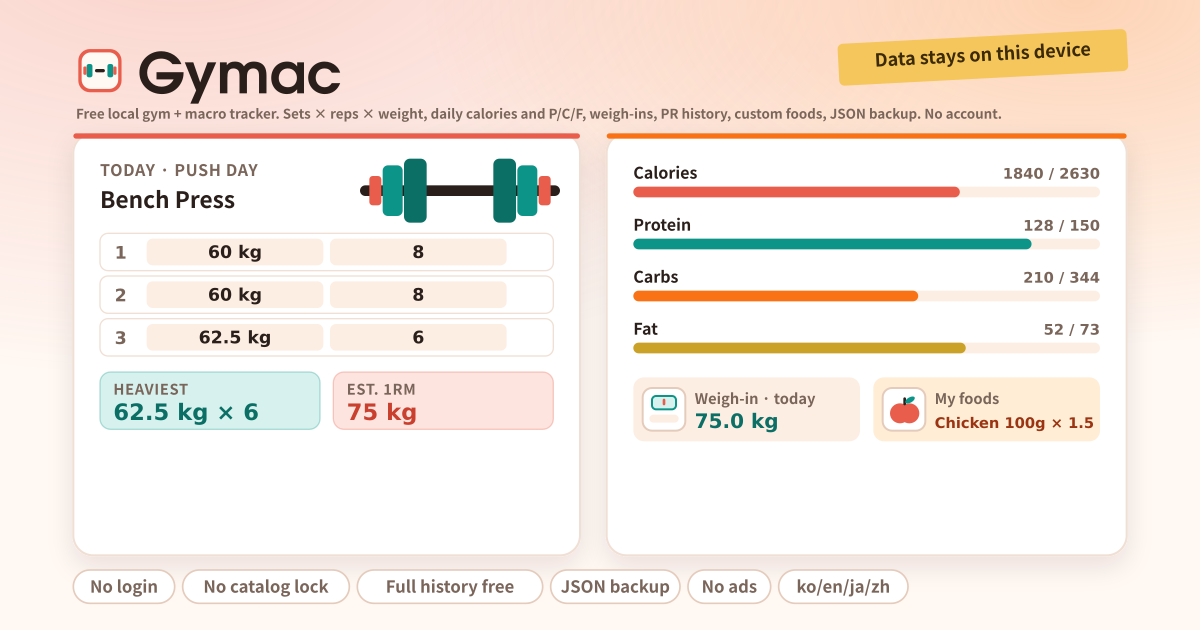
In the Targets card, a profile of male, 30, 175 cm, 75 kg, moderate activity gives a BMR of 1699 kcal, a TDEE of 2633 kcal and suggested targets of 150 g protein, 73 g fat and 344 g carbs. Tap Use suggested, then change only the numbers you want. Log today’s weight in the Weigh-ins card, then start a session in the Workout card, add Bench Press and type three sets of 60 kg × 8. Change a set and the PR in the Strength card follows straight away.
In My foods, create “Chicken 100g” at 165 kcal, 31 g protein, 0 g carbs, 3.6 g fat, then log 1.5 servings in the Daily macros card and the bars fill against your targets. With no foods yet, Quick add takes a name and the numbers and logs them right away. Between sets, tap Rest or the 90 s preset in the timer card to start the countdown. Before switching devices, export JSON from the Backup card and import it on the new one; everything comes back.
Where the calorie and macro numbers come from
The resting-energy estimate comes from the Mifflin–St Jeor equation. In its standard form it is, for men, 10 × weight in kg + 6.25 × height in cm − 5 × age + 5, and for women the same expression with −161 in place of the final +5. That value is multiplied by an activity factor the user picks, from 1.2 for sedentary to 1.9 for very active, to give the daily calorie figure. The app does nothing beyond those two steps and calculates on exactly the numbers the user entered.
The equation is a population estimate. For any one individual it can be off by a few hundred kcal a day against real expenditure, and muscle mass, body composition and medical history do not enter the formula at all. The suggested macro split (protein 2.0 g per kg, fat 25 % of calories, carbs the rest) is likewise a common default, not a prescription. None of the four targets has to be kept as suggested; they are left editable so they can be changed to fit the situation.
The estimated 1RM in the Strength card is an estimate in the same way. It is the weight and reps of a submaximal set put through the Epley formula (weight × (1 + reps / 30)), not a measurement of what can actually be lifted once. The error grows as the rep count rises, so treat the number as a way to compare progress over time and nothing more.
Who should not rely on these numbers
Anyone with a medical condition, a history of disordered eating, a pregnancy, or who is under medical supervision should follow their clinician or dietitian rather than the numbers in this app. Gymac does not diagnose, treat or replace professional advice. What the Targets card produces is the arithmetic described above and nothing more; it knows nothing about an individual’s health.
When adjusting targets, look at the weigh-in trend over weeks rather than at a single day. Body weight moves within a day with water and meal timing, so changing calories on the strength of one reading means chasing noise. That is why the Weigh-ins card keeps a record by date.
Every card, from the date strip to Backup
- The amber strip at the top: a note that your data stays on this device. Nothing is sent to a server.
- Date strip: previous / next day arrows, that day’s exercise count and calories, a Today jump.
- Workout: Start workout (optional name), Start from routine, Add exercise (your catalog appears as suggestions), set rows (weight, reps), Add set, a Rest button, notes.
- Rest timer: 60 / 90 / 120 / 180 s presets and a custom value, Start and Stop. It counts while the screen is on; there are no background notifications.
- Daily macros: calorie, protein, carb and fat bars against targets with what is left or over, log from My foods or with Quick add, and the day’s entries with delete.
- Targets · Mifflin–St Jeor: profile → BMR and TDEE → suggested targets → My targets (all four editable). Use latest weigh-in pulls the value from the Weigh-ins card.
- Weigh-ins: date and weight (kg or lb) with a note; the newest-first list shows the change against the previous entry and a small range bar.
- Strength · PRs: per exercise the heaviest set, the estimated 1RM and the session count; unfold for every set by date.
- My foods: name, serving description, kcal and P/C/F per serving. Unlimited, and no paid food database.
- Routines: a name and an exercise list (one per line), with no cap. The play button starts a session on the selected day with those exercises already in it.
- Settings: text size A / A+ / A++, weight unit kg / lb, default rest seconds. Backup: Export JSON, Import JSON, Delete all data.
Where the log stays
Workouts, meals, weigh-ins, foods, routines, the profile and the settings stay on this device; there is no account, no sync and no ad script, and nothing is sent to a server. Clearing the browser’s site data or uninstalling removes them, so export JSON from the Backup card before switching phones and import it on the new one. Delete all data wipes everything on purpose when you want to start over.
How is the calorie target worked out?
Mifflin–St Jeor gives the BMR (men 10 × kg + 6.25 × cm − 5 × age + 5, women −161 instead of +5), multiplied by an activity factor from 1.2 to 1.9 for the daily figure. The suggested split is protein 2.0 g per kg, fat 25 % of calories and carbs the rest. This is arithmetic, not a diet prescription, and all four targets can be overwritten.
Does the rest timer notify me in the background?
No. It shows the countdown while the screen is on and gives a short vibration at the end where the device supports it. There are no push notifications and no background work. Leave the tab and come back and the remaining time is corrected from the real clock.
How is the estimated 1RM calculated?
With the Epley formula: weight × (1 + reps / 30). A set of 60 kg × 8 gives 60 × (1 + 8 / 30) = 76 kg, and a single-rep set counts as the weight itself. The Strength card runs every set of an exercise through it and shows the highest result next to the heaviest set actually lifted. It is an estimate from a submaximal set and the error grows with the rep count, so use it to compare progress rather than to pick a weight for a max attempt.