It started with “is there an app that does the progression for me”
The post appeared on the r/gzcl subreddit. Someone who had just started GZCLP asked whether there was an app that would take the session they logged and work out the next one by itself. The GZCLP rules are short on paper and awkward to run in your head every time — every set made means more weight next time, a single miss means the weight stays and the stage moves from 5×3 to 6×2 and then to 10×1, and only a miss at 10×1 brings the weight down to 90 % and the stage back to the start — and the squat as T1 and the squat as T2 keep their own weight and stage. A spreadsheet will do it, but editing cells on the gym floor does not last.
Look at what came back in the replies and a pattern repeats. The apps that actually know the rules speak English only, several want an account first or put the program itself behind a subscription, and the common workout loggers record sets × reps × weight perfectly well but never say what to do next, so the rules go back into your head. Worst of all for GZCLP is a logger that cheerfully writes “+2.5 kg next time” after a miss — adding weight where the stage should have changed is not the program, it is a wall.
GZCLpad is a different answer to that question. The coach holds the rules; you only type the reps you actually made on each set. Every set made puts one plate step on the next session, a miss writes the next stage at the same weight, and only a miss on the last stage goes back to 90 % — and every session keeps a line saying why the verdict came out the way it did. The UI is in Korean, English, Japanese and German, there is no account, and everything stays in the browser on this device. It is a different job from the free-form sets × reps × weight log that Gymac does, so it is a separate app.
What GZCLpad does
Starting is one tap. “Start GZCLP” opens the program at the empty bar — 20 kg on squat, bench and press, 40 kg on the deadlift, a light start on the lat pulldown and dumbbell row — and puts up the first session, A1. If you already know your numbers, correct the starting-weight fields underneath first and then start. kg and lb switch on the start card and in the settings; switching converts every slot and puts the plate steps to that unit’s defaults (5 kg / 10 lb on lower lifts, 2.5 kg / 5 lb on upper lifts).
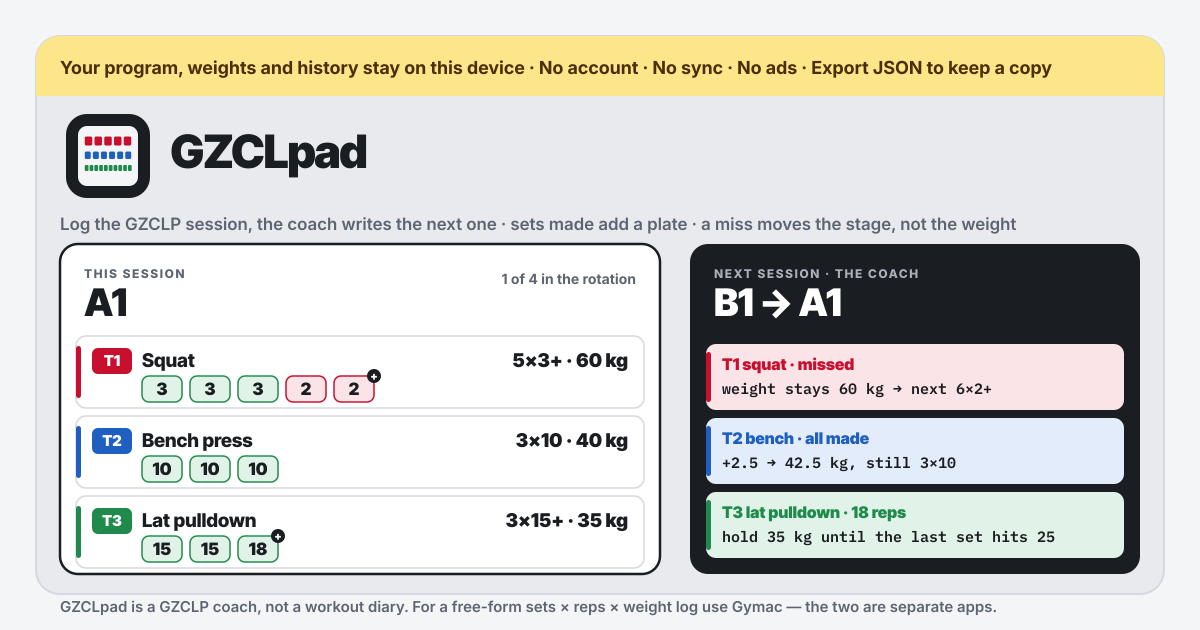
The session card shows the day’s three lifts — on A1 the T1 squat 5×3+, the T2 bench 3×10, the T3 lat pulldown 3×15+ — each with one box per set, the faint number in the box being the target. Type what you actually made and the box turns green (made) or red (missed), and the moment every box of a lift is filled the coach’s line appears under it: “Every set made → next time 22.5 kg, still 3×10”, “Missed → the weight stays 20 kg, next time 6×2+. No weight is added.” The + on a last set marks it as AMRAP: at or above the target makes it, extra reps are welcome. “All made” fills every set at target, “Clear” empties them. When all three lifts are filled, “Save session” lights up; saving updates the board and puts up the next day.
Everything else is the board and the history. The program board lists the ten slots — the four lifts as T1 and as T2, plus the two T3s — with their current weight and stage, and “Edit” on any row changes both by hand, after which the coach applies the rules from there. The history keeps, per session, the date, the day name, each lift’s weight, stage, reps and made/missed, and one line of outcome such as “+2.5 → 22.5 kg” or “stage → 6×2+, same weight”, plus a note if you wrote one. “Undo the last session” asks once, removes that session and puts the weights and stages back to what they were before it — exactly, even if you had edited a value in between. The rest timer per tier starts the moment you type a set (switch that off in the settings) and tells you when it is over. Pick the language with ?lang=ko, ?lang=en, ?lang=ja or ?lang=de on the address, and add it to the home screen to install it as a PWA that works offline.
The rules the coach applies
GZCLP is as Cody Lefever wrote it up. Four sessions rotate A1, B1, A2, B2, each with one T1, one T2 and one T3. A1 is T1 squat, T2 bench, T3 lat pulldown; B1 is T1 overhead press, T2 deadlift, T3 dumbbell row; A2 is T1 bench, T2 squat, T3 lat pulldown; B2 is T1 deadlift, T2 overhead press, T3 dumbbell row. The same lift as T1 and as T2 is two slots with their own weight and stage — the T1 squat can sit at 60 kg on 6×2+ while the T2 squat is at 40 kg on 3×10, and neither touches the other.
The T1 has three stages, 5×3+ → 6×2+ → 10×1+; the T2 has three, 3×10 → 3×8 → 3×6. On any stage, every set at target adds one plate step next session — 5 kg / 10 lb on squat and deadlift, 2.5 kg / 5 lb on bench and press — and the stage stays. A single set short of target keeps the weight and moves to the next stage. Only a miss on the last stage (10×1+ or 3×6) brings the weight down to 90 %, floored to a plate step, and the stage back to the first — 90 % of 60 kg is 54 kg, which floors to 50 kg in 5 kg steps. No tier ever adds weight after a missed session.
The T3 3×15+ has no stages. Make the three sets and reach 25 on the last AMRAP set and the next session adds 2.5 kg / 5 lb; until then, made or missed, the weight holds. The optional linear 3×5 template alternates two days (A: squat, bench, dumbbell row; B: squat, overhead press, deadlift 1×5), adds weight when every set is made, repeats the weight after a miss, and takes 10 % off after three straight misses. The two templates live side by side: starting one leaves the other’s progress alone.
How one miss plays out
Take an example. On an A1 where the T1 squat sits at 60 kg 5×3+, you type 3, 3, 3, 2, 2. The fourth set missed, so the coach’s line reads “Missed → the weight stays 60 kg, next time 6×2+. No weight is added.” Save, and the board shows the T1 squat at 60 kg · 6×2+, with B1 up next. After B1, A2 and B2, the next A1’s session card shows the T1 squat as 6×2+ · 60 kg with six boxes — not 62.5 kg. Make all six that day and it goes to 65 kg 6×2+; miss again and it goes to 60 kg 10×1+; miss at 10×1+ and it goes back to 50 kg 5×3+. On that first session the T2 bench 3×10 made at 40 kg reads “+2.5 → 42.5 kg”, and the T3 lat pulldown at 15, 15, 18 reads “hold until the last set reaches 25”.
How is this different from Gymac, and why not one app?
Gymac is a diary: you write sets × reps × weight for any exercise, it finds your PRs and keeps macros and weigh-ins beside them, and it does not care what program you follow. GZCLpad is a coach: it holds the rules of one program, GZCLP, and decides the next session’s weight and stage from the one you just did. One app’s point is “write anything down”, the other’s is “do this next”, so the screens and what they store are different. The two share nothing and never read each other’s storage. If you follow GZCLP and also want to log the rest of your training or your food, run the two side by side.
Do I need an account or a subscription? Where is the data?
No. There is no account, no login, no subscription and no in-app purchase, and every part of the coach is open to everyone from the first tap. The program, weights, stages and history are stored only in the browser on this device and are never sent to any server — the app requests nothing but its own files. That makes the backup yours to keep: “Export JSON” downloads the whole book as one file, and “Import JSON” in another browser or on a new phone brings that state back exactly (if something is already there, it asks before replacing). Clearing the browser’s site data clears the history too, so download the file every few weeks.
I want to do a different day than the one that is up. Can I change the order?
Yes. “Day to do now” at the top right of the session card lets you pick any of A1, B1, A2 or B2; the card shows that day’s three lifts at their current weight and stage, and saving continues the rotation from the day after it. Weights and stages belong to slots, not to dates, so changing the order never disturbs any lift’s progress. If a starting weight was wrong or you are back after a long break, “Edit” on the board sets that slot’s weight and stage by hand; if the session you just saved was wrong, “Undo the last session” puts everything back to before it.
Can I change the plate steps or the rest times? I use microplates.
Yes, in the settings. Plate steps are set separately for lower lifts (squat, deadlift), upper lifts (bench, press) and accessories; put the upper step at 1.25 kg and the bench and press climb by exactly that. The 90 % reset floors to a multiple of the same step, so a smaller step also makes the reset finer. Rest is set in seconds for T1, T2, T3 and the linear template (180, 120, 60 and 180 by default); if you would rather it did not start by itself when you type a set, untick the box underneath and use the “Start rest” button on each lift.
Are there ads or sync? Does an update wipe the history?
No ads on the tool UI, and no sync — the only way between devices is the JSON file, which is the intent. A new version arrives quietly the next time the page opens; it never puts up an “update required” wall and never removes what you saved. An older backup file still loads, and an odd value is put back to a default rather than refused. The “Guide & Feedback” button at the bottom right is one small script that opens this guide, and the app calls no other outside resource.