When drinking enough water keeps slipping your mind
You mean to drink more water, and by the afternoon you have forgotten. A log that only piles up numbers gets dull fast, and missing one day feels like you broke everything, so you stop.
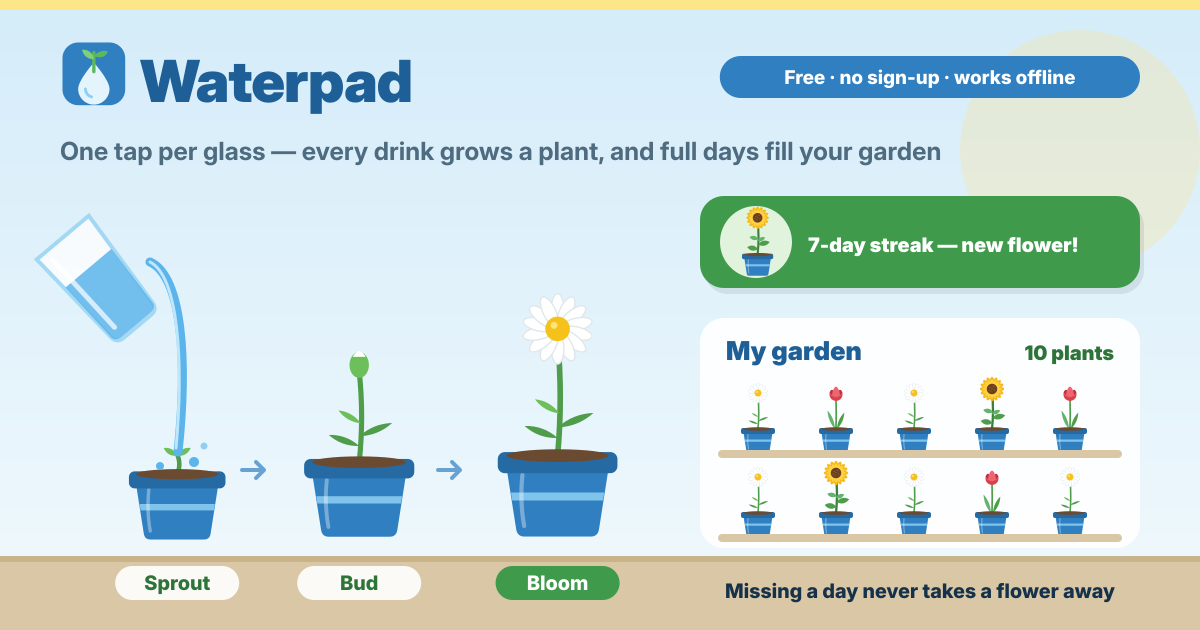
Waterpad is a water log where every drink you have grows the plant in your pot. It opens right in the browser with no install and no sign-up. The interface is in Korean, English, Japanese and German, and your drinks are saved in this browser on this device only.
1. Log a glass with one tap
- On the Today tab, tap Glass (250 ml) or Bottle (500 ml) and it is logged. Switch the unit to US fl oz and the buttons become 8 oz and 16 oz.
- If your cup is a different size, type the amount under Custom amount and tap Add. Amounts you use are kept as Your cups buttons, so next time it is one tap.
- Tapped by mistake? Tap Undo last. You can also delete any drink from the Today’s drinks list.
2. Set your daily goal
- The goal starts at 2000 ml. Tap Goal: 2000 ml to set anything from 500 to 6000 ml. A new goal counts from today on, and past days keep their own goal.
- The right amount differs from person to person. Start with a goal that feels easy.
3. Watch today’s plant grow
- Each day starts with a seed in the pot. As you get closer to your goal, the plant grows through five stages: Seed, Sprout (1 % of your goal or more), Leaves (35 % or more), Bud (70 % or more) and Bloom (100 %).
- Below the plant you see how much you drank today and how much of your goal that is. You do the drinking; the plant simply grows with it.
4. Full days fill your garden
- Reach your goal and that day’s bloom is planted in Your garden on the Garden tab. The garden is grouped by month, with the total at the top (for example “12 plants”). Tap a pot to see the day it bloomed.
- Missing a day never wilts or removes a flower you already have. The next day simply starts again: “A new day, a new seed.”
5. Streaks unlock new flowers
- Days in a row where you reach your goal build a streak. Today counts once you reach the goal.
- You start with the Daisy, then unlock the Tulip at a 3-day streak, the Sunflower at 7 days, the Cactus bloom at 14 days and the Cherry blossom bonsai at 30 days. Once unlocked, a flower stays yours even if the streak ends.
- Under Flowers on the Garden tab, tap Grow this next on any unlocked flower, and that one grows in your next pot.
6. Reminders, only if you want them
- Reminders are off to start. On the Settings tab, tap Turn on reminders and your browser asks once whether to allow notifications. Choose to be reminded every 1 hour, 1.5 hours, 2 hours or 3 hours.
- No reminders arrive during Quiet hours (22:00–08:00 to start), and with Stop after today’s goal switched on, they stop for the day once you reach your goal.
- Reminders are made on this device with no server sending them, so they are best-effort: they only arrive while Waterpad is open or added to your Home Screen and your browser allows it. On iPhone, add it to the Home Screen first (iOS 16.4 or later).
7. Look back at your week
- Last 7 days on the History tab shows each day as a bar, with a goal line and a mark on every day you met your goal.
- The Last 30 days list shows how much you drank each day and whether you met your goal.
8. Keep a backup file
- Under Backup on the Settings tab, tap Save a backup file to keep your drinks, garden and flowers in one backup file.
- Tap Restore from a backup file and it first shows what the file adds. Choose Add to what’s here or Replace everything; Replace everything asks you to confirm. A broken file is refused and nothing is changed.
- Delete everything asks first and offers Export first, so you can keep a backup file before it goes.
Where are my drinks stored? Are they sent anywhere?
In this browser on this device only, and they are never sent anywhere. There is no account and no server that receives your drinks or your garden. Even reminders are made on this device.
Will my plants wilt if I miss a day?
No. Flowers in your garden never wilt or disappear, and unlocked flowers stay unlocked. Only the streak starts over, and the next day begins with a new seed.
What happens if I clear my browser data?
Clearing the site data deletes your drinks and your garden too, and there is no way to bring them back. Tap Save a backup file now and then and keep the file. It is also how you move your garden to another device.
Does it work offline? Can I keep it like an app?
Yes. After the first visit it opens without a connection, and logging, the garden, history and backups all work. Add to Home Screen in your browser menu keeps it like an app, and on iPhone that is also what reminders need.
Is it free? Where do I send feedback?
All of it is free. There is no sign-up, new flowers unlock only by drinking and there is nothing to buy, and there are no ads on the tool. Send feedback with the Guide & Feedback button.