Only protein and fiber, on purpose
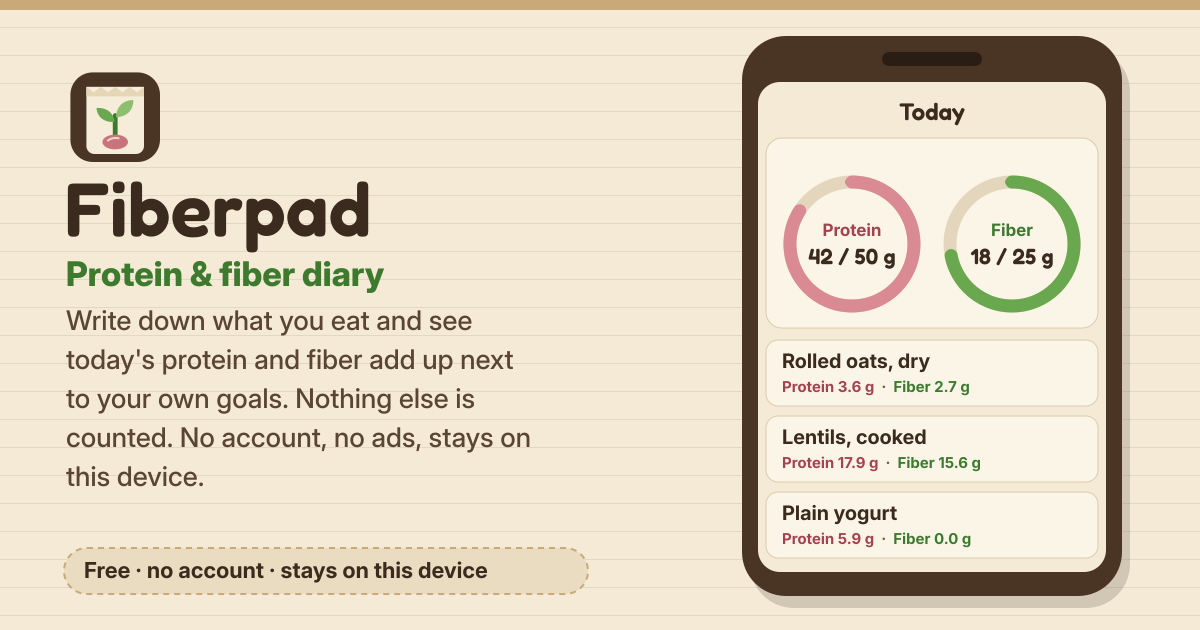
You may just want to know whether you get enough protein and fiber, yet many food apps show a wall of other numbers and judging words. Fiberpad leaves all that out: write down what you eat, and you see today’s protein and fiber add up.
Nothing else is counted, and no food is called good or bad. Progress is shown in plain words such as “so far” and “reached”. There is no account and no ads, and your diary stays in this browser on this device. It speaks Korean, English, Japanese and German, and has a dark mode.
1. Goals only if you want them: Settings → Daily goals
- Both goals are optional. Leave them empty and Today just shows the totals, with no rings; you can clear a goal any time with No goal.
- Fiber: the 25 g and 38 g buttons are the Adequate Intake for adult women and men in the US National Academies’ reference intakes. You can type any other number.
- Protein: the 50 g button is the reference amount behind the US FDA Daily Value. Work out 0.8 g per kg of body weight uses the adult RDA from the same reference intakes; the weight you type is used once and never stored.
- These are general reference amounts for adults. For a health condition, pregnancy or sport, talk to a doctor or a nutrition professional.
2. Log what you eat: the + Add button
- The starter list has 131 foods: beans and lentils, tofu and natto, grains, rice and noodles, bread, nuts, fruit, vegetables, seaweed, eggs, dairy, fish and meat. Search by its name in any of the four languages — “lentil”, “Linsen” or “レンズ” all find lentils.
- Amount: after picking a food, choose a household portion such as “1 cup” or “1 slice” (with its grams), “100 g”, or Grams…, and how many. This adds shows the protein and fiber before you save.
- My foods: in the Foods tab, save values from a package label per 100 g, per serving or both, and search them like the starter list.
- Quick add: just type grams of protein and fiber; a name is optional. Save & add another keeps the sheet open for the next food.
- Tap an entry to edit it. Change protein or fiber on its own and the other value stays as it is. A deleted entry comes back with Undo.
3. Logging again, quickly: favorites, recent, templates
- Tap the star on a food to make it a favorite. Favorites and up to 20 recent foods sit at the top of the add sheet; a recent food comes back with the amount you used last time.
- Templates: tap Save as template under a meal on Today (say, breakfast), or put one together in the Foods tab. Log writes every item on the day you pick, ×1, ×2 or any multiple.
4. Today and the week summary
- Today: two calm dials show protein and fiber “so far” against each goal, and say “Reached” once you get there — going over is simply “Reached” too. Entries are grouped by breakfast, lunch, dinner and snack; the arrows or a date open another day.
- The week summary in History runs Monday to Sunday. It only counts days with at least one entry, and shows how many of them reached each goal — for example “Reached on 3 of the days you logged (5 days logged)”. Days without entries are not counted either way. You also see the average per logged day and a small bar for each day.
- Tap a day in the last-30-days list to open it on Today. There are no streaks and no badges.
5. Everything stays on this device — and the backup file
- Entries, my foods, templates and goals are stored only in this browser on this device and never uploaded. There is no account and no ads. The food list ships with the app, so nothing about your food is looked up online.
- On iPhone/iPad, use Safari’s Share button → Add to Home Screen and open it from there: Safari may clear website data after 7 days without a visit.
- Download a backup file now and then from Settings → Download backup. Restore from backup only merges: nothing on this device is deleted, nothing is added twice, and restoring the same file again changes nothing. Export CSV gives you a spreadsheet of your entries.
Where the food values come from
The protein and fiber values in the starter list are copied as they are from USDA FoodData Central, SR Legacy (April 2018), published by the US Department of Agriculture. It is in the public domain, and every food shows its USDA number (FDC #). Values are per 100 g of the food described; real foods vary with variety and cooking. No missing value is made up, so foods without a fiber value were left out.
Planning meals for the week?
Fiberpad is a diary of what you ate. To plan the week’s meals ahead and get one shopping list, use Mealpad.
Not planned for now
If you would like something, tell us with the Guide & Feedback button at the bottom of the screen.
- Barcode scanning
- Logging by photo or voice
- Sync with health apps (Apple Health, Health Connect)
- Accounts and cloud sync
Why only protein and fiber?
On purpose. Fiberpad is for people who want to see whether they get enough of these two, so it counts only protein and fiber and leaves out every other number and every word that judges food.
Where do the food values come from?
From USDA FoodData Central, SR Legacy (April 2018), which is in the public domain. The values per 100 g are copied without rounding; real foods can differ a little.
My food isn’t in the list
Save it under My foods in the Foods tab with the values from its package label, and it shows up in search from then on. For a one-off, use Quick add and type just the grams of protein and fiber.
Is this medical or nutrition advice?
No. Fiberpad is a personal diary, and the goal buttons are general reference amounts for adults. If you have a health condition or are pregnant, talk to a doctor or a nutrition professional.
How do I move to a new phone?
On the old phone, Settings → Download backup; move the file to the new phone and choose Restore from backup in Fiberpad there. Entries, my foods, favorites and templates are merged in, and if the new phone has no entries yet, your goals come along too.