It started with “how do you track symptoms?”
The question came from a forum for people living with Sjögren’s. Someone asked how others keep track of their symptoms for the rheumatologist: which ones came back, how bad they were, whether anything went along with them. The answers were what people who have managed a condition for years tend to use — a notes app on the phone, a spreadsheet, a paper diary, one of the paid tracker apps. The problem underneath the question is one most people with a chronic condition know: the appointment comes every few months, and what gets said there is whatever memory has kept.
Look at the tools people mention and a pattern repeats. The web trackers are English-only. The store apps put the useful parts — more symptoms, the export, the history beyond a few weeks — behind a subscription or an account, so someone who wants to write down that their joints hurt at 3 pm meets a sign-up screen first. Many trackers record that a symptom happened without a time and an intensity, or with nowhere to note what else was going on: what they ate, whether they exercised, how they slept, whether a dose was missed. And without an export, the log stays inside the app and the appointment ends up as a monthly guesstimate anyway.
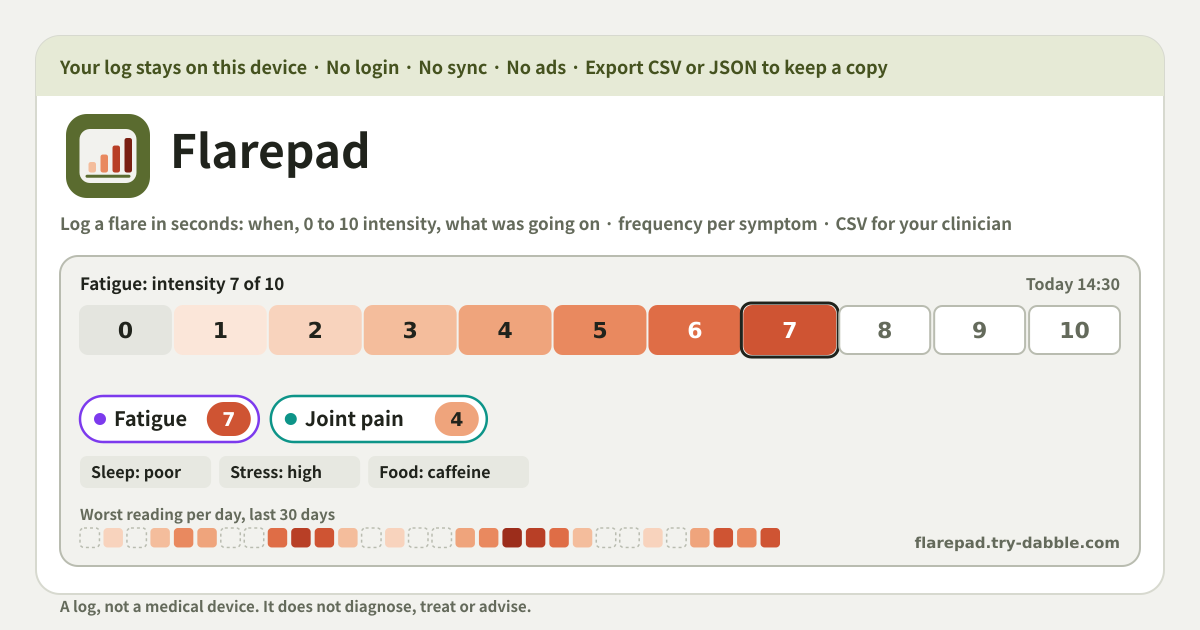
Flarepad is the log that question was asking for. Every entry has a time and a 0 to 10 intensity per symptom, with tags for food, exercise, stress, sleep and meds and a note. The history is unlimited, lives only in this browser on this device, speaks Korean, English, Japanese and German, and comes out as a CSV any spreadsheet opens. It is a log and nothing more: not a medical device, and it does not diagnose, treat or advise.
What Flarepad does
You start by naming your symptoms. There are suggestions to tap — fatigue, joint pain, dry eyes, dry mouth, brain fog, headache, rash, gut pain — but the list is yours: type whatever the thing is called for you, rename it later, remove it when it stops mattering. Under “Your symptoms” each one shows how many entries it appears in.
Then, when a flare comes, you log it under “Log a flare”. An entry is a date and time (“Now” fills in the current one), one or more symptoms each with a “How bad” from 0 to 10 where 0 is none and 10 is the worst you can imagine, what was going on as tags in five groups, and an optional note. “Save entry” and it lands in the history, grouped by day, where you can edit or delete it later. That is deliberately all an entry is — something you can do in the time it takes to notice that your hands hurt.
Everything else exists to make that pile of entries useful at the appointment. The “Overview” counts what came back and how often, over 7, 30 or 90 days or everything. “Export CSV” and “Copy summary” take it out in a form a clinician can read. “Backup” exports and imports a JSON file so the log survives a new phone. There is no account on a server, so there is no login to lose and nothing to subscribe to.
How to use it
- Open the app and name your symptoms under “Symptoms”. Tap a suggestion or type your own into “Add symptom” — the words that make sense to you, not a medical term you would have to look up. You can rename or remove any of them later under “Your symptoms”.
- When a flare comes, go to “Log a flare”. “When” starts at the current date and time; press “Now” to reset it, or change it if you are logging something from earlier in the day. Logging as close to the moment as you can is what makes the time useful later.
- Tap each symptom that is flaring to put it in the entry, then set “How bad” from 0 to 10. 0 is none, 10 is the worst you can imagine. One entry can hold several symptoms at different intensities — dry eyes at 3 and fatigue at 7 in the same entry is normal.
- Under “What was going on”, tap the tags that apply. They come in five groups. Food: caffeine, alcohol, sugar, gluten, dairy, skipped a meal, ate out. Exercise: none, light, moderate, intense. Stress: low, medium, high. Sleep: poor, short, fine, good. Meds: taken as usual, missed a dose, new medication, dose changed. Use the plus to add your own tag to any group — “flight”, “period”, “heatwave”, whatever matters for you. Tags are optional.
- Add a “Note” if something else was different today, then “Save entry”. The entry appears in “History”, grouped by day with today and yesterday named. Tap “Edit” to change it or “Delete” to remove it.
- Before an appointment, open “Overview” and pick the window: 7 days, 30 days, 90 days or All. Read the counts, then press “Export CSV” or “Copy summary”.
- Now and then, press “Export JSON” under “Backup” to keep a copy. On a new phone or another browser, “Import JSON” brings it back.
- Pick the language with ?lang=ko, ?lang=en, ?lang=ja or ?lang=de on the address; the choice sticks for next time. Add it to the home screen and it installs as a PWA on Android and any browser, and it works offline.
The overview, and what “counts only” means
The “Overview” works on one window at a time: 7 days, 30 days, 90 days or All. At the top is a heat strip, “Worst reading per day”: one cell per day, darker the higher the worst intensity logged that day, empty when nothing was logged. Under it are three numbers: entries, days logged, and days at 5 or more. That last one is a plain rule — any reading of 5 or above on that day counts it — not a judgement about what a bad day is for you.
“How often each symptom came back” lists every symptom that appears in the window with how many times it was logged, on how many days, its average intensity and its worst. This is the line that answers the question from the forum: not “how have you been”, but “joint pain, 14 times on 11 days, average 5.2, worst 8”.
“What was tagged alongside” takes one symptom you pick and, for each tag, shows how many of that symptom’s entries carried it, plus the average intensity of that symptom with and without the tag — “high stress: 9 of 14 entries, with 6.1, without 4.0”. Right under it the app prints the line it means literally: “Counts only. A tag that keeps showing up next to a symptom is worth mentioning at your appointment; it is not a cause.” The number says how often you tagged two things together; it does not say one led to the other, and Flarepad never tries to. You logged the tag because it was true that day. Whether it matters is a conversation for the appointment, and the export is what you bring to it.
Before the appointment: the CSV and the summary
“Export CSV” writes one row per symptom reading: date, time, symptom, intensity from 0 to 10, one column for each tag group (food, exercise, stress, sleep, meds) and the note. An entry with three symptoms becomes three rows that share a time. The file is UTF-8 with a byte-order mark, so Excel, Numbers, Google Sheets and LibreOffice open it with the right characters, and the column headings come out in the language you are using. A clinician who wants to sort by symptom or filter to one month can do that in their own spreadsheet, and so can you.
“Copy summary” is the short version: a few plain-text lines for the window you picked — the totals, one line per symptom with times, days, average and worst, the most-tagged tags, and the footer “A log, not a medical device. Counts, not conclusions.” Paste it into a message to the clinic, a patient portal, or the notes you bring on your phone. If the clipboard is blocked, “Show as text” puts the same lines on screen to select by hand.
The app’s own advice under “Before the appointment” is the whole method: export the CSV or copy the summary the day before, so the appointment starts from what actually happened instead of what you can remember of it.
Where the log lives, and backups
Every entry, every symptom name, every tag and note sits in this browser on this device and nowhere else. There is no account, no server of ours and no sync; the app never contacts a server with your log. Nothing about your health is sent anywhere, there are no advertising trackers, and no usage history builds up in an analytics account. That is also the trade-off: clear the browser’s data, or close a private window, and the log goes with it. The backup is the safety net.
“Export JSON” under “Backup” writes the whole log — symptoms, tags, entries — into one file that is made on this device and leaves only as a download. “Import JSON” merges rather than replaces: symptoms are matched by name, entries you have on both sides keep the newer copy, and nothing already here is thrown away. So you can import an old backup onto a phone you have kept logging on and end up with both.
A new version of the app never shows an “update required” wall and never wipes the log. Deleting an entry asks first, and reminds you there is no copy anywhere else.
Does Flarepad tell me what is behind my flares? Is any of this medical advice?
No, on both counts. Flarepad is a log, not a medical device; it says so on screen. It does not diagnose, treat or advise, and it does not tell you why a flare happened. Everything it shows is a count or an average of what you typed: how many times a symptom was logged, on how many days, how bad on average, and how often a tag was next to it. A tag that keeps appearing next to a symptom is something to bring up with your clinician, not a conclusion. If you are unwell, or something in the log worries you, that is a conversation with a doctor — take the CSV or the summary with you and decide together.
Is it only for Sjögren’s?
No. The thread that started it was about Sjögren’s, and the suggested symptoms — fatigue, joint pain, dry eyes, dry mouth, brain fog — reflect that, but they are only suggestions. The symptom list is whatever you type, so it fits any condition that comes and goes: other autoimmune conditions, migraine, IBS, skin conditions, chronic pain, long-running fatigue. If your thing has a name, add it; if it does not, describe it in your own words. Nothing is locked to a condition.
How do I pick a number from 0 to 10?
The scale says what it means: 0 is none, 10 is the worst you can imagine. Beyond that there is no right answer, and you do not need one. What makes the numbers useful is that they are yours and consistent: a 7 for you in March should mean roughly what a 7 meant in January. A rough anchor helps — 2 or 3 is “there, but I got on with my day”, 5 is “it changed what I did”, 8 or more is “I could not do much else”. The overview only ever compares your numbers with your numbers, so it never matters whether your 6 is someone else’s 4.
I missed a few days. Does that break the overview?
No. Flarepad logs flares, not every day. A day with no entry shows as an empty cell in the heat strip and is not counted as a day logged, so the counts describe the days you did write down and nothing else. Gaps are normal and they are also information: “days logged” tells your clinician how much of the window the numbers cover. If you want to back-fill something you remember clearly, set “When” to that date and time and save it; if you do not remember, leave the gap.
What happens to my entries if I rename or remove a symptom or a tag?
Renaming a symptom under “Your symptoms” renames it everywhere, past entries included, and nothing else changes. Removing a symptom takes its readings out of every entry, and an entry that had nothing else in it is deleted too; the app tells you how many entries are affected before you confirm. Removing a custom tag takes it off every entry that carried it. None of this can be undone from inside the app, so if the history matters, press “Export JSON” first.
Is it free? What about ads, accounts and purchases?
It is free. No account, no login, no subscription, no in-app purchase, and no ads on the tool UI. There is nowhere to pay for more symptoms, for the export, or for history older than a few weeks — nothing is locked behind a tier, and there is no entry cap. The interface comes in Korean, English, Japanese and German, and every language gets the same app. Open the address and it works; add it to the home screen and it installs as a PWA on Android and any browser. Your log lives only in this browser on this device, and you can take it out whole as CSV or JSON whenever you like.