It started with “more than 5 options”
Someone on Reddit's r/apps asked for mood tracker recommendations: "I really wish that there were more than 5 options for rating my mood using the free version." They wanted "a scale format that is more than ratings of 1-5" and one that "has a calendar view".
Many mood apps give you five steps for free, live only in an app store, or are English only. Moodpad opens in a browser, has no account, and choosing your scale costs nothing. Your log is saved in this browser on this device. The interface is in Korean, English, Japanese and German.
What Moodpad does
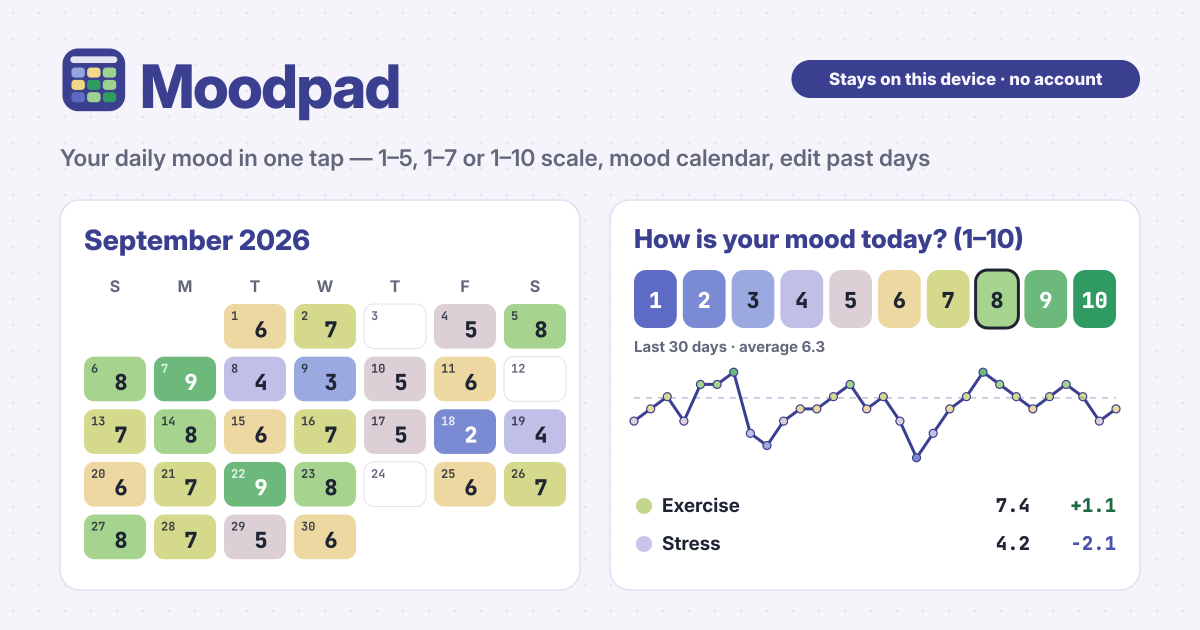
- Your scale → choose 1–5, 1–7 or 1–10. It starts at 1–7.
- One tap → tap a number under Today and it is saved.
- Mood calendar → each day is coloured by mood, and you can tap past days to fill them in or change them.
- Tags and notes → add activities such as Exercise, Slept well, Work or Friends, your own tags and a short note, only when you want to.
- Trends → a 30- or 90-day line with its average, monthly averages and your average mood with each activity. No streak pressure.
- Backup → move your log with Export JSON and Import JSON; Export CSV opens in Excel.
Logging today
- Under How is your mood today?, tap one of the numbers. There is no separate save button: it is saved the moment you tap.
- By default it is one entry a day: if you change your mind, tap another number and today's entry changes. To log several times a day, choose Several per day in Scale & settings.
- After saving, press Add tags & note to pick activities. Tags save as you tap them; for the note, press Save note. For your own tag, type it in the box and press Add tag.
- Made a mistake? Press Undo in the message that pops up at the bottom.
The calendar and past days
- On the Calendar, logged days are filled with their mood colour and show the number: calm blue for low days, pale yellow in the middle, green for good days.
- Tap a day to open it. Pick a number, add a time, tags or a note if you like, and press Save. If the day already has an entry, you can change it or Delete it.
- Use the arrows to go back a month. Days that have not come yet cannot be tapped.
- History lists your entries newest first with date, time, tags and note. Press Edit to open that day.
Changing the scale keeps old entries right
In Scale & settings you can switch between 1–5, 1–7 and 1–10 at any time. Every entry remembers which scale it was logged on, so old entries are never rewritten, only shown converted to the current scale. A day that was 5 on 1–5, for example, shows as 10 after you switch to 1–10.
Trends and activity averages
- In Trend, choose 30 days or 90 days to see each day's mood as a line; the dashed line is the average for that range. Days without an entry leave a gap.
- Monthly average shows each month's average and how many days you logged.
- Mood with each activity shows the average mood on entries with that tag next to your overall average. It shows what goes together, not what causes what.
Backup and changing phones
- Your log lives only in this browser on this device. Before you change phones or clear the browser's data, save a file with Export JSON under Backup.
- On the new device, open Moodpad and pick that file with Import JSON. Importing replaces what is on that device, so the confirmation offers Export JSON first.
- Export CSV saves date, time, mood, scale, tags and note as a table that opens in Excel.
What Moodpad is not
Moodpad is a log you keep yourself. It is not therapy, not a diagnosis and has no AI chat, and it is not medical advice. If hard days keep coming, please talk to someone you trust, a doctor or a local support line.
No account, no sync, no ads on the tool and no premium wall. Your log is never uploaded.
Is it free? Is the 1–10 scale free too?
All of it is free. The scale, tags, trends and backup are not locked, and there is no sign-up or payment screen.
Is it okay to skip days?
Not at all. There are no streaks and no nagging. If you remember later, tap that day on the calendar and fill it in.
Does it work offline? Can I put it on my home screen?
Once opened, it opens without internet too. Use Add to Home Screen in your browser's menu to keep it like an app. Send feedback with the Guide & Feedback button in the bottom corner.