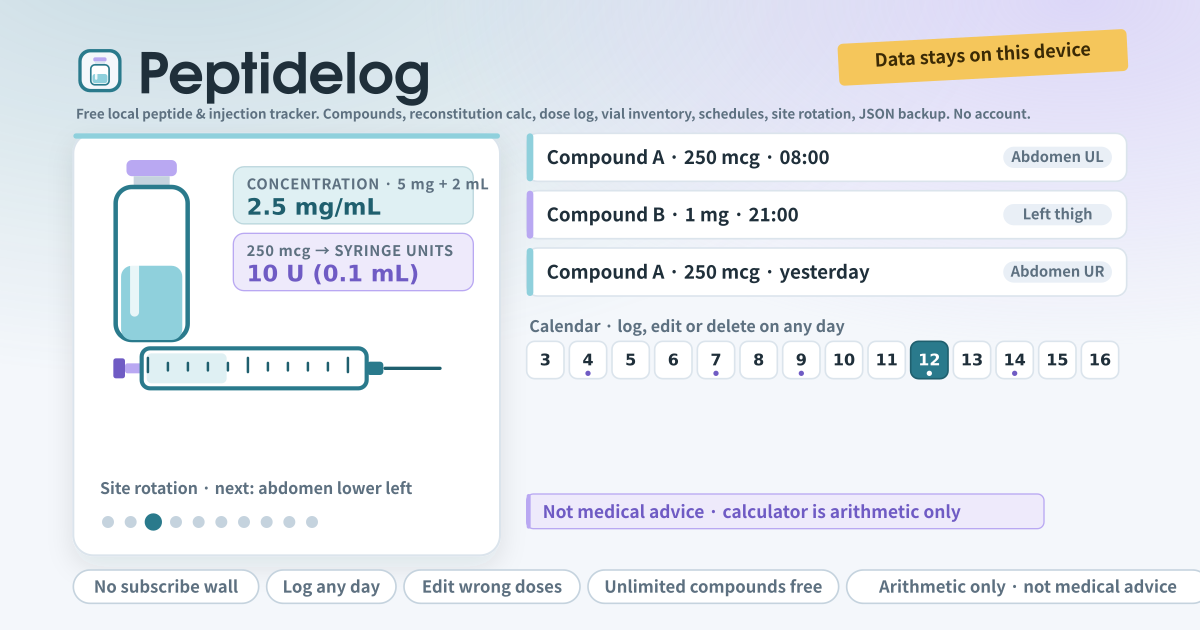
Compounds, the reconstitution calculator and a first week of logs
Peptidelog is a small journal for people who keep their own record of peptide or other injections. Start by adding compounds: a name and a default unit (mcg, mg, IU, units) is all it needs, there is no limit and nothing to pay. Then use the Quick log card to note the compound, the amount, the date and time, the injection site and a note, and save. The date and time field starts at now but can always be changed, so an injection from yesterday can be written down today.
The reconstitution calculator turns vial mg plus bacteriostatic water mL into mg/mL and mcg/mL, and a desired dose into syringe units, volume and doses per vial. The default is a U-100 insulin syringe (100 units = 1 mL) and you can change that in Settings. The calculator only multiplies and divides. It never suggests what to type, and there is no AI dosing assistant. That is why every screen carries the line “Not medical advice”.
Add two or three compounds with “Add compound”. In the calculator, vial 5 mg with 2 mL of water gives 2.5 mg/mL, and a desired dose of 250 mcg gives 10 units (0.1 mL) on a U-100 syringe. Save today’s injection in Quick log with its site and a note, then tap yesterday on the calendar and add or fix a log there. A wrong amount is fixed by tapping the pencil and changing the number; a log that should not exist goes in the bin.
Add a vial and set a low-stock threshold (say 1 mg); a “Low” chip appears once the remaining amount falls to that. Make two schedules (say A Mon/Wed/Fri 08:00 and B daily 21:00) and tap Done in “Next 7 days” to have the log for that slot written for you. After a few logs the rotation card starts pointing at a different site each time. Before switching devices, export JSON from the Backup card and import it on the new one.
A logbook, not a protocol
Peptidelog is a place to write down what the user has already decided with a prescriber. There are no dosing recommendations, no compound information, no sourcing and no protocols anywhere in the app. Which compound, how much and when is something the app does not know and does not try to know. Even the compound name and unit are typed in by the user, and the app never checks that name against any list.
The reconstitution calculator applies exactly two pieces of arithmetic to the numbers the user enters: concentration = amount in the vial ÷ diluent volume, and dose volume = dose ÷ concentration. There is nothing beyond that. A mistyped number produces a wrong result, and the app has no way to tell that it is wrong. That is why every figure the calculator shows must be checked against the prescriber’s instructions. The app is not a medical device and it is not medical advice.
Anyone with a question about a compound, a dose or a side effect should ask a clinician or a pharmacist, not this app. The app does not hold that answer and cannot stand in for it.
Why the log exists at all
Consistent records make a conversation with a clinician easier. When each injection was given, which site was used, which days were missed and how many days a vial has been open can be shown by date instead of recalled from memory. The calendar and the notes exist for that conversation, not for the app to judge anything.
The app tracks injection sites because using the same spot repeatedly tends to cause local irritation, and rotating sites reduces it. The rotation card only points at the site that has rested longest. The low-stock warning on a vial means the remaining amount is about to run out; it says nothing about how much to use.
Every card, from Quick log to Backup
- The amber strip and the lavender strip at the top: a note that your data stays on this device, and the not-medical-advice line.
- Quick log: compound, amount and unit, date and time (editable), site (with the suggested one marked), optional vial link, notes, Save.
- Reconstitution calculator: vial mg, water mL, desired dose → concentration, syringe units, volume, doses per vial, with the not-medical-advice line underneath.
- Compounds: the list and “Add compound”. The pencil on each row edits name, unit, default dose, optional half-life hours and notes, or deletes it. No limit.
- Vial inventory: each vial shows what is left in mg or mL and a “Low” or “OK” chip. You set the low-stock threshold, and a log linked to a vial reduces the remaining amount automatically.
- Schedules (protocols): name, compound, dose per slot, one or more times, weekdays or every N days, preferred site, active. “Next 7 days” below lists the slots; tapping Done writes a log for that slot.
- Calendar: a month grid. Tap any day and its logs appear underneath, with a pencil to edit, a bin to delete, and “Add a log for this day” to write a new one. Past or future, it does not matter.
- Site rotation: out of ten common sites (four abdomen quadrants, thighs, deltoids, glutes, left and right) it suggests the one that has rested longest. “Use in quick log” fills it in, or tap any other site instead.
- Half-life estimate (optional), Supplies (optional), Settings (syringe scale, default site, text size) and Backup (Export JSON, Import JSON, Delete all data).
Where the log stays
Compounds, vials, logs, schedules, supplies and settings stay on this device; there is no account, no sync and nothing is sent anywhere. Clearing the browser’s site data or uninstalling removes them, so export JSON from the Backup card before switching devices and import it on the new one. The “Delete all data” button wipes everything on purpose when you want a clean start.
Does the calculator tell me what dose to take?
No. It turns vial mg and water mL into a concentration, and the dose you typed into syringe units. It never suggests which numbers to enter, and there is no compound database and no AI recommendation. The half-life estimate is a simple halving calculation from the hours you typed and is labelled “estimate only”. Discuss dosing with a qualified clinician.
How does the vial remaining amount go down?
When you save a log with a vial linked, that amount is subtracted from what is left. Mg and mcg are subtracted directly; units or mL are converted through the concentration only when the vial has its water mL set. You can correct the remaining amount by hand in Edit vial at any time, and the “Low” chip appears once it is at or below your threshold.
Can I edit a dose logged on a past day?
Yes. Open that day on the calendar, tap the pencil on the log and change the amount, the time, the site or the note; the bin deletes it. “Add a log for this day” writes a new one on any past or future date, and the date and time field in Quick log can be set to yesterday too. One thing to know: a vial’s remaining amount only goes down when a new log is saved, so editing or deleting a log does not put anything back. Correct the remaining amount by hand in Edit vial when that happens.