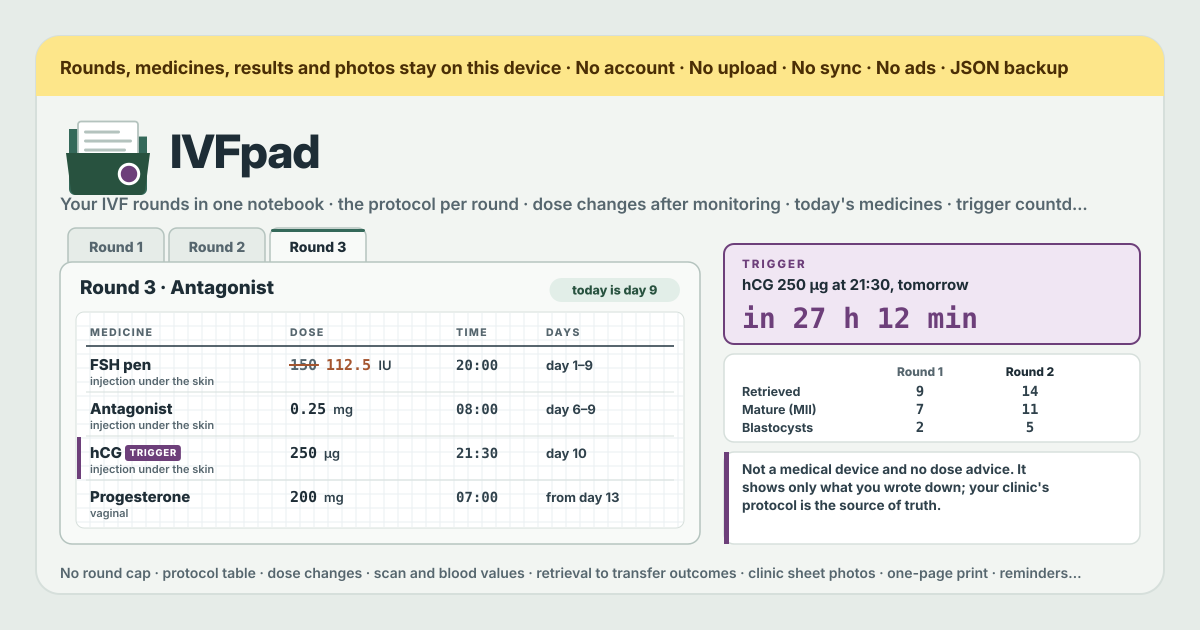
It started with a thread on r/IVF about tracking IVF cycles and protocols
The thread went up on r/IVF, asking how people keep track of their cycles and protocols across several rounds, and the replies described much the same situation. The protocol is a sheet of paper from the clinic or a PDF in an email, and after monitoring the dose changes — “go up to 150 from tomorrow” — arrive by phone or in a chat. By round 2 or 3, what was taken in round 1 and how much, when the dose changed and how many follicles there were that day are spread across a pile of paper and a scroll of messages.
It is not that no app exists; they just do not fit. Period apps are built to count a monthly cycle, so an IVF round — stimulation, then the trigger, then retrieval, transfer and the two-week wait — has nowhere to go. Dedicated IVF trackers come up, Cove IVF Tracker among them, but they tend to be iPhone apps, often with a paid tier, which does not help someone on Android or at a computer. Some people are simply uneasy about putting fertility records on someone else's server. And on top of it sits one particular fear: the trigger shot has to go in at an exact time — what if that time is missed?
IVFpad is a notebook for that gap. It opens in a browser, installs on Android and on a computer alike, has no account and no payment screen, and what you write stays in this browser on this device. What it does not do is just as plain: it is not a medical device, it suggests no dose, and it interprets no value. It is a place to write down what the clinic told you, in your own hand.
What IVFpad does about each of those
- Scattered paper and messages → one tab per round. New round opens a round, and its Protocol table, Dose changes, Visits & labs, Outcome and Clinic sheets all sit inside it. Add medicine puts each row from the clinic's sheet in as written: medicine, dose, unit, route, time, first day and last day. The dose is plain text — IVFpad does not calculate or check it.
- Dose changes by phone → Change dose on each medicine. Write the new dose, New dose from, What the clinic said and After which visit, and the table shows the starting dose alongside the latest one, while today's list uses the dose written for that day. A visit (Add visit) holds the E2, P4, LH, lining and follicle sizes from the scan and bloods as read out, and Units on your report sets E2 and P4 to the units your clinic's report uses.
- The IVF shape period apps lack → rounds counted from Day 1. Day 1 is the day your clinic counts as day 1 — the first day of the period or of injections, whichever the sheet uses — and every “Day n” counts from it. A round can be Stimulation, Frozen transfer or Other, and its Outcome holds eggs retrieved, mature (MII), fertilised (2PN), blastocysts, frozen and transferred, embryo grades, the transfer date and the result (waiting, positive, negative, chemical, cancelled, freeze-all with no transfer).
- iPhone-only and paid apps → one browser. The same address opens in the browser on Android, on a computer or on an iPhone, and installed it opens from an icon. It is free, with no round cap and nothing locked away.
- Unease about fertility data on a server → nothing is uploaded. There is no account, no server and no sync; the records and photos are in this browser on this device. Clinic sheets attached with Add photo are shrunk to 2000 px on the long edge on this device and kept there — not uploaded.
- The fear of missing the trigger → the Trigger box at the top of Today. Tick This is the trigger shot — one day, an exact time on the medicine, give it its day and time, and the box counts down to that moment; press Done once it is in. If the time passes without a tick, it stays up for a day as “ago — not ticked”. This is not an alarm, though: set a phone alarm for the trigger as well.
Your first round, step by step
Start with the clinic's protocol sheet next to you. Once it is copied in, from then on you only write what changes.
- Press New round and fill in the kind of round, the protocol as the clinic called it, the clinic and Day 1. From round 2, pick the earlier round under Copy the protocol table from: medicine names, doses, units, routes and times come across as they were. Dates and dose changes do not, so put in the new dates.
- Use Add medicine for each row on the sheet. Leave the time empty for a medicine with no set time, and the last day empty for one that runs until the clinic says stop. For the trigger, switch on This is the trigger shot — one day, an exact time and give it its day and time.
- Open Today each day. Every medicine running today in any round shows at the dose written for today, with a tick box to press when it is done. A medicine whose dose changes today says “new dose from today”.
- On a monitoring day, Add visit with the date, the kind (Scan, Bloods, Scan + bloods, Appointment, Retrieval, Transfer, Pregnancy test, Other) and the numbers as read out. Follicle sizes go on one line, like “R 18 16 14 · L 17 12”. If the clinic then changed a dose, open Change dose on that medicine, write the new dose and New dose from, and choose this visit under After which visit.
- For a nudge at medicine times, open Reminders, switch on Remind me at medicine times, pick When (at the time, 15 min, 30 min or 1 h before) and check it with Send a test. Reminders arrive only while IVFpad is open. For the trigger, set a phone alarm separately.
- To keep the clinic's sheet as a picture, use Add photo under Clinic sheets. For one page to take to the next appointment, Print / PDF puts the round's protocol table, dose changes, visits and outcome on a single sheet, printed or saved as a PDF (photos are left out of the print).
- When the numbers come in, fill in Outcome and press Save outcome; leave anything you do not know yet empty. From the second round on, pick the rounds to read under Rounds side by side.
Rounds side by side — what it shows and what it does not
The comparison is one column per round. Row by row it shows the kind, the protocol, Day 1, the trigger date, the days from day 1 to the trigger, each medicine from its first to its last dose, the number of dose changes, the number of visits, the highest E2, the last follicle line, the last lining, then the numbers from retrieval to transfer, the embryo grades and the result. Each column is only what you wrote in that round.
The follicle line reads only the numbers in what you typed and counts them: how many sizes, the largest in mm, and how many are 14 mm or more. No value is coloured, nothing is marked high or low, good or bad, and no round is picked as the better one. What a number means is for the clinic to say.
Not a medical device, said plainly
- IVFpad is a notebook, not a medical device and not medical advice. Your clinic's protocol and instructions are always the source of truth; if anything written here differs from what the clinic says, the clinic is right. If a medicine, a dose or a time is unclear, ask the clinic.
- It gives no dose advice. It does not suggest, calculate or check any dose or time, and it knows nothing about any medicine. The dose in the table is exactly the text you typed.
- It interprets no value. E2, P4, LH, lining, follicle sizes and embryo grades are kept as they were read out; nothing is compared with a normal range or marked high or low.
- Do not rely on browser reminders for the trigger. They fire only while IVFpad is open (a tab or the installed app) and only after the browser has asked for permission; with the browser closed or the phone asleep they may not come at all. Set a phone alarm for the trigger and use IVFpad's countdown only as a check.
- In an emergency, call your clinic or your local emergency number.
What stays on the device
Rounds, medicines, dose changes, visits, outcomes, photos and the reminder setting all sit in this browser on this device. There is no upload, no server, no account and no sync. Close the page and open it again and it is all still there, and once opened it works without the internet.
So the copy is yours to keep. Export JSON under Backup saves one file with everything, photos included, and Import JSON moves it into another browser or device as it was (importing replaces what that browser holds). Export CSV saves medicines, dose changes, visits, outcomes and ticks as one table, each line with its round and cycle day, that opens in a spreadsheet. Delete everything clears every round in this browser after a confirmation. Clearing the browser's data clears it too, so export JSON now and then during treatment.
Is there an account or a paid tier?
No. There is no sign-up screen, no payment screen and no free trial, and no cap on the number of rounds. There are no ads on the tool either.
Will it tell me whether my E2 or my follicles look good?
No. IVFpad interprets no value and colours nothing high or low. It only lays out what you wrote, by date and round beside round. What a number means and whether a dose changes is the clinic's call — take a Print / PDF page to the next appointment and ask there.
Can I count on the reminder for my trigger shot?
No — not on its own. The browser reminders fire only while IVFpad is open and only after you allow them, and with no server to push them they cannot wake a closed browser. Set your phone's own alarm for the trigger. IVFpad's Trigger box is there to show the exact time and the time left, and to record it with Done once it is in.
Do I have to type round 1's table again for round 2?
No. In New round, pick round 1 under Copy the protocol table from, and the medicine names, doses, units, routes, times, notes and the trigger mark come across. The dates are left empty, and round 1's dose changes and ticks do not come with it. Put in the dates for the new protocol and fix only the rows that differ.
Where do the photos of my clinic sheets go?
Into this browser on this device. A picture chosen with Add photo is shrunk on this device to a JPEG 2000 px on its long edge — enough to read a printed protocol — and kept there. It goes nowhere else, and it travels inside the Export JSON file. Removing a photo takes it out of IVFpad only; the original in your phone's gallery stays.
My clinic reports E2 in pmol/L
Under Visits & labs, Units on your report lets you pick pg/mL or pmol/L for E2 and ng/mL or nmol/L for P4. IVFpad converts nothing: choose the units your report uses and copy the numbers as printed.
Can I use it on my phone and my computer, or share it with my partner?
Not automatically. There is no sync, so each device keeps its own notebook. A file saved with Export JSON on one side and opened with Import JSON on the other moves everything across, photos included — but importing replaces what that browser holds, so if both sides write, one side's entries get overwritten. It is safer to keep one device as the one you write on and let the other read a Print / PDF page or an occasional copy.
Does it work offline and in Korean, Japanese and German? Where do I send feedback?
Once it has been opened, it works with no internet at all. “Install” or “Add to Home Screen” puts it on Android or a computer as an icon. The interface is in Korean, English, Japanese and German. The “Guide & Feedback” button at the bottom right is a link that opens this guide in a new tab; there is no panel inside the app.