It started with “how do you keep track of what you own?” on r/magicTCG
It was a thread on the r/magicTCG subreddit. Someone asked how people keep track of the cards they own — not to price them or sell them, but to know what is already in the box when a deck is being built, and how far a set has been filled. It is one of the most common questions in the hobby, and a very practical one: the cards are already in the box; what is missing is a list that keeps up with it.
Look at what the replies point to and a pattern repeats. The collection tools most people name on the web — Deckbox, Archidekt, Moxfield — want an account before the first card is ticked, and speak English and only English on the screen. The store apps split two ways: some, like UrzaGatherer, put market value and collection worth front and centre; others, like ManaBox, let you switch prices off but are built for a phone, so there is nothing to open on the big screen at your desk. Either way, for someone who only wants to mark off a set and count what a deck is short, there is a lot standing in front of it.
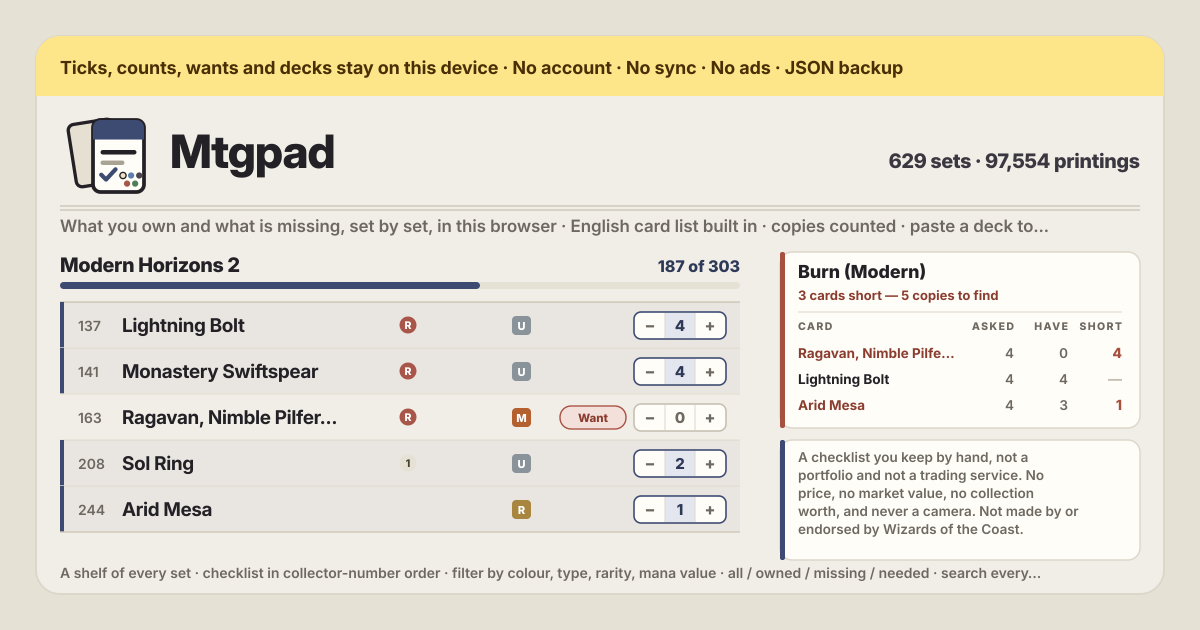
Mtgpad is a different answer to that question. The English card list is built into the app, so you open a set, get a checklist in collector-number order, and count what you hold with − and + — in the browser on this device, with no account, no card cap and no server. There is no price anywhere on the screen: no market value, no collection worth, not a currency symbol. The UI is in Korean, English, Japanese and German; card and set names stay English because that is the data.
Open a set and count what is in the box
The shelf on the left holds all 629 sets, newest first. Find one by name or code, narrow it by kind — expansion, core set, Commander, Masters, promo — or switch on “Only sets I have started” to see just the ones you have touched. Press one and its checklist opens on the right in collector-number order: the same order printed on the cards, so it is easy to follow while you flick through a box or a binder.
Every row has a − and a +. Press + as many times as you have copies and the row gets an indigo spine, while the progress bar above and the counts in “Your collection” follow at once. A card at zero is missing. Every fifth rule is drawn a little darker, so counting down a 400-card set by eye is easy. Switch on “Count foils on their own line” and each row grows a second, dashed counter that keeps foils apart — though a foil is still a copy in the totals.
The filters are the ones a collector actually sorts by: colour (white, blue, black, red, green, colourless), type, rarity, mana value, and a search that matches a name or a collector number. Above them, “Show” is the whole point of a checklist — all, owned, missing, and needed, which is what your decks are short. Leave it on “Missing” and press “Copy the missing list”: the clipboard gets the set name and code, then every missing card as number and name, ready to paste into a shop's order form or a trade post.
Close the set and search by name — one row for every printing of a card
Press “Close the set”, type a name in the search box, and all 34,148 card names are searched at once. Here a row is a card, not a printing, and the “N in all” on the right is every printing of that name added up — which is exactly the shape of the question “how many Lightning Bolts do I have?”, because which printing they are does not matter.
Press the name in a row and every set that printed that card unfolds beneath it, newest first, each printing with its own − and +. Tick the printing you actually hold and the set checklist and the name search agree on the same number. The same drawer opens from a row inside a set, so “do I have this one in another set too?” is answered where you stand.
Paste a decklist and get back what you are short, card by card
In the “Decks” card press “Paste a decklist”, give it a name and paste the list as it is. The reader is forgiving: “4 Lightning Bolt”, “4x Lightning Bolt”, “1 Sol Ring (C21) 263 *F*” and a bare card name all read the same. A line that says “Sideboard” starts the sideboard, and an “SB:” prefix is understood too; lines beginning with // and trailing #tags are ignored. Before you even save, the line underneath says “N cards, M copies”, and if some lines held no card it says how many were left out — nothing is dropped in silence.
Saved, each deck carries a one-line summary: “3 cards short — 5 copies to find”. Press “Open” and a table appears — the card, how many the deck asks for, how many you hold, how many are short — with sideboard lines marked and the biggest gap at the top. “Copy what is short” puts exactly that shortfall on the clipboard as order lines like “4 Monastery Swiftspear”.
One deck at a time, or all of them at once
With more than one deck, a question appears: if two decks each want four of the same card, do you need eight or four? The answer depends on how you play, so Mtgpad asks rather than deciding. “One deck at a time” takes the largest ask of any single deck, because the same four copies can sleeve up in turn. “All decks at once” adds every deck together, for when you want all four decks built and sleeved. One switch changes it, and the want list and the “Cards wanted” count recompute straight away.
The want list gathers the shortfalls of the decks and every “Want” you pressed on the checklist into one table — the card, how many are asked for, how many you hold, how many are short, and who asked. A card you added by hand can have its number edited directly, and the whole list copies out as lines like “4 Lightning Bolt” or exports as CSV to carry into a shop.
Import the CSV your old app exported — the money columns are thrown away
If your collection already lives somewhere, there is no need to count it again. Choose the CSV that Deckbox, ManaBox or Moxfield exported, or paste it straight in. Column names differ from app to app, so the reader is generous: Count and Quantity, Name and Card Name, Edition and Set name, Card Number and Collector number, Foil and Finish all read as the same thing.
Afterwards it tells you plainly what happened: how many of the rows were read and how many copies came in, how many rows named no set and landed on the card's newest printing (said out loud, because it is a guess), which columns went unused, and — naming them — which columns held money and were thrown away. A row with both a set code and a collector number lands on exactly that printing; when the number disagrees with the name, the name wins, because filing the wrong card in silence is worse than ignoring a number.
There are no prices. Anywhere.
This is the choice at the centre of the app. Mtgpad fetches no market data, works out no collection worth, and never prints a currency symbol. If an imported file carries amounts, they are read only so the app can say “this column held money and was thrown away” — they are not stored. The CSV it writes has no money column either.
The reason is simple. With prices on the screen a checklist quietly turns into a portfolio: which card to get next becomes “is this one going up?”, and the missing list becomes a shopping basket. Some people want that tool, and plenty of them exist. This one answers only the other question: what do I have, and what am I short? So nothing here is an appraisal, a valuation or investment advice, and the app says nothing at all about what a card is worth.
A screen made for a desk
Sorting a collection usually happens sitting down with a box in front of you. So on a wide screen the set shelf and the collection summary stay pinned on the left while the checklist runs long on the right — no scrolling back up to change sets. Sixty rows to a page, and “Tighter rows” fits more of them on one screen. The same app folds into a single column on a phone and works there too, but the desk is what it was drawn for.
Is this official? Where does the card data come from?
No. Mtgpad is not made by, endorsed by or connected to Wizards of the Coast, and it has no relationship with any card shop, marketplace or grading company. Card names, set names, collector numbers, rarities and mana costs come from the open Scryfall bulk file, bundled into the app, and belong to their respective owners. There are no card images — a checklist does not need them, and leaving them out keeps the app small and fully offline. The date the list was built is printed under “Your collection”.
Where is my checklist kept, and can I move it to another device?
Every tick, count, want and deck lives in this browser on this device. There is no account, no server of ours and no sync in the background. To move it, use “Export JSON” under “Backup” to download one file, get it to the new device however you like, open Mtgpad there, press “Import JSON” and confirm with “Replace”; everything is restored as it was. If you only want to hand the collection to a spreadsheet or another app, use “Export the collection (CSV)”. Clearing the browser's site data removes the checklist, and we have no copy to restore it from — which is why exporting now and then is worth the click.
Does it work offline? What happens when a new set comes out?
Yes. Open it once with a connection and it installs as a PWA on Android or any browser; after that the whole thing works with no network, because the card list is part of the app and nothing is fetched while you browse, tick or search. A new set arrives with a new version of the app, which loads quietly the next time the page opens online — your marks are untouched, the shelf simply grows. The list's build date is shown under “Your collection”, so you always know how current it is.
Can I count foils and showcase printings separately?
Yes. A row on the checklist is one printing — a set code and a collector number — so the regular and the showcase version of the same card are separate rows with separate counts inside that set. Open a row and every printing of that card is there to pick exactly the right one. Foils get their own counter on each row once “Count foils on their own line” is on. When a deck's shortfall is worked out, though, any printing and any finish counts as one copy — a deck asks for a card, not for a version.
How do I get a list out for a trade or an order?
Two ways. If you are filling a set, set “Show” to “Missing” and press “Copy the missing list” — you get the set name and code, then every missing card as number and name. If you are building a deck, “Copy the want list” under “Want list” gives you just the lines, like “4 Lightning Bolt”, which most shop order boxes and deck inputs accept as they are. “Export the want list (CSV)” writes the table with asked, held, short and which deck asked. Either way the app posts and sends nothing — it goes as far as your clipboard and your downloads folder.
Is there a card cap? Do I need an account or a subscription?
None of it. There is no card cap, no set limit and no limit on how many decks you keep; there is no account and no login; there is no paid tier and no in-app purchase. Browsing sets, counting copies, the filters, pasting decks, the want list, CSV import, CSV and JSON export — all of it is simply the app. There are no ads on the tool either. Nothing you have ticked ever needs unlocking to look at again.