It started with a question on r/motorcycle: is there an app to track which bikes you have seen?
The thread on r/motorcycle had a one-line title: is there an app out there to track which bikes you have seen? Whether it is a new model or a fifty-year-old classic, the wish to tick off a bike the first time you see one in the street is close to a birdwatcher's life-list. After a few dozen you start to wonder how many you have seen, and which ones you are still waiting for.
Look around and there are apps nearby, but each does a slightly different job. Early Riders and What Bike Is This (Bike Identifier) are built around an AI that identifies a bike from a photo; Early Riders saves bikes in guest mode or after sign-up and tracks maintenance, and What Bike Is This includes some free scans, then a Pro subscription. The Spotted apps are about cars, or are social apps with maps, events and a community vote. Ride-log apps such as Ride Log and MotoLog track the bike you own and your rides — a different job — and a search for RideDEX turns up things that are not a bike list. Most of them are iOS apps, in English only.
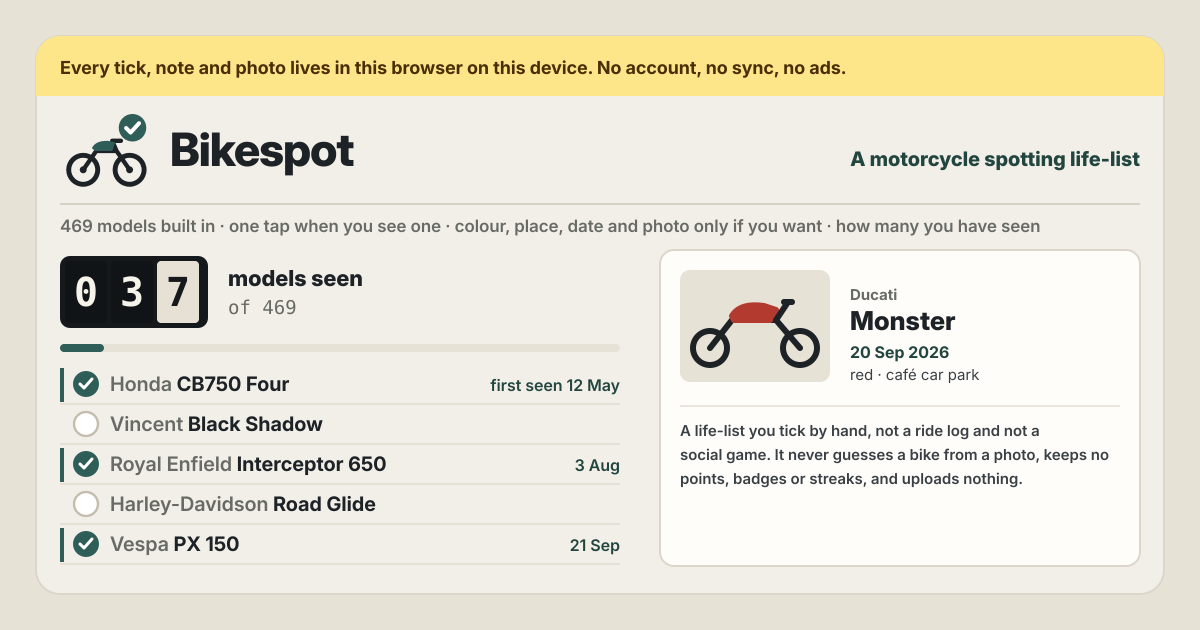
Bikespot is a list that answers that question as asked. 469 models are already in it, so you find one by name and tap once; it never tries to work out what is in a photo. It opens in a browser and installs on Android, iPhone or a computer, has no account and no payment screen, and what you write stays in this browser on this device. The interface is in Korean, English, Japanese and German.
What Bikespot does
- The list is already there → 469 models from 46 makes. Bikes like the Honda CB750 Four, Ducati 916, Vincent Black Shadow and Vespa PX 150 come with a style — sport, naked, adventure, touring, cruiser, modern classic, vintage, dual-sport & supermoto, off-road, scooter & step-through, mini bike — and the list is grouped by make.
- Finding one is quick → search by name, and filters. Part of a make or model name is enough, and accents and hyphens are ignored, so “zx10” finds the Ninja ZX-10R. Narrow it with Show (All, Seen, Not yet), Style and Make.
- At the kerb, one tap → ticked as seen today. The round button next to a bike ticks it with today's date, and the toast offers Add colour, place, photo. Add them now, or at home later.
- A bike that is not on the list → add it yourself. A make, a model and a style put it on your list, marked “added by you”. If the bike is already on the list, it is not added twice — you get “Already on the list”.
- The same model again → another sighting. Open that bike and press I saw one to add another sighting; its row shows the first-seen date and ×n.
- A photo is a keepsake → nothing reads it. One photo per sighting, shrunk on this device to 1600 px on the long side and kept only on this device; nothing looks into it to guess the bike.
Your first sightings, step by step
A bike riding past gives you a few seconds. So the tick is a single tap, and everything else can wait.
- Type part of a name into Find a make or model — “bonneville”, “ducati monster” or “zx10” will do.
- Tap the round button next to the bike once. It is ticked with today's date and the toast says “Seen: name”.
- To add more, press Add colour, place, photo on the toast, or open the bike later and press Edit on the sighting. Type a colour or tap a common one such as black, white or red, and write the place as text, like “café car park, Main St” (no location permission is asked for). The date, a note and one photo go here too.
- If the search finds nothing, fill in make, model and style under Add a bike that is not on the list and press Add to the list. A bike you added is ticked like any other.
- When the same model passes again, open it and press I saw one. A new sighting appears, with its own colour, place and photo.
- Tapped the wrong one? Tap the round button again. A bare tick comes off at once; a tick with notes or a photo asks first, and the question offers Export JSON first.
Reading the life list
At the top, the Life list shows models seen out of the total, like an odometer. Next to it is the share of the list, rounded down, so it only reads 100% once every model has been seen. Sightings in all counts every sighting, repeat ones included.
By style has one bar per style; tap a bar and the list shows only that style. Makes you have seen lists every make you have ticked so far, and Latest sightings gathers the most recent ones. There are no points, badges, streaks, levels or leaderboards — the numbers only count what you wrote.
What it deliberately does not do
- It never guesses a bike from a photo. There is no AI identification; a photo is only a keepsake on the bike you chose. Which bike it was is your call.
- It does not turn the list into a game. No points, badges, streaks, levels or leaderboards.
- It is not social. No profile, no follows, no shared feed, no map; the list is yours alone.
- It is not a ride log for a bike you own. No mileage, trips, maintenance or GPS — it records bikes you have seen.
- Bikespot is not made or endorsed by any manufacturer. Make and model names are there only so you can find a bike.
What stays on the device
Ticks, sightings, notes, photos and the bikes you added all sit in this browser on this device. There is no upload, no server, no account and no sync. Close the page and open it again and it is all still there, and once opened it works without the internet.
So the copy is yours to keep. Export JSON under Backup saves everything in one file, photos included, and Import JSON in another browser replaces that browser's list after a confirmation (which also offers Export JSON first). A file that is not a Bikespot backup is refused. Export sightings CSV saves one line per sighting — date, make, model, style, colour, place, note and whether it has a photo — that opens in a spreadsheet. Empty Bikespot, after a confirmation, deletes every tick, note, photo and added bike in this browser and leaves the built-in list. Clearing the browser's data clears it too, so export JSON now and then.
Is there an account or a paid tier?
No. There is no sign-up screen, no payment screen and no in-app purchase, and no cap on the list. There are no ads on the tool either.
Can it tell me which bike is in my photo?
No. Bikespot never identifies a bike from a photo, and nothing looks into the picture. You find a bike by part of its name and pick it yourself. For a bike you do not know, keep a photo of the tank badge or the side-panel lettering, look it up later, then tick it.
The bike I saw is not on the list
Add it under Add a bike that is not on the list with a make, a model and a style. It goes on your list only, on this device, and counts towards the total. Search for part of the name first: accents and hyphens are ignored, so “zx10” still finds the Ninja ZX-10R, and a bike already on the list is not added twice.
I saw the same model twice. Can I keep both?
Yes. Open the bike and press I saw one: a new sighting appears with its own date, colour, place, note and photo. Models seen stays the same and only Sightings in all goes up; the row shows the first-seen date and ×n.
Does writing a place share my location?
No. The place is just text you type; Bikespot never asks for location permission and uses no GPS. Photos are shrunk on this device and kept only on this device, uploaded nowhere. Removing a photo takes it out of Bikespot only; the original in your phone's gallery stays.
Can I move my list to a new phone or a computer?
Not automatically. There is no sync, so each device keeps its own list. A file saved with Export JSON on one side and opened with Import JSON on the other moves everything across, photos included — but importing replaces that browser's list. If you tick on both devices, one side gets overwritten, so it is safer to keep one device as the one you tick on.
Does it work offline and in Korean, Japanese and German? Where do I send feedback?
Once it has been opened, it works with no internet at all. “Install” or “Add to Home Screen” puts it on Android, an iPhone or a computer as an icon. The interface is in Korean, English, Japanese and German. The “Guide & Feedback” button in the bottom corner and Guide in the footer are links that open this guide in a new tab, and feedback is left on this guide page; there is no panel inside the app.