The word count lives in the app you write in, and the deadline math lives nowhere
A 1,500-word scholarship essay, an 8,000-word thesis chapter, a 4,000-word story for a contest. The goal always arrives as a number. The writing happens in Google Docs, Word, Notion, sometimes on paper. Those tools are good at telling you how many words you have right now, and useless at answering the question that actually matters: with ten days left, how many words do I owe per day? So people do the division in their head, forget it by the next morning, and discover 3,000 unwritten words two days before the deadline.
It is not that no tool does the division. The web has essay trackers such as SmartSignify, but they speak only English. The “writing goal” apps in the stores mostly put a second project behind a subscription, ask you to create a cloud account, or run only on an iPhone. Paying monthly to see one progress bar is odd, and so is uploading your essay titles to someone else’s server. What people ask for is small: a progress tracker that stays on this device and opens in any browser.
And the tool has to know two things about real life. First, many people do not write on weekends; if Saturday and Sunday count as write days, the daily target comes out too small and every Monday starts behind. Second, nobody logs every day. When Tuesday’s words get written down on Thursday, they should land on Tuesday, or the calendar starts lying.
What Essaypad does
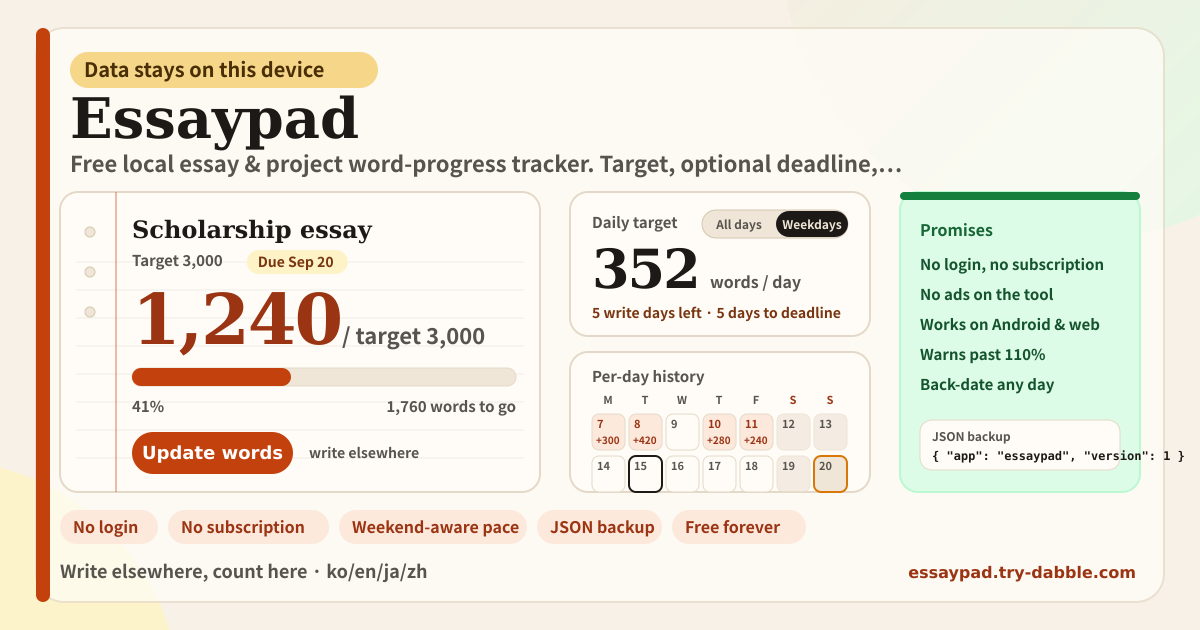
Essaypad is that small progress record. It is not an editor. When you create an essay or project you give it a title and a target word count, and a deadline if there is one; leave it empty if there is not. You keep writing wherever you already write, then come back, press “Update words” and enter the current total. The progress bar, the percentage and the words to go change, and if there is a deadline the daily target is recomputed.
The daily target has one rule: the remaining words divided by the write days from today through the deadline, rounded up. Write days are every calendar day by default; switch to “Weekdays only” and Saturday and Sunday drop out, so the daily figure rises accordingly. If the deadline is today, everything left is today’s share. If the deadline has passed, the app says how many days ago and how many words remain, framed as catching up today. Once you reach the target the daily figure becomes zero.
When you update, the date can be changed. It defaults to today, but pick an earlier day and the total is recorded for that day, and the calendar shows how many words that day added. Entries are stored as “the total at the end of that day”, so filling in Tuesday later never disturbs Thursday’s number. The current word count is always the total of the latest dated entry.
Past 110% of the target a rose-coloured warning appears: if the assignment has a word limit it means cut, and if it does not you can ignore it. You can create as many essays as you like and switch between them with the chips at the top. The Backup tab exports every essay, its history and your settings as one JSON file and reads it back.
Banner, essay chips, the sheet, daily target, history, backup
- Amber banner: data stays on this device, no login, no ads, no subscription, unlimited essays. It is at the top every time you open the app.
- The “Write elsewhere, count here” note: one line saying this is not an editor.
- Essay chips: one per essay; tap to open it. “+ New essay” asks for a title, a target word count and an optional deadline.
- The sheet card: title, target, deadline, the big current count, progress bar, percentage, words to go, the over-110% warning, and the big “Update words” button with Edit and Delete beside it.
- Update words dialog: the new total, the date (defaults to today, any past day allowed, no future days), an optional note.
- Daily target card: words per day from today to the deadline, write days left, days to the deadline, the “All days / Weekdays only” toggle. Without a deadline it says so; once done it shows 0; past the deadline it shows how many days ago and the catch-up figure.
- History tab: one month of calendar (days with an entry show the words added, today is outlined, the deadline has an amber outline, weekends dim when weekdays-only is on) and a per-day list with total, change, note and Delete.
- Backup tab: Export JSON, Import JSON, Delete everything.
- Promise chips: Works on Android & web · No login · No ads on tool · No subscription · Stays on this device · JSON backup · Weekend-aware pace · Back-date history · Free forever · ko/en/ja/de.
- Footer: Privacy, Terms, Guide, try-dabble.com. The “Guide & Feedback” button at the bottom right opens this guide page in a new tab.
Where your data stays
Essay titles, targets, deadlines, the word totals you enter with their per-day history, and the write-days setting live only in this browser on this device. Nothing is sent to a server and nothing is tied to an account. The text of your essay never enters this app at all, because you write elsewhere and type only a number here. The only cookie remembers your language across try-dabble apps. Clearing site data or changing devices removes the history, so download a JSON from the Backup tab if you want to keep it.
Does it work on Android or a desktop browser?
Yes. It is a web app, so the same address opens on Android Chrome, Samsung Internet, desktop Chrome, Edge, Firefox and Safari, and iPhone Safari. It is not Apple-only. Add it to the home screen and it opens like an app, and after the first visit it works offline. Data is per browser, though, so to move between a phone and a PC use the JSON backup.
Do I write the essay in here?
No. Essaypad has no body editor. You write where you always write, in Docs, Word, Notion, Scrivener, an email draft or on paper, and enter the word count that tool shows into “Update words” as the total. The one thing to remember is that you type the current total, not the amount added; the app compares it with the previous entry and shows the difference as that day’s words.
How are weekends counted?
The default is “All days”, which divides by the number of calendar days from today through the deadline. Switch to “Weekdays only” and Saturday and Sunday drop out of the write days. For example, with 1,760 words left on a Tuesday and a deadline next Monday, all days gives seven days and 252 words a day; weekdays only gives five days and 352 a day. The setting is one per device and applies to every essay. If the deadline falls on a Saturday with weekdays only, the write days can reach zero, in which case everything left is shown as today’s share.
Can I record yesterday’s writing today?
Yes. Change the date in the “Update words” dialog to yesterday and enter the total as it stood at the end of yesterday. Future dates cannot be chosen. Entering twice for the same day makes the later value that day’s total. If today already has an entry and you fill in a day in between, today’s total is untouched; the current word count is always the total of the latest dated entry. A wrong day can be deleted from the History tab, after which the current count falls back to the latest remaining entry.
What happens past the deadline, or past the target?
If the deadline has passed and the target is not met, the daily target card shows how many days ago and how many words remain in an amber warning, and frames everything left as catching up today. Nothing is deleted and progress stays visible. When you reach the target it says “Target reached” and the daily figure becomes zero. When the current count exceeds 110% of the target, a rose warning appears on the sheet card; it means you are over a word limit if the assignment has one, and can be ignored if it does not.
Is it free? Any ads, account or subscription?
Everything is free. No essay count, deadline, weekdays-only setting, back-dating or JSON backup sits behind a payment, and there is no “upgrade to Pro” and no cloud purchase. No ads, no account, no login. The tool page loads no ad script; the domain serves an ads.txt only so the publisher record matches the rest of try-dabble. If you have thoughts, use “Send feedback” on this page.