What Periodpad is
Periodpad is a period and ovulation calendar that runs in your browser. Log the days of your period and it predicts the next period, the fertile window and the ovulation day. One thing is different: when an LH test or your basal body temperature tells you the real ovulation day, you can confirm or move that cycle’s ovulation yourself, and the fertile window and the next period are worked out again from that date. It was made so that a “most fertile” hint never shows up after ovulation has already happened.
There is nothing to install and no account, it is free, and there are no ads in the tool. It speaks Korean, English, Japanese and German. Everything you log stays in this browser on this device; nothing is uploaded. Add it to your home screen and it opens offline after the first visit.
Log your period days
On the first day of your period, press “Period started today” on the Today card. While it lasts, “Period today too” adds each day, and “Period ended” fills in any day you skipped between the start and the last day. To enter past periods in one go, press “Tap to log period days” above the calendar and tap the dates: each tap marks or unmarks a period day. Press “Done” when you have finished.
Forgetting a day is fine. One unlogged day between period days keeps it the same period; two or more empty days start a new one. Only light, medium and heavy flow count as period days, and spotting alone never starts a period. The app states these rules under “How Periodpad counts”.
Averages and regularity
The “Your averages” card shows the cycle length averaged over your last up to 6 complete cycles of 15–60 days, and the period length from your last up to 6 periods. Until a cycle has ended it uses 28 and 5 days, and in the settings you can fix your own length instead. With 3 or more complete cycles it says regular when the longest and shortest differ by 7 days or less, and irregular when they differ by more. Irregular cycles mean the predictions are less certain too.
Predictions and the Today card
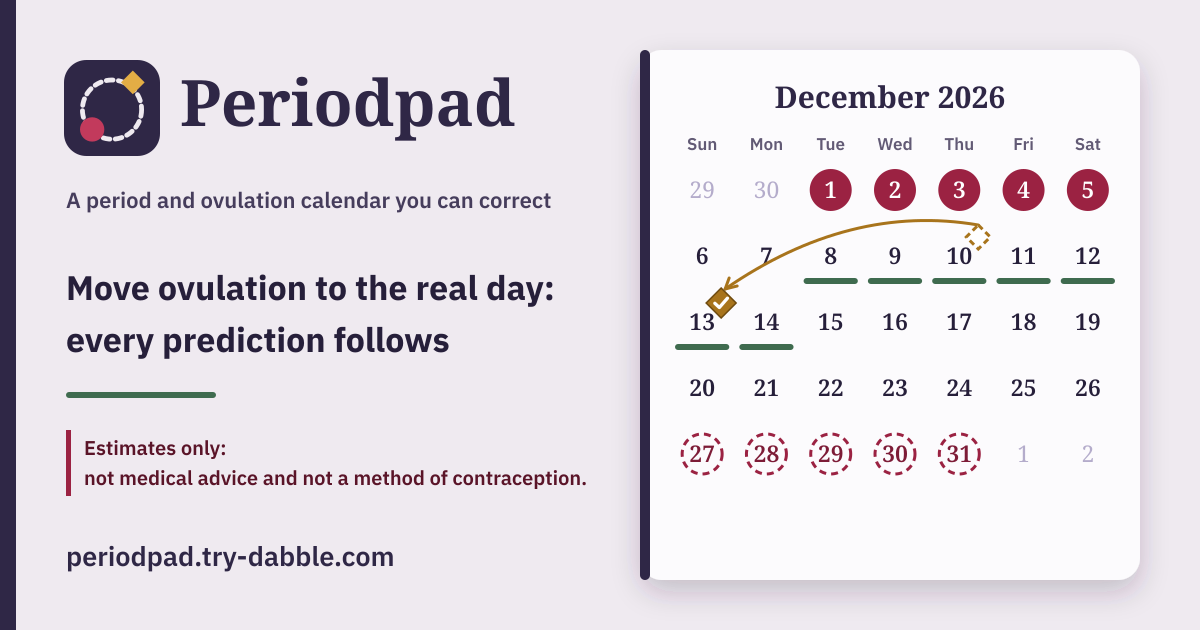
The calendar shows the next 6 cycles at once. Logged period days are filled circles, predicted ones dashed circles, the fertile window is a band under the dates (dotted when predicted, solid around a confirmed ovulation), and ovulation is a diamond: hollow when predicted, filled with a check when you confirmed it. Shape and words tell them apart, not only colour, and the legend sits under the calendar.
The Today card shows the cycle day, the days left until the next period (or how many days late it is) and where you are now: outside the fertile window, fertile window, most fertile days (predicted, the 2 days before ovulation), ovulation day (predicted or confirmed) or after ovulation. Ovulation is predicted as the next period start minus the luteal phase (14 days by default), and the fertile window runs from ovulation −5 to +1 days.
The daily log
Tap a date on the calendar, or “Log today”, to open that day’s sheet. Log bleeding (none, spotting, light, medium, heavy), mood, symptoms (pick several: cramps, headache, clear stretchy discharge and more), energy, basal body temperature, the LH test result (negative, positive, peak) and a note. Days that haven’t come yet can’t be logged; their sheet shows the predictions only.
Confirm or move the ovulation day
The predicted ovulation day is only an estimate from averages. Once you know the real day there are three ways to set it: in that day’s sheet pick the source (“LH test”, “BBT shift” or “own judgement”) and press “Confirm ovulation on this day”; drag the diamond on the calendar to another day (confirmed as your own judgement); or move it a day at a time with “1 day earlier” and “1 day later” on the This cycle card. A confirmed day shows as a filled diamond with a check and the word confirmed.
Confirming moves that cycle’s fertile window to the confirmed day (−5 to +1 days) and sets the next period to the confirmed day plus your luteal phase. Once the confirmed day has passed, the Today card says “After ovulation (confirmed)” and no “most fertile” hint comes back in that cycle. When a confirmed cycle ends, the days from the confirmed ovulation to the next period give your own luteal length (averaged, kept within 9–18 days), which is then used for later predictions. “Clear the confirmation” goes back to the prediction.
The BBT and LH chart
In the Cycles view each cycle has a basal body temperature chart. A positive LH test is a hollow triangle, a peak a filled one, and the ovulation day a vertical line (dashed when predicted, solid when confirmed). Choose °C or °F in the settings; German shows decimals with a comma, such as 36,55. “Suggest from BBT” looks for 3 higher temperatures after 6 lower ones, the third at least 0.2 °C above the highest of the 6 (the 3-over-6 rule), and suggests the day before the rise. It only suggests: confirm it yourself if you agree.
Backup, CSV, calendar file and print
Your calendar lives only on this device, so press “Save backup file” in the More view now and then. On another device, “Restore from a file…” either adds what’s new or replaces the whole calendar, and loading the same file twice changes nothing; if any part of a file is broken, nothing is changed at all. “Export CSV (one row per day)” makes a file for spreadsheets, and “Export predicted dates (.ics)” turns the next 6 cycles into all-day events titled predicted for your own calendar app. “Print” prints the month view, one month per page with the legend.
No background notifications
Periodpad sends no notifications and has no reminders. It is a web app with no server and no account, so it does nothing while it is closed and shows today’s status only when you open it. If you want a heads-up before a predicted period, export the predicted dates as .ics, add them to your phone’s calendar and use that calendar app’s alerts.
Estimates only
Estimates only: not medical advice and not a method of contraception. Cycles change from month to month, and the app only counts from the days you logged and confirmed; it cannot see ovulation. Talk to a doctor or midwife about your health, a pregnancy wish or contraception.
Privacy: everything stays on this device
Period days, symptoms, temperatures and ovulation days are all kept only in this browser on this device and are never sent to our server. The anonymous usage counter of the shared Guide & Feedback button counts only the app name and language, never what you logged. Clearing your browser data removes the calendar too, so keep a backup file.
Periodpad or Ivfpad?
Periodpad is a calendar for a natural cycle: period and ovulation days, no medicines and no clinic. If you are in IVF or other fertility treatment, your clinic’s schedule comes first, and Ivfpad is the notebook for each round’s medicines, doses and appointments.
What changes when I confirm the ovulation day?
That cycle’s fertile window moves to the confirmed day −5 to +1, and the next period and the 6 cycles after it are worked out again from the confirmed day. Once that day has passed, no “most fertile” hint appears in that cycle.
Can I use it for contraception?
No. Estimates only: not medical advice and not a method of contraception. Ask a doctor or midwife about contraception.
Will it remind me before my period?
No. Periodpad sends no notifications and shows your status only when you open it. Export the predicted dates as .ics and add them to your calendar app to use its alerts.
How do I move my calendar to another device?
Make a file with “Save backup file”, open Periodpad on the other device and choose that file with “Restore from a file…”. The file never passes through us.