What Napline is
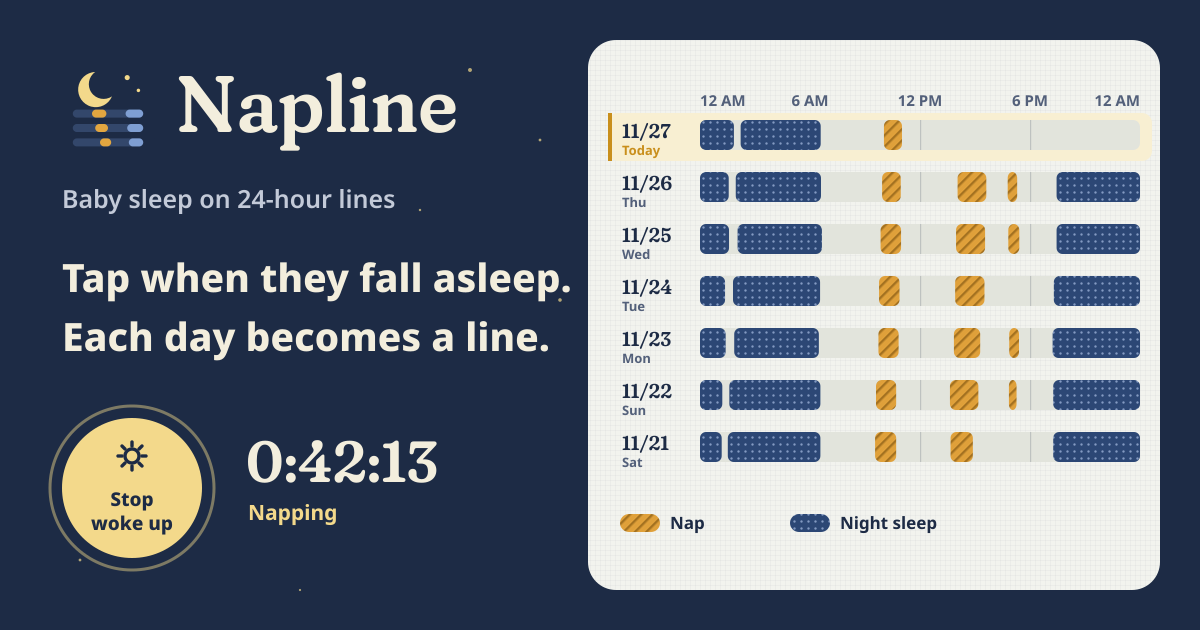
Napline is a sleep log for babies and small children: naps in the day and sleep at night. Press one button when your baby falls asleep and another when they wake, and each day becomes one 24-hour line. Stacked day under day, those lines show what is hard to see at 3 a.m.: a nap creeping later, getting shorter, or two naps turning into one. It opens in the browser with nothing to install, no account and no payment, and everything stays on this device.
Babypad is a diary of notes and photos as your child grows; Napline keeps only the times your child slept, and draws the pattern from them.
Napline is a log, not medical advice. If you’re worried about your baby’s sleep, talk to your pediatrician.
The first time you open Napline it shows an example with ten made-up days, so you can try the bars, the totals and the patterns. When you are done, press “Remove example” and add your own child; with no child added yet, “Look at an example first” brings it back.
Tap Start when your baby falls asleep, Stop when they wake
When your baby falls asleep, press “Start sleep”. When they wake up, press “Stop: woke up”, and the sleep is saved with both times. Whether it is a “Nap” or a “Night” is picked from the time of day, and you can change it any time. A timer stopped after less than a minute saves nothing, so a slip of the thumb never leaves a one-second nap.
The timer remembers when it started instead of counting in the background, so it keeps going if you close the tab, switch apps or the phone locks: open Napline again and it shows the right time asleep. If you started it by mistake, “Discard timer” throws it away without saving a sleep.
Add a sleep afterwards
Forgot to press Start? “Add a sleep afterwards” takes the day it began, when your baby fell asleep and when they woke, plus an optional note. A night from 19:30 to 6:10 is one entry: tick “Woke up the next day” and it runs across midnight. One sleep can be 24 hours at most, and a sleep that would overlap another one is refused with the times of the one in the way, so no day counts the same minutes twice.
Days stacked as 24-hour bars
Under “Sleep by day” each day is one bar from midnight to midnight, the newest day on top and today highlighted. “Days shown” switches between 7, 14 and 30 days. A “Nap” piece is honey with hatching and a “Night sleep” piece is navy with dots, so the two differ by pattern as well as by colour, and a timer that is still running shows as a growing piece.
Read the bars from top to bottom and the pattern shows: the first nap starting a little later each week, a nap getting shorter, or the last nap of the day fading as two naps merge into one. Tap a piece to change or delete that sleep, or tap an empty stretch to add a sleep that starts there. A sleep across midnight is drawn on both days but stays one entry.
Daily totals and patterns
Every day lists its number of naps, the nap time, the night sleep and the longest stretch, and today’s totals stay at the bottom of the screen the whole time.
The patterns look across the days shown. “First nap starts”, “Bedtime” and “Morning wake-up” each give the usual time (the median day), the middle half (where the middle 50 % of days fall) and the ± standard deviation, so you see both the typical time and how steady it is. “Average nap” shows how long a nap usually lasts and whether naps are getting longer, getting shorter or staying about the same, and the first nap also shows whether it is drifting later or earlier. A few days of sleeps are needed before a figure appears.
Several children
Use “Add a child” for each child, with a name or a nickname. Twins or siblings each get their own timer, so two sleeps can run at once. “Switch child” picks whose day you are looking at, and a child can be renamed or deleted; a child deleted by mistake comes back with all their sleeps if you press “Undo” right after. One device keeps up to 12 children.
Undo after every change
Every add, edit and delete shows a short message with “Undo”, so a sleep deleted by a sleepy thumb at 4 a.m. is back with one tap. It works the same after deleting a child and after “Delete everything”.
The night look and the clock
For night feeds Napline has a dark night look that is easy on sleepy eyes. It follows the device at first; the moon and sun button in the header switches it with one tap, and under “Look” in the settings you can set it to “Night”, “Day” or “Like this device”.
The “Clock” setting shows times in 12-hour or 24-hour form. At first it follows the language, and you can change it.
CSV files and the backup file
“Sleep log as CSV” saves every sleep with its child, type, start and end; “Daily totals as CSV” saves one row per day with the naps, nap minutes, night minutes and the longest stretch. Column names are in your language, and the files open in any spreadsheet app, handy when you want to share a few weeks with your family.
“Save backup file” saves one JSON file with every child and sleep. “Restore from backup” reads it here or on another device and asks how: “Add to what's here” adds the children and sleeps you don’t have yet and skips any sleep that would overlap one already here, so the same file twice changes nothing; “Replace everything here” swaps all children and sleeps for the file’s, and your settings stay.
Privacy: everything stays on this device
Sleep times, notes and children’s names are kept only in this browser on this device, and nothing is uploaded. There is no account and no login, and there are no ads in the tool. After the first visit Napline opens offline, and you can add it to your home screen to open it like an app.
Clearing this browser’s data deletes the sleep log, so press “Save backup file” now and then and keep the file somewhere else.
Does the timer stop if I close the tab or the phone locks?
No. The timer keeps its start time, so when you open Napline again it shows how long your baby has been asleep. Press “Stop: woke up” when they wake.
Can both parents log on their own phones?
There is no automatic sync, because nothing leaves the device. One parent presses “Save backup file” and sends the file; on the other phone, “Restore from backup” and then “Add to what's here” adds only what is new.
Does Napline tell me how much my baby should sleep?
No. Napline shows what you logged and how it changes, with no targets and no ratings. It is a log, not medical advice; if you’re worried about your baby’s sleep, talk to your pediatrician.
Is my baby’s sleep log uploaded anywhere?
No. Everything is kept only in this browser on this device. A CSV file or a backup file is made only when you save one, and goes only where you save it.