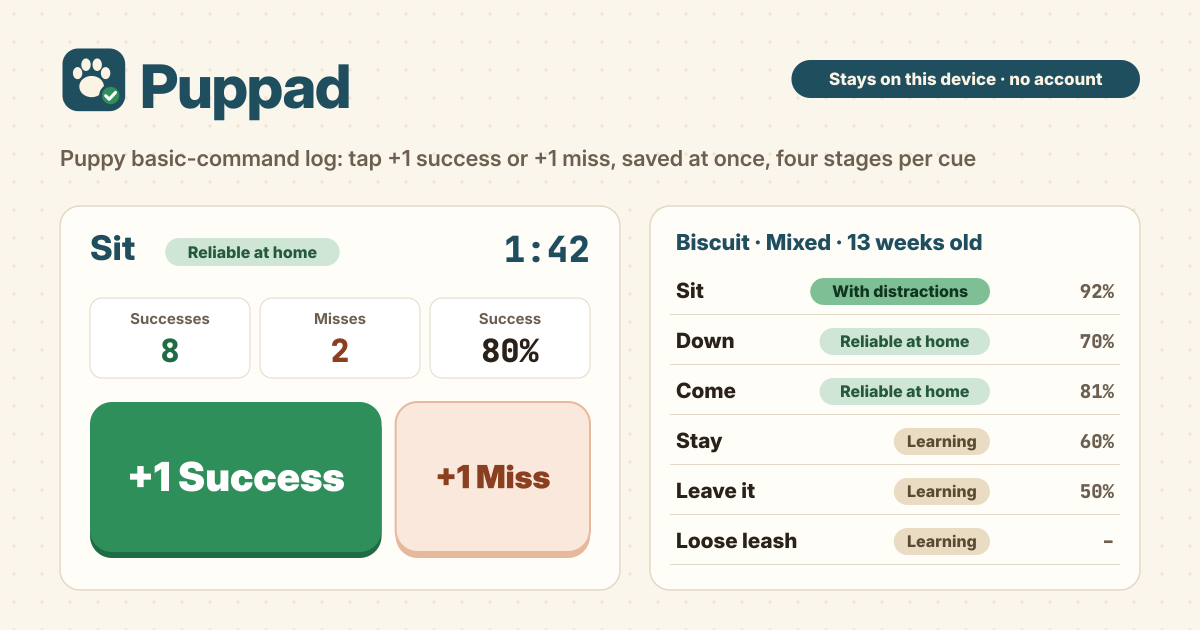
It started with “an app to help me train my puppy”
Someone on Reddit's r/androidapps wrote: "Looking for an app to help me train my puppy with basic commands that could track exercises, free or free with ads preferred."
There are plenty of dog training apps, but most are built around a video course subscription or an AI chat, and writing down "how many sits today, and how many worked" is still fiddly. Nobody fills in a form with treats in one hand and a leash in the other.
Puppad is that log. It opens in a browser, there is no account, it is free, and there are no ads on the tool. Your log is saved in this browser on this device. The interface is in Korean, English, Japanese and German.
What Puppad does
- Basic cues → Sit, Down, Come (recall), Stay, Wait, Leave it, Drop it, Loose-leash walking and Place (mat) are ready from the start, and you can add cues of your own.
- One-handed logging → press Train, then the big +1 Success or +1 Miss after each try. It is saved from the first tap.
- Four stages → for each cue you set where it stands yourself: Learning, Reliable at home, With distractions or Proofed.
- How-to steps → every basic cue has three short steps and a tip.
- The copy is yours → Export CSV gives a sheet that opens in Excel, and Export JSON a full backup.
First: your dog and the cues
- On the first screen, fill in Name (optional), Breed (optional) and Birth date (optional), then press Start with the basic cues. All three can stay empty. With a birth date, the age works itself out.
- Want to see it filled in first? Press Show an example. An example dog and a few sessions are loaded; when you are done looking, Delete everything starts you fresh.
- More than one dog? Add a dog. Each dog has its own cues and sessions, and a new dog starts with the basic cues ready. To change a name or birth date, or to remove a dog, press Edit dog.
- Teaching something beyond the nine, like Paw, Touch or Spin? Use Add your own cue and type a Cue name. Your own cues can be renamed with Rename or removed with Delete cue.
- Dog names, your own cues and notes stay exactly as you typed them and are never translated.
A training session: +1 with one hand
- Press Train next to a cue to open a short session. After each try, press +1 Success if it worked and +1 Miss if it did not. The buttons are big enough to hit with one thumb while the other hand holds the treats.
- The session is saved the moment you make the first tap, and every tap after that is saved as you go. If the screen goes dark or the page closes halfway, what you tapped so far is kept. Close it before the first tap and nothing is saved.
- Tapped the wrong one? Undo last tap takes it back.
- If you like, set the Timer to 1, 2, 3 or 5 min (it starts at Off). When it runs out you see Time's up. End on an easy win. Puppies tire fast, so two or three minutes is plenty.
- In Note (optional), jot down the place or situation, such as kitchen, before dinner. Press Done when you finish. The session keeps the date and time, how long it ran, successes, misses and the note.
- The Today line shows today's sessions, reps and time, and each cue shows today's successes and misses and its success rate over the last 5 sessions.
The four stages, how-to steps and Progress
- Press Steps & stage on a cue to see How to teach it (three steps) and a Tip, and pick the stage right there. Sit, for example, starts with a treat at the nose moved slowly up and back over the head.
- The stages are Learning (follows your hand or a treat), Reliable at home (does it on the first ask in a quiet room), With distractions (with toys, people or the garden around) and Proofed (anywhere, on the first ask).
- A stage only changes when you change it. When the last 3 sessions each had 5 or more reps at 80% or better, the cue shows Last 3 sessions at 80%+. Ready for the next stage when you are. Whether to move on is still your call.
- Progress counts how many cues sit at each stage and lists every cue with its stage, sessions and last-5 success rate in a table. No streaks, no scores, no scolding.
- Your own cues have no built-in steps, so keep your method in the session notes.
Editing sessions and logging past ones
- Sessions lists every session, newest first. Edit changes a session's date, time, length, successes, misses and note, and Delete removes it.
- If an edit or a delete was a mistake, press Undo last change.
- Trained without the app? Log a past session lets you add the cue, Date, Time, Minutes, Successes, Misses and a note afterwards. Minutes can be typed as 3 or 2:30.
Backup and changing phones
- Your log is saved in this browser on this device only, and does not sync. Export it before you change phones.
- Under Backup, Export CSV saves a sheet with one row per session (Date, Time, Dog, Cue, Stage, Minutes, Successes, Misses, Success %, Note) that opens in Excel, handy for showing a vet or a trainer.
- Export JSON saves a file with every dog, cue, stage and session. On the new phone, Import JSON and choose that file; it replaces what is on that device, so a confirm comes first and you press Replace. That confirm also has Export JSON first, to save what is there now.
- Delete everything asks first before erasing every dog, cue and session, and that dialog has Export JSON first too. Clearing the browser's site data also erases your log.
What it deliberately does not do
- It is not an AI trainer chat and not a video course. Each basic cue has short how-to steps; you do the training, and Puppad just keeps the log.
- It does not track walks or location, and it is not a virtual pet game.
- No streaks, no scores, no scolding and no nagging reminders. Days off are fine.
- No account, no sync, no cloud and no ads on the tool. Your log is never uploaded.
Is it free? Are there ads?
It is free. There is no sign-up, no payment screen and no cap on dogs, cues or sessions, and there are no ads on the tool.
Can the whole family log to the same dog?
Each device keeps its own log and nothing syncs. You can share one phone, or move the log with Export JSON and Import JSON, but importing replaces what is on that device rather than merging.
Does it work offline? Where do I send feedback?
Once it has been opened, it works with no internet, so you can log at the park or the training field. The interface is in Korean, English, Japanese and German. The Guide & Feedback button at the bottom right of the app opens this guide in a new tab, and feedback is left on this guide page.