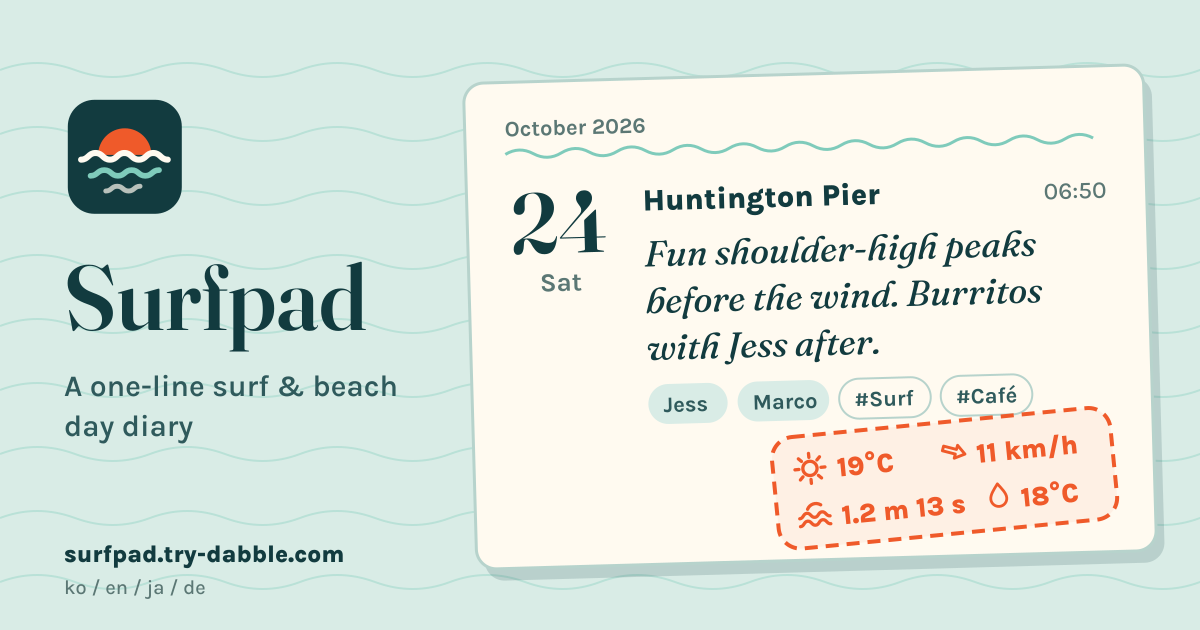
What Surfpad is
A diary for days at the sea, whether you surfed, paddled, swam or just sat on the beach, one line at a time. Back from a dawn session at your local break, you write something like “Waist-high, lefts peeling, paddled out with Sam” and save. The entry gets that hour’s wave height and period, sky, air temperature and wind at that spot, like a stamp on a postcard, so months later you can look back and see what the sea was doing on the days you remember.
There is nothing to install and no account, it is free, and there are no ads in the tool. It speaks Korean, English, Japanese and German. The diary stays in this browser on this device; only a spot’s rounded coordinates go to the weather and wave data providers when conditions are fetched (see “Privacy: what leaves your phone” below).
Saving your spots
- A spot is a name plus latitude and longitude, and you can keep up to 100. There is no map on screen; only the coordinates matter.
- Standing on the beach? Tap Use my location. The position is asked for only at that tap and kept only as the spot’s coordinates. If you said no to location access, the app tells you so and you type the coordinates instead.
- Setting up at home, type the coordinates as latitude, longitude (for example 35.3081, 139.4870) or paste a link copied from a map app. Coordinates are read from Google Maps links (@lat,lon, ?q=lat,lon or the !3d…!4d… part), Apple Maps (ll= or q=) and OpenStreetMap (#map= or mlat/mlon).
- A spot used by entries can be renamed or moved but not deleted, so no day in the diary loses its spot.
Writing a day in one line
- An entry is a date, a spot and one line of up to 140 characters. The date starts at today; the time starts at now for today and 12:00 for an earlier day. Set it to the hour you were in the water and the conditions are for that hour.
- You can write up to 9 days ahead as a plan: it gets the forecast, and after the session you fix the line. Days further out, and dates before 1990, are refused.
People, tags, boards and a rating
- People you met go in as name chips. Names from earlier days are suggested, and the same name twice is one chip, whatever the capitals.
- Activity tags come ready-made (surf, SUP, bodyboard, swim, beach, beach clean-up, work, study, drinks, café) and you can add your own. A day working on a laptop by the sea or a beer after the session is just as much part of the log.
- Boards and gear are chips from your saved list, up to 3 per entry: a 6’2” shortboard, the 9’0” log, a 4/3 wetsuit. The 1–5 rating is optional.
Conditions that fill in by themselves
- Weather comes from the MET Norway forecast: a sky icon and label, air temperature, wind speed and direction, and rain in the next hour. MET Norway publishes forecasts, not history, so weather fills in only when the session hour is inside its forecast window, from the current hour to about 9 days ahead. The forecast hour used is shown, as in “forecast for 14:00”.
- Waves come from the WaveWatch III global wave model by PacIOOS / NOAA: significant wave height in metres and peak period in seconds, for any hour from 1 January 2017 to about 6 days ahead. So a day from last summer, logged today, still gets its waves.
- This is not a surf forecast for the break. It is a 0.5° (about 50 km) offshore model, so the nearest open-sea grid point with data is used and its distance is shown, as in “nearest open-sea grid point (~30 km)”. Inside a bay, behind a harbour wall or on a reef that bends the swell, the real waves can be quite different; read it as a way to compare one day’s sea with another. With no sea point within about 120 km (an inland spot), waves are unavailable and you type them in.
- Requests are made only when you save an entry, open one that is still missing conditions, tap Retry, or — if entries saved offline are waiting — when you open the app or come back online; there is no polling and no background refresh. Results are kept on the device so the same hour is not asked twice (past wave hours for good; future wave hours are checked again at most every 3 hours, when you reopen the entry).
- Wind is shown in m/s, km/h or knots and temperature in °C or °F. The defaults are m/s on the Korean and Japanese screens, km/h in English and German, and °C everywhere.
What you type yourself, and the status of each value
- Water temperature is always typed by hand; there is no free source good enough for it. Weather for earlier days, outside the forecast window, is typed by hand too.
- A session earlier today, at an hour already past, gets its weather typed by hand too, because the MET Norway forecast starts at the current hour (waves for past hours still fill in). Spots so far north or south that they are outside the wave model’s grid get their waves typed by hand. For a day more than about 6 days ahead the wave model doesn’t reach yet: the waves show unavailable with a Retry button; open the entry again or tap Retry nearer the day and they fill in.
- Every value can be edited, and each shows its status: auto, edited, typed, waiting, or unavailable with the reason. Retry appears only for passing failures, such as a dropped connection or too many requests (429), and for days the forecast doesn’t reach yet. Inland spots, dates before 2017 and weather for past days can’t be fetched again, so type those by hand.
- A value you typed or edited is never overwritten by a later fetch. If the waves you saw were not what the model says, correct it and your number stays.
- A failed fetch never blocks saving. Offline, the entry saves and its conditions wait (“waiting for connection”) until the device is back online or you open the app again. If by then the session hour has left the forecast window, weather stays for you to type, but the waves can still fill in.
Timeline, calendar and filters
- The timeline runs newest first, grouped by month, each entry a postcard with its conditions stamp.
- The calendar shows a month at a time; weeks start on Sunday in Korean, English and Japanese and on Monday in German.
- Filter by spot, person and tag, and combine them: your home break + Sam + SUP, say. Clear filters takes them all off.
Stats
Sessions per month over the last 12 months, sessions by spot, the people you met most, your top tags and the average rating. Average water temperature comes from the values you typed and average wave height from the entries that have waves, each with the number of entries it used.
Share card, backup and CSV
- Turn one day into a PNG card: date, spot, the line, people, tags, rating, the conditions stamp and a data credit line, drawn on this device. Send it through the phone’s share sheet or download it.
- A backup is one JSON file; restoring it lets you merge or replace. Restoring the same file twice adds nothing, and a broken file changes nothing. Entries also export as CSV for a spreadsheet.
- After 20 changes or 7 days without a backup, the app suggests one. If saving fails, what you wrote stays on screen with a message and Try saving again; if the saved data can’t be read, nothing is wiped silently and a recovery panel offers to download it, restore a backup or start fresh.
Data credits
Weather: data from MET Norway (CC BY 4.0, NLOD 2.0). The Norwegian Meteorological Institute’s open forecast, used under those licences. The weather icons are drawn by Surfpad.
Waves: WaveWatch III global model by PacIOOS / NOAA. It is a roughly 50 km offshore model, not a surf forecast.
Privacy: what leaves your phone
Only when conditions are fetched does the browser itself contact two places. MET Norway (Norway) gets the spot’s latitude and longitude rounded to 4 decimals; PacIOOS (University of Hawaiʻi, USA) gets a 3° × 3° box around the spot and the hour asked about. Like any web request, both see your IP address.
Nothing else leaves. Your lines, people, tags, gear, spot names, ratings and water temperatures are never sent anywhere, and Try Dabble receives no diary data. Location is read only when you tap Use my location and kept only as the spot’s coordinates.
How it differs from Moodpad
Moodpad is a mood log: you rate each day with one number on a 1–5, 1–7 or 1–10 scale and watch the trend. Surfpad does not score your mood. It is a sea diary that keeps one line about where you went, with whom and what you did, and stamps on that hour’s waves and weather by itself. For how you feel from day to day, use Moodpad; for your days at the sea and the swell that came with them, Surfpad.
What it does not do
It is not a surf forecast app: no break-level forecasts, no tides, no measured water temperature and no map. The conditions are model estimates, so don’t use them for safety decisions such as whether to paddle out. There is no account, no syncing between devices and no subscription or paid data. The Guide & Feedback button in the app leads here; send a missing feature or a problem from this page.
Is this a surf forecast?
No. The waves are the nearest grid point of a roughly 50 km offshore model and can differ from what breaks on the beach. Use them to compare your sessions, and decide whether to go out by looking at the sea.
Can I log a session from last summer?
Yes. Set the date and hour, and the waves fill in for any day since 2017. The weather is past the forecast window, so you type it yourself.
Why does it say the wave point is 30 km away?
The wave model works on a grid of about 50 km and only over open sea. Surfpad uses the nearest sea point that has data and tells you honestly how far away it is.
Does it work offline?
Yes. After the first visit it opens without a connection, and writing, the timeline, calendar, stats, the card and backups all work. An entry saved on a beach with no signal keeps its conditions waiting and fills them in when you are back online or open the app again.
Where is my diary kept?
Only in this browser on this device. Clearing browser data or closing a private window erases it, so save a backup file now and then. Only a spot’s rounded coordinates go to the weather and wave providers.
How do I move it to a new phone?
Save a JSON backup on the old phone, move the file across (email, a cloud drive, a cable) and restore it in Surfpad on the new one. Spots, entries, people, tags, gear and the conditions already fetched all come along.