It started with “when did I last wash this?” on r/androidapps
The post appeared on the r/androidapps subreddit. The ask was modest: one list of clothes, sorted so the item that has gone longest since its last wash sits on top, and one tap when it has been washed to send it to the bottom. Not a photo wardrobe, not an outfit of the day, not a wear counter — a list that answers “when did I last wash this hoodie?” while you stand over the basket. The replies mostly pointed somewhere else.
Look around that category and a pattern shows. WearStreak is English-only and starts with a Google account. Fitly answers a different question — what to wear. Store apps like DoneAgo, EverWear and Wearcount come close by counting wears or days, but they do not hand you the list the post asked for: a name, a wash date and the order. Wardrobe apps want a photo of every item before anything else. For someone who wants to keep track of a dozen shirts and a few towels, that is a lot to do before the first wash is ticked.
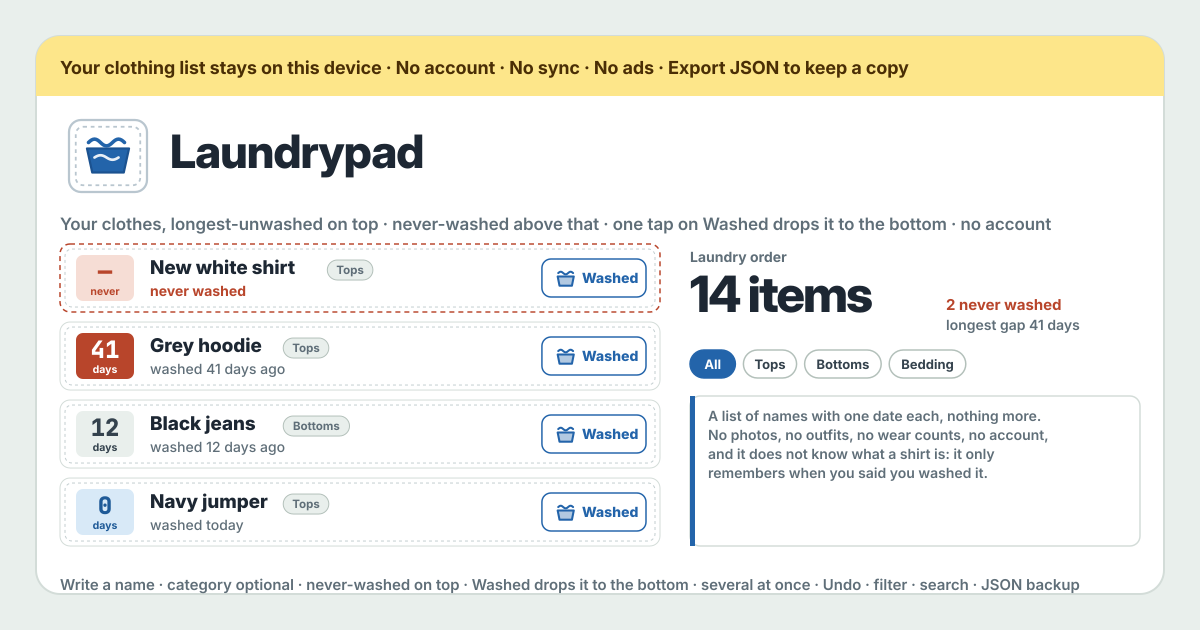
Laundrypad is that question answered as asked. You write the names of your clothes, the list keeps the never-washed ones on top and the rest in order of how long since their wash, and one tap on Washed sends an item to the bottom with today’s date — in the browser on this device, with no account, no photos and no server. The UI is in Korean, English, Japanese and German. If you want the photo closet and the outfit draw, that is Outfitpad’s job; Laundrypad stands on purpose at the other end: a list of names with one date each, and nothing more.
What Laundrypad does
An item is a name — “Grey hoodie”, “Black jeans”, “Guest towel” — and, if you like, a category in your own words. Preset chips for Tops, Bottoms, Outerwear, Underwear, Socks, Bedding, Towels and Sports save typing, but anything goes. There is no photo and no place for one. To put in ten items, Enter adds each one and keeps the field open with the category kept, so ten items are ten Enters; “Several at once” takes a pasted list, one name per line.
The list has one order: never-washed items on top (in the order you added them), then everything else from the longest-ago wash down. Each item carries a number on its left — the days since its wash — and the colour of that number says how things stand: water blue within three days, plain up to two weeks, sand up to a month, rust beyond, and a dashed label with a rust “never” for an item that was never washed. Beside it the same thing in words: “washed today”, “washed yesterday”, “washed 12 days ago”, “washed 3 weeks ago”, “washed 2 months ago”, “never washed”. The top row is what to wash today.
Washed something? Tap Washed on that item once. It takes today’s date and drops to the bottom; if that was a slip, Undo on the toast puts it straight back. After a full load, tick several items and press “Mark N as washed” once. When the list grows, the category chips filter it and the search box finds a name — both only narrow the list, never reorder it. Washed it yesterday but forgot to tap? Open Edit and set the last wash date by hand; leave it empty and the item is “never washed” again.
Your first week, step by step
You do not need to copy the whole wardrobe in on day one. Six or seven things you wear often are enough to see whether the list earns its place on the home screen; the rest can be added the next time they come out of the machine.
- Open https://laundrypad.try-dabble.com and pick your language at the top. Whatever you choose, the names and categories are your own words and are never translated.
- Write the first name into “Add clothes” and press Enter. It lands on top as “never washed”, and the field is cleared and still open. Next name, Enter, next name, Enter. If you picked a category, it stays for the next item.
- To put many in at once press “Several at once” and paste one name per line. The button counts how many it will add; blank lines and repeated names drop out on their own.
- Press Washed next to whatever you washed today. It drops to the bottom, reads “washed today”, and its number turns a water-blue 0. Pressed the wrong one? Tap Undo on the message at the bottom.
- On a full-load day tick the boxes on those items and press “Mark N as washed” on the bar that appears at the bottom. They all take the same date and drop together.
- Open it again a few days later. On top, whatever is still never washed on its dashed label; below, the oldest wash first — the top row is the next load. A glance at the colours of the numbers is enough.
- For the item you washed yesterday and never tapped, open its Edit and set “Last washed” to yesterday. The same screen renames it, changes its category, and deletes what you no longer own — after asking, with Export JSON on offer first.
- Before you close the tab press “Export JSON” under “Backup”. The file holds the list and the wash dates; it is the only copy there is.
What it does not do, said plainly
Laundrypad is not a wardrobe app. It has no photos, never opens the camera and has no place for an image. It does not draw outfits and does not suggest what to wear. It counts no wears, no cost per wear and no price paid. It does not know what a shirt is or how often jeans should be washed — the name and the category are your words, and the date is only when you tapped Washed. It gives no advice on fabric care.
There are no reminders either. The list answers when you open it; it does not call you to the machine. There is no account, no Google sign-in, no server and no sync — to see it on another device you move the JSON file. No ads, no in-app purchase, no item cap, no update lockout.
What stays on the device, and the backup
The whole list — names, categories, last wash dates — stays in the browser on this device. Nothing goes to any server of ours, and the app makes no network request of its own while you use it. One language cookie is shared across the try-dabble apps, and it carries nothing about your clothes.
So the backup is yours to keep. “Export JSON” writes one file and hands it over as a download; “Import JSON” in another browser reads it back into the same list in the same order. Importing where a list already exists asks first, and the dialog offers “Export JSON first”. “Empty Laundrypad” goes through the same confirmation. Clearing the browser’s site data removes the list, and we have no copy to restore it from.
Is there an item cap? Is there a premium tier?
No cap and no tiers. Every feature is open to everyone from the first tap, and the list holds as many items as your wardrobe does, because an item is a few characters and one date. No ads, no in-app purchase, no locked feature.
Why are never-washed items on top?
The list sorts by “how long since the wash”, and for an item with no wash recorded the answer is “longer than anyone knows”. So it sits on top, in the order you added it. If it is brand new and does not need washing yet, open its Edit and set the last wash to today; it drops to the bottom.
I forgot to tap. Can I set an earlier date?
Yes. Open the item’s Edit and pick a date under “Last washed”. The list re-sorts by that date and the line beside it follows, “washed 3 days ago” and so on. Clear the date and it goes back to “never washed”.
What do the colours on the numbers mean?
Only a scale of days since the wash: water blue within three days, plain up to two weeks, sand up to a month, rust beyond, and rust on a dashed label for never washed. It is not a judgement about how often anything should be washed — a month on jeans is not a month on a towel, and that call stays yours.
Why no photos?
Because the post asked for a list without them, and the question does not need them. “Grey hoodie” is recognisable without a picture, and photographing every item is the commonest reason such a list never gets started. If you do want a photo closet and an outfit draw, Outfitpad on try-dabble does that job; Laundrypad stands on purpose at the other end.
Can I move it to a new phone or another browser?
Yes, with the JSON file. Press “Export JSON” in the browser you use now, carry the file to the new device (a message, an email, a cloud drive — anything), open Laundrypad there and press “Import JSON”. The same list comes back in the same order. There is no automatic sync.
Does it work offline?
Yes. Once it has opened once, the app lives in this browser and so does the list. In a basement laundry room with no signal you can still open the list and tap Washed; a new version arrives quietly the next time you open it with a connection, and never wipes or locks what was saved. Installable to the home screen on Android and any browser.