It started with “tell me if something I use gets recalled”
The ask in the thread was simple: log the products you regularly use and have something tell you if there is a recall. The person wanted out of “the fear of searching up every little thing” — instead of typing a brand into a search box every time they open a new bottle of detergent, pick a formula for the baby or reach for the medicine tin, they wanted a list they write once and check once.
Look at what already exists and the picture repeats. The web trackers (recalltracker.app, recallornot.com, recallscope.com) are English-only. The store apps (USA Recalls, RecallSentry, RecallDefense, Product Alert) either cap how many products a free watchlist may hold, add in-app purchases, or require an account. Someone who opens a recall tool because they are worried meets a paywall or a sign-up screen first.
Recallpad is that request, built as asked. The list is unlimited and lives only in this browser on this device, the interface speaks Korean, English, Japanese and German, and there is nothing to sign into. All it does is read the public recall data on your behalf.
What Recallpad does
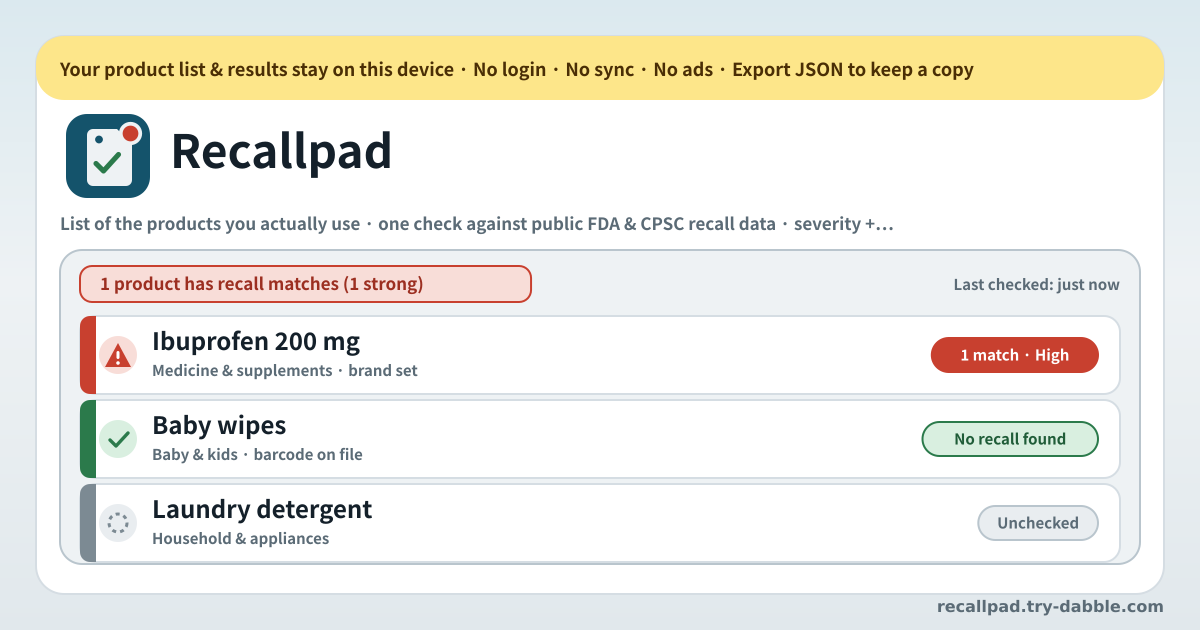
The screen is one list of products. You write down what you actually use — the laundry detergent, the cosmetics on the shelf, the medicine and supplements you take, the car seat and the pushchair, the kettle, the groceries you buy every week. Each entry carries a name and a brand; the barcode (UPC/EAN), the category and the note are optional. There is no limit on how many you keep.
Press “Check now” and the whole list is matched against the public recall data. When the check finishes, each product carries its result: no match, or one or more recalls. A recall shows its severity, why the product was pulled, what to do about it, when it was announced, which agency issued it, and a link to the original notice. The last-checked time stays at the top of the screen, so you always know how fresh what you are looking at is.
Everything else exists to keep that list usable: hide a match that is not yours, re-check a single product, be reminded to check again now and then, and take the whole list plus its results out as a JSON file. There is no account on a server, so there is no login to lose and no password to forget.
How to use it
- Tap “Add product” and type the name and the brand. Copy what is printed on the label: “Purebaby Sensitive Wipes / Purebaby” matches far better than “baby wipes”. There is nothing to sign up for.
- The barcode (UPC/EAN) is optional but it is the most precise thing you can give. Type the digits from the back of the packet and a match can be confirmed by number even when the wording of the name differs.
- Pick a category: food, cosmetic, drug or supplement, device, household, baby, other. The category narrows where the check looks and keeps the list tidy. Use the note for things like “in the kid’s drawer” or “taken every morning”, so later you remember which item this was.
- Press “Check now” to run the whole list at once. It takes a few seconds. When it finishes, the last-checked time updates and every product carries its result. To look at one item again, use its own “Re-check”.
- When a match appears, open it and read. The severity and the summary come first, then what to do, the date, and the link to the official notice. That link is always the point: make your decision from the original notice.
- Hide a hit that is not your item with “Not mine”. That is for the same name under a different brand, a different size, a batch sold somewhere else. Hidden hits drop out of the list without being destroyed, so a mis-tap can be undone.
- The reminder is optional. Set it to weekly or monthly and, once the list is overdue, opening the app shows a nudge saying it is time to check again. If you allowed browser notifications, a single browser notification comes as well.
- Press “Export JSON” now and then to keep a backup. Products, categories, notes and the check results all go into one file. On a new phone or another browser, “Import JSON” picks up where you left off.
- Pick the language with ?lang=ko, ?lang=en, ?lang=ja or ?lang=de on the address; the choice sticks for next time. Add it to the home screen and it installs as a PWA.
What it checks against: the public FDA and CPSC data
There are two sources. One is the enforcement report data the US FDA publishes (openFDA), which covers food and cosmetics, drugs and medical devices. The other is the SaferProducts recall data from the US Consumer Product Safety Commission (CPSC), which covers consumer goods such as appliances, furniture, toys and baby gear. Both are government data published for anyone to read.
The check runs from your browser. Only the CPSC feed cannot be called by a browser directly, so it goes through a small relay on the same address; all that relay ever sees is a request saying “give me the public recall list for this search term”. The list itself is never uploaded to any account and is never stored anywhere off this device.
Matching works like this. The words of your product name, the brand and the barcode are compared with the product description in the recall notice. A barcode that lines up, or a brand and a product name that line up together, makes a strong match; only part of the name overlapping, or the brand alone, makes a possible match. The reason for the split is simple: dressing weak evidence up as strong evidence frightens people about nothing, and filtering it away loses the real ones. So both are shown, each labelled for what it is.
The notices themselves are in English. They are documents US agencies publish in English, and Recallpad links to them as they are rather than translating them. The interface and the severity wording come in four languages, but the original notice you open will be an English page.
How to read the severity
Every match carries one of high, medium or low. On the FDA side that is the agency’s own class, carried straight through. Class I is high — using it could cause serious harm or death. Class II is medium — it could cause a temporary or reversible problem. Class III is low — a violation of the rules that is unlikely to hurt anyone, a mislabelled pack for instance.
CPSC recalls have no such class. Instead the hazard wording in the notice is read: an immediate bodily hazard — fire, burns, choking, falls, electric shock — reads as high, and lesser hazards as medium or low. That judgement is the tool’s, not the agency’s, so always read the hazard description in the original notice alongside it.
Under the severity come the plain summary and the “what to do”. Where the notice names a remedy — return, refund, replacement, repair, throw it away — that is carried across; where it names none, the field stays empty. No remedy is invented that the notice does not give.
“Not mine”, and the gentle reminder
The commoner the name, the more other people’s products turn up. Write down “Vitamin D 1000 IU” and every vitamin D recall in the world can land on it. That is what “Not mine” is for: the hit leaves the list and does not come back on the next check. A quieter list is one where a real match is visible.
A hidden hit is not deleted. You can bring it back from the list of hidden matches, so a mis-tap or a change of mind later is fine.
It is better to be plain about the reminder. Recallpad is not an OS alarm and does not watch in the background while the app is closed. Set a weekly or monthly rhythm and, once the list is overdue, opening the app shows a nudge that it is time to check. If you allowed browser notifications, one browser notification comes too. This is not a live alert that fires the second an agency announces a recall — it is a way of making sure you come back and sweep the list regularly.
Backups, and where the list actually lives
The product list, the categories, the notes, the hidden matches, the last-checked time and the results — all of it sits in this browser on this device and nowhere else. There is no copy on a server and no account to sign into. Clear the browser’s data, or close a private window, and the list goes with it. That is why the backup is the safety net.
“Export JSON” writes the whole list into a single file. The file is made on this device and leaves only as a download — it is not uploaded anywhere. On a new device, “Import JSON” brings back the products, the hidden matches and the past results exactly as they were. The import asks whether to merge into the current list or replace it outright.
The only thing that goes out during a check is the search term: the words of a product name, the brand, the barcode, used to query public data. The list itself, the notes, how many of what you own — none of that leaves. There are no advertising trackers and no usage history piling up in an analytics account.
Does it cover recalls in my country?
The data it matches against comes from two US agencies, the FDA and the CPSC. So it centres on products recalled in the United States, and the notices are in English. Multinational brands often sell the same product in several countries, so a US notice can still be the clue you needed, but you should not assume Korean, Japanese or German domestic recalls are all in there. Think of it as a tool that sweeps the freely published US data for you, not as a replacement for your own country’s official recall channel. The interface is in four languages; the coverage of the data is American.
What is the difference between a strong and a possible match?
They differ in how strong the evidence is. A barcode that lines up, or a brand and a product name that line up together, is a strong match — it is probably the same item. Only the brand, or a couple of overlapping words, is a possible match — it could be another product from the same company, or someone else’s similarly named product. Weak evidence is not hidden because recall notices often describe a product differently from the label: a different size wording or a dropped series name keeps it out of strong-match territory. When a possible match appears, open the official notice and compare the lot numbers, the distribution dates and the region with your own. If it is not yours, tuck it away with “Not mine”.
Is any of this medical or safety advice?
No. Recallpad finds public recall notices and summarises them; it does not diagnose, prescribe or tell you to stop taking anything. The on-screen summary is shortened to be readable, so decisive details in the original — lot numbers, distribution dates, the region sold in — may be missing from it. Always open and read the official notice before acting on anything. For a medicine or supplement you are taking, talk to a doctor or pharmacist before stopping on your own; for something a child uses, follow the instructions the manufacturer or agency gives in the notice. The summary is a starting point; the original notice is what you decide from.
Do I have to enter a barcode?
No. A name and a brand are enough to run a check. A barcode is simply the surest thing you can give — whatever wording you used for the name, matching digits are evidence of the same item. Copy the UPC or EAN from the back of the packet. You can fill them in later when you have a moment, or add them only for the things you care most about, like what you buy weekly or what a child uses. On the other hand, a very generic name (“painkiller”, “wipes”) produces more irrelevant hits. Writing the full product name and brand as printed on the label gives a much cleaner result.
Will it tell me about a recall while the app is closed?
No. The check only runs while the app is open. Once the rhythm you set has elapsed, opening the app shows a nudge that it is time to check, and if you allowed browser notifications one notification comes with it. It does not watch in the background like an OS alarm. With no account and no server, there is simply nobody holding your list and pushing to you. Turning on the weekly or monthly reminder makes forgetting much less likely, and a check takes seconds. If something feels urgent, you can always hit “Check now” yourself.
How many products can I keep?
There is no limit. There is no “five items on the free tier, pay for more” here. Put in the detergents under the sink, the supplements in the cupboard, the child’s things, the kitchen appliances — everything you can think of. A longer list just means the tool does more work; it never costs more. A check runs the whole list at once, and you can re-check a single product when you want to.
Is it free? What about ads, accounts and purchases?
It is free. No account, no login, no subscription, no in-app purchase, and no ads on the tool UI. There is nowhere to pay for more products, for the reminder, or for seeing more of a result — nothing is locked behind a tier. The interface comes in Korean, English, Japanese and German, and switching language changes nothing about what you get (the notices themselves stay in the English the US agencies wrote). Open the address and it works; add it to the home screen and it installs as a PWA. Your list lives only in this browser on this device, and you can take it out whole as JSON whenever you like.