It started with “any apps for someone who is completely clueless about how to dress”
The post appeared on the r/Advice subreddit. Someone wrote that they were completely clueless about how to dress — not looking for a style, just for a way to stop standing in front of the closet every morning with no idea what goes with what — and asked whether there was an app for that. It is a common ask, and an honest one: the person already owns clothes and does not need to buy more; they need something that looks at what they have, says “this, with this, and those shoes”, and gives a reason a beginner can follow.
Look at what came back in the replies and a pattern repeats. The wardrobe apps people were pointed to want an account before the first photo goes in, cap the free tier at about a hundred items and put the rest behind a paid tier, speak English only — no Korean, Japanese or German on the screen — and some promise that an AI will pick for you, which is a promise nobody can check. For someone who just wants to know what to wear tomorrow, that is a lot of logging in and paying before the closet even exists.
Outfitpad is a different answer to that question. You photograph your own clothes into a closet that lives in the browser on this device, give each piece a colour and a few tags, and every morning there is a combo drawn fairly from what you own — hold the pieces you like, shuffle the rest — with a few honest tips under it that are plain colour rules anyone can read and argue with. There is no stylist and no AI, no account, no item cap, and no photo ever leaves the device. The UI is in Korean, English, Japanese and German.
What Outfitpad does
The closet fills from photos. Under “Add to the closet” you pick the category first — tops, bottoms, outer layers, dresses, shoes, bags or accessories — then “Take a photo” opens the camera and “Choose photos” takes image files, several at once. Each photo is shrunk on the device before it is stored, so a closet of a few hundred pieces stays light. Tap a piece afterwards and the “This piece” dialog lets you set its colour chip (black, white, grey, navy, denim, beige and brown count as neutrals; blue, green, red, pink, orange, yellow and purple as colours; “Patterned” for anything with a print), an optional name such as “white linen shirt”, and tags: casual, work, date, sport, formal, warm days, cold days, rainy days, or any word of your own. The same dialog moves a piece to another category, replaces the photo or deletes it.
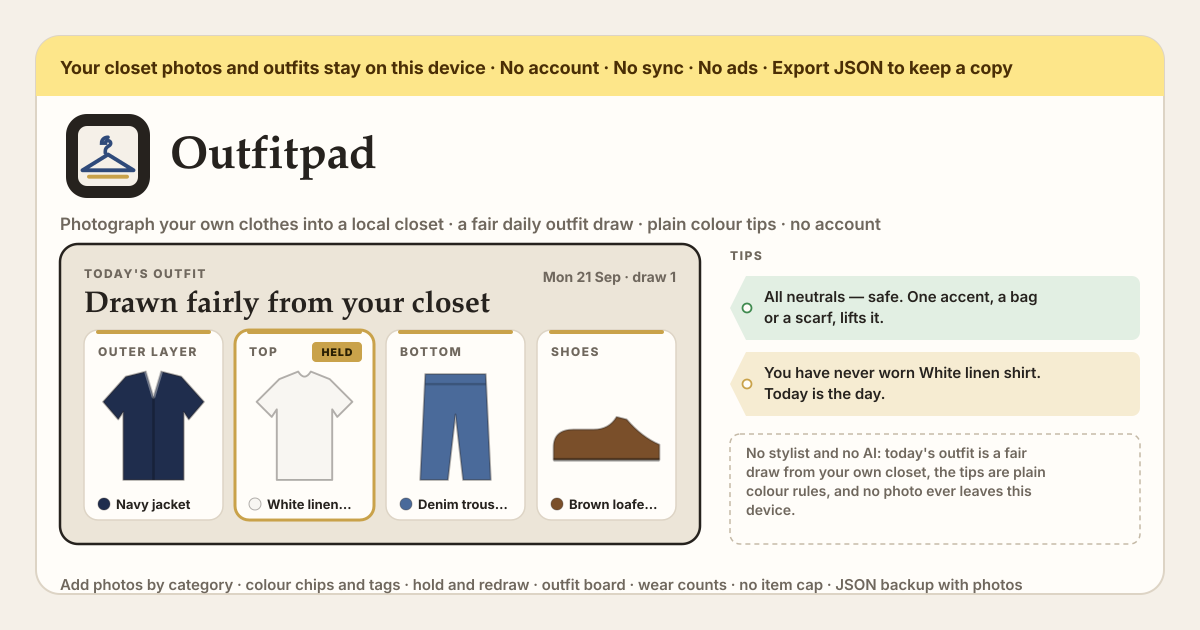
“Today’s outfit” is the top of the page. Once there is at least a top, a bottom and a pair of shoes, a combo is drawn from the closet by the date: a top and a bottom or a dress, shoes, and — if “With an outer layer” or “With bag and accessory” is on — those too. The same day shows the same combo after a reload. Under each slot “Hold” keeps that piece and “Shuffle” redraws only the unheld slots; the counter reads “draw 3” so you know how many times you have gone again. “Occasion” narrows the draw to pieces tagged work, date, sport or whatever you pick, and “Base” forces a top and bottom or a dress, or leaves it to the draw. Under the combo sit the tips — plain colour rules over the chips you set, spelled out in full further down — and two buttons: “Save as outfit” puts the combo on the outfit board under a name, and “Wore it today” logs it.
The rest is the board and the backup. The “Outfit board” has “Compose by hand” — one strip per category, tap one piece per row and skip the rows you do not need — and “Saved outfits”, each with a name, its piece count, a wear count and a last-worn date; “Load” puts a saved outfit back at the top, “Wore it today” logs it, and “Delete” removes the outfit and leaves the pieces in the closet. Every piece in the “Closet” shows “worn 3×” or “not worn yet”, which is what the never-worn and long-unworn tips read from. “Backup” downloads the whole closet — pieces, outfits and photos — as one JSON file with “Export JSON”, “Import JSON” loads it in another browser after one confirm, and “Empty the closet” wipes this browser after the same confirm.
How the draw and the tips actually work
The draw is seeded, not random every second. The seed is today’s date plus the number of times you have shuffled (plus the occasion, base and layer settings), and it feeds a small deterministic generator, so the same day and the same shuffle count always give the same combo — reload the page and nothing changes; press “Shuffle” and the count goes up, which is a new, equally fair draw. Within a slot every candidate has exactly the same chance: there is no score, no ranking, no “most worn first” and no model behind it. Each slot takes one draw whether or not it is held, which is why holding a piece never reshuffles the others. When the closet has both dresses and separates and “Base” is “Let the draw decide”, a coin tossed before anything else picks a dress about one time in three; when only one kind exists, that kind is used. Bags and accessories are optional — a closet without bags is not missing one — but a wanted top, bottom, dress, shoes or outer layer that the closet cannot fill is listed as missing.
An occasion tag narrows each slot in a fixed order. First the pieces in that slot carrying the tag; if none does, the pieces with no tag at all (a plain white tee goes with anything); if none does either, everything in the slot. So tagging a few work pieces already gives a work draw, and an untagged piece is never punished for having no tag — it is the fallback, not the exclusion.
The tips are arithmetic over the colour chips of the pieces in the combo, computed on the device, and this is the whole rulebook. A chip that is “Not set” is ignored; “Patterned” is counted separately from the colours; the neutrals — black, white, grey, navy, denim, beige, brown — are free and never counted as colours; and the same colour on two pieces counts once, so a red top with a red bag is one accent, not two.
- No chip set on any piece: “Give your pieces a colour and the colour tips appear.” Nothing else about colour is said until you set one.
- Three or more different colours besides the neutrals: “Three or more colours besides the neutrals is a lot. Swap one for a neutral.”
- Only neutrals and no accent at all: “All neutrals — safe. One accent, a bag or a scarf, lifts it.”
- Exactly one colour besides the neutrals, with that colour named: “One red piece, the rest neutral — the easiest combo there is. Good.”
- Exactly two colours: “Two colours. Keep everything else neutral so they don’t fight.”
- Two or more “Patterned” pieces, on top of whatever the colour count said: “Two patterns fight. Make one of them plain.”
- A black piece and a navy piece in the same combo, even though both are neutrals: “Black and navy read as a mismatch in daylight. Pick one.”
- Shoes and bag with the same chip, as long as it is a real colour and not “Patterned”: “Shoes and bag in the same brown — a classic.”
- The first piece in the combo that has never been worn and was added more than 14 days ago: “You have never worn the white linen shirt. Today is the day.” A piece that was worn, but not in over 30 days: “The white linen shirt has not been out in over a month.” Only one such nudge is shown per combo, and it comes from what you logged with “Wore it today”.
- A slot the draw wanted but the closet could not fill: “No shoes in the closet yet. Add one and the combo is complete.” With nothing to draw at all the page says “Nothing to draw from yet.” and lists what is missing.
A beginner’s first week
You do not need the whole closet in the app to get something out of it. A dozen pieces, honest colours and two tags are enough for the draw and the tips to start earning their keep; the rest can come in a few pieces at a time.
- Day one: photograph ten to fifteen pieces you actually wear — four or five tops, three or four bottoms, two pairs of shoes, one outer layer. Hang each on a door or lay it flat, one piece per photo, and pick the category under “Add to the closet” before you shoot so nothing lands in the wrong place.
- Then tap each piece and set its colour chip honestly. If a shirt is mostly white with a thin stripe, it is white; if the print is the first thing you see, it is “Patterned”. Denim is its own neutral. These ten minutes are what make every colour tip work.
- Tag only what needs it: “Work” on the pieces you would wear to work, “Casual” on the weekend ones. Leave the plain basics untagged — they are the fallback for every occasion. Add “Cold days” to the outer layer and you already have a winter filter.
- Each morning open “Today’s outfit” and read the combo and the tips under it. If the top is right and the bottom is not, “Hold” the top and “Shuffle”; two or three draws is usually enough. Set “Occasion” to “Work” on weekdays. When a tip says three colours is a lot, believe it once and see how the day feels.
- In the evening press “Wore it today” on what you actually wore — that is what turns on the never-worn and long-unworn nudges later. When a combo felt right, “Save as outfit” with a name like “Monday office” so it is one tap away next time.
- At the end of the week add the pieces the draw kept missing, try “Compose by hand” once on the outfit board to build the combo you wish it had drawn, and press “Export JSON” — the file holds the photos too, and it is the only copy that exists outside this browser.
What stays on the device, and what this is not
Everything stays in the browser on this device: the photos, the closet, the tags, the saved outfits and the wear log. Photos are shrunk on the device before they are stored and are never uploaded anywhere — the app requests nothing but its own files, and once it has been opened it works offline as an installed PWA. There is no account, no login, no server of ours and no sync. That also means the backup is yours to keep: “Export JSON” writes one file with the photos inside, and “Import JSON” in another browser or on a new phone restores the closet exactly. A new version never locks anyone out and never wipes what was saved; an older backup file still loads.
And what it is not. Outfitpad has no stylist and no AI: nothing looks at your photos, nothing learns your taste, nothing ranks your clothes. The daily combo is a seeded fair draw and the tips are the rules listed above — you can read every one of them and disagree. It does not recognise garments from a photo (you pick the category and the colour), it does not fetch weather, it does not sell clothes or link to shops, and it has no item cap, no ads on the tool UI and no in-app purchase. It is a closet in a browser with a fair coin and a short list of colour rules, which is what the question asked for.
Is there a limit on how many pieces I can add? Is there a free tier?
No cap and no tiers. Every feature is open to everyone from the first photo, and the closet holds as many pieces as you photograph. The only practical limit is the browser’s own storage on your device; because each photo is shrunk before it is stored, a closet of several hundred pieces takes a small fraction of what the originals would.
Does it use AI? Who picks the combo?
No. There is no AI, no model and no stylist, on the device or anywhere else. The combo is a fair draw: the date and the shuffle count seed a small generator, and every piece in a slot has the same chance. The tips are the fixed colour rules written out in this guide — counting accent colours, spotting two patterns or black next to navy, matching shoes to the bag, noticing a piece you have not worn. If a tip is wrong for you, ignore it; nothing adapts and nothing is learned.
Where are my photos stored? Can anyone see them?
In the browser’s own storage on this device, and nowhere else. A photo is shrunk on the device the moment you add it, saved there, and never sent to a server — ours or anyone’s. Nobody can see your closet unless they hold your unlocked phone or the JSON file you exported. Clearing the browser’s site data removes the closet, which is why “Export JSON” exists.
Can I move the closet to a new phone or another browser?
Yes, with the JSON file. “Export JSON” under “Backup” downloads one file that holds every piece, every saved outfit, the wear counts and the photos themselves. Get that file to the new device any way you like — a cable, a message to yourself, a drive you already use — open Outfitpad there and press “Import JSON”; after one confirm the closet is restored exactly as it was. There is no sync in the background, so do this whenever you want a fresh copy.
Does it work offline?
Yes. Open it once with a connection and it installs as a PWA on Android or any browser; after that the closet, the draw, the tips and the board all work with no network, because nothing is fetched — the draw is computed from the date on the device and the tips from the chips you set. A new version arrives quietly the next time the page opens online and never removes what you saved.
Why does it warn about black with navy? Both are neutrals.
Because they are close enough to look like one colour that went wrong. Both are dark, and in daylight navy next to black tends to read as a black that faded or a navy that is off, rather than as a deliberate pair. That is the whole reason for the rule, and it is a rule of thumb, not a law: plenty of people wear the two on purpose. The tip fires whenever a black chip and a navy chip land in the same combo, and “Hold” one of them and “Shuffle” is the quick way past it — or ignore it.
I have not added any shoes yet. Does the draw still work?
It draws what it can and tells you what it could not. The slots that exist are filled — a top and a bottom, an outer layer if you asked for one — and the tips list the empty slot as “No shoes in the closet yet. Add one and the combo is complete.” Shoes, a top and a bottom (or a dress), and the outer layer if it is switched on, are the only slots the draw counts as missing; bags and accessories are optional and a closet without them is complete. Add one pair and the combo fills in on the next draw.