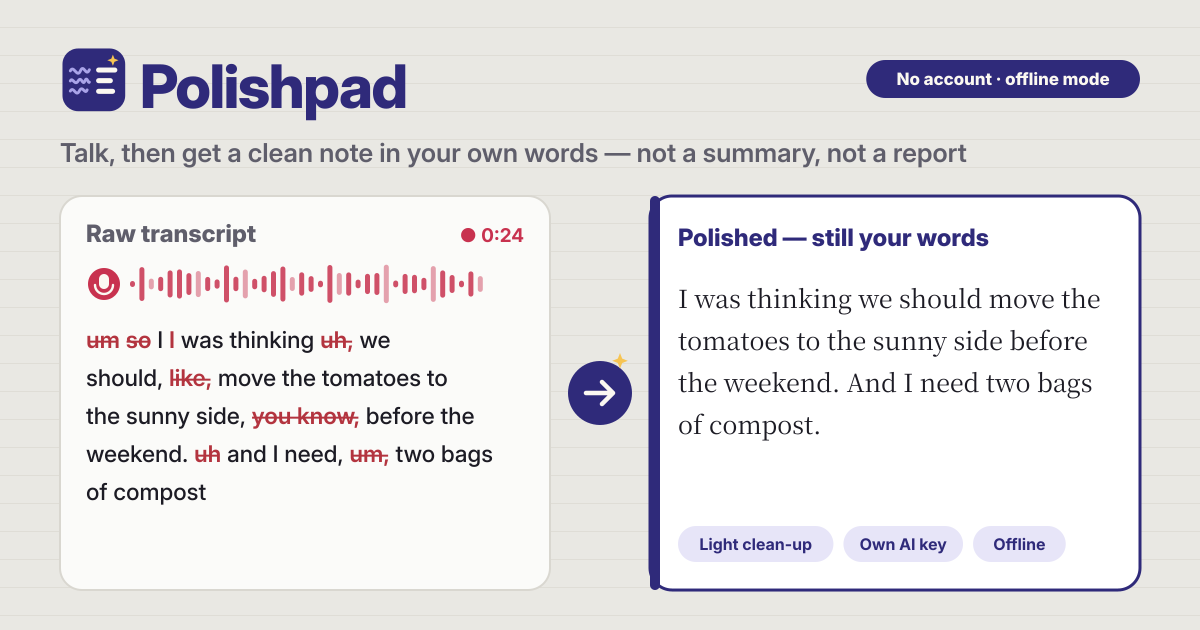
It started with “not a third-voice report-style summary”
Someone on Reddit’s r/iosapps asked for an app that “polishes a raw muddy note into a clear but accurate clean note” — “not a third-voice report-style summary”, ideally offline or with their own key, and without a subscription.
Similar apps are mostly English only, need a subscription, or summarise what you said. Polishpad opens in a browser, has no account, tidies up without any key, and works in Korean, English, Japanese and German.
What Polishpad does
- One tap to record → the big Record button is there as soon as it opens. Tap again to stop. You can also paste or type a note instead.
- The raw text stays editable → the transcript lands in the raw box, and you can fix it by hand any time.
- One tap on Polish → a note without fillers, stutters and repeats, with spacing and punctuation fixed. First person, your own words.
- Side by side and What changed → see raw and polished next to each other, and What changed strikes through every word that was taken out.
- Copy, share, keep → copy, share from your phone, download a .txt or .md file, and Save note to keep it in your notes.
Three ways your voice becomes text
- Browser speech → the fastest, and words appear while you talk. It uses your browser’s online speech service, so your voice goes to the browser maker (Google for Chrome, Apple for Safari). In browsers without it, such as Firefox, it shows as off with the reason.
- On this device → downloads a speech model to your phone once (small about 41 MB, better about 77 MB). After that it turns speech into text on your phone with no internet, and your voice goes nowhere. The text appears after you stop.
- Your OpenAI key → available once you add an OpenAI key in Settings. Very accurate; the recording goes only to OpenAI, with your key.
- Pick Korean, English, Japanese or German under I’m speaking. It can differ from the screen language.
Polishing: light clean-up and AI polish
- Light clean-up → no key, no internet, runs on this device. It only takes out fillers like um, uh, like and you know, stutters and repeats, and fixes punctuation. Every word left is yours, in your order. “I like it” keeps its like.
- AI polish → uses your own AI key (OpenAI, Anthropic Claude or Google Gemini) to smooth sentences and fix grammar lightly. The AI is told to keep first person and your expressions, not to summarise, not to add facts, and to return only the note. You can change the model name yourself.
- Strength → Light (only ums and repeats), Medium (filler phrases too), Strong (hedges like basically too). Even Strong keeps your words and your voice.
- Style → Plain note, Bullet points, Email-ready, Journal entry. Light clean-up does plain notes and bullet points; Email-ready and Journal entry change wording, so they need AI polish.
- Output language → the language you spoke, by default. Pick another and AI polish translates it, keeping your voice.
Where your AI key lives
- Paste it under Your AI keys in Settings and tap Save. The key is stored only in this browser on this device; there is no Polishpad server.
- When you polish or transcribe, it goes straight to that key’s company (OpenAI, Anthropic or Google) and nowhere else.
- Keys are never in the JSON backup. Delete key removes it at once.
- Any cost is billed by that company to your own account. One short note usually costs very little.
Offline-only mode
- Switch it on in Settings and no sound or word leaves the device. Browser speech, OpenAI transcription and AI polish turn off, and it is not just the buttons: the sending code itself refuses.
- Then you use On this device and Light clean-up. Download the speech model once before you switch the mode on.
Nothing you said gets lost
- The raw and polished boxes are saved on this device as you go, so a reload or a closed tab keeps them.
- Switch to another app while recording and it stops safely, keeping everything so far. A recording that could not be turned into text yet is kept so you can try again.
- If the microphone is blocked, it tells you what to change, and meanwhile you can type or paste and polish right away.
Your notes and backup
- Save note keeps the raw text, the polished note, the date and a title in Your notes. Search by words, tap to reopen, delete.
- Recordings are not kept by default. Turn on Keep recordings with saved notes in Settings if you want them.
- Export JSON puts your notes into one file, and Import JSON brings them back on a new phone. Delete all notes always asks first, with an Export JSON first button.
What Polishpad does not do
- It is not a summariser or a third-person report. It never turns your note into “the speaker said…”, and it does not make things up.
- It is not a meeting-minutes or speaker-labelling tool. It is for notes you say yourself.
- No account, no subscription, no ads on the tool, and no server of ours that handles your key or your recordings.
Is it free?
All of it is free. Recording, light clean-up, notes and backup are not locked, and there is no sign-up or payment screen. If you use AI polish, only that AI company bills your own account for it.
Will it change what I said?
The light clean-up only removes. Every word left is one you said, in the same order. AI polish smooths sentences but is told not to summarise or add facts, and What changed shows you exactly what is different.
Does it work offline? Can I put it on my home screen?
Once opened, it opens without internet too, and On this device transcription (after the one-time model download) and the light clean-up work. Use Add to Home Screen in your browser’s menu to keep it like an app.