Keeping a group engaged with a rotation of short games
Attention for a simple game lasts about a minute, then it drops. That is true of a classroom before lunch and of an older parent at the kitchen table. The trick is not a better game but a better order. Alternate something demanding, like remembering a sequence, with something easy and quick, like tapping a target, so nobody stays at full effort for long. Open with a game the group already knows, because a first round spent learning rules is a first round spent losing people. Keep the whole rotation short — four or five rounds, six or seven minutes — and stop while it is still fun. Ending on a round the person enjoys and does well makes them willing to sit down again tomorrow, which matters more than any single session.
Fix the order in advance rather than choosing between rounds. Every pause to decide what is next is a moment for someone to drift, reach for the remote, or say they are tired. Have a short set for low-energy days and a longer one for good days and pick once at the start. Do not keep score out loud; in a small group, score turns a game into a comparison, and the person who is slower today will notice. If one game is a favourite, let it appear twice. Repetition is not a failure of the rotation; it is what makes a nervous player relax.
Six games, one list, one press of play
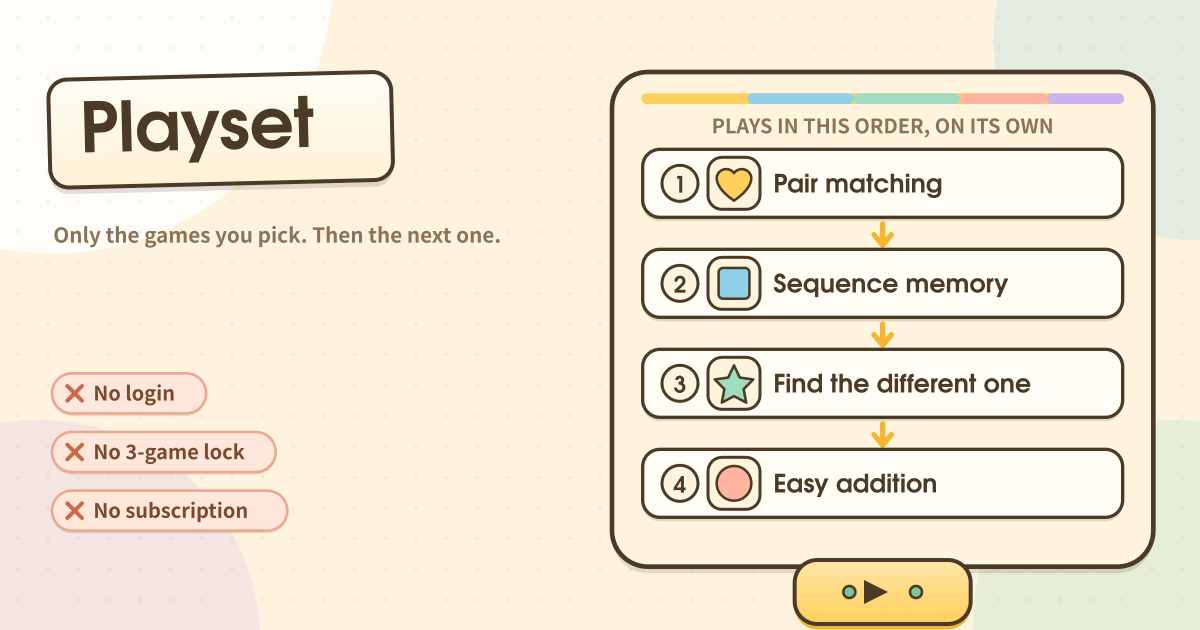
Playset has six simple brain games: pair matching, sequence memory, find the different one, easy addition, colour and shape sort, and target tap. You pick only the ones you want, put them in the order they should run, give the list a name and save it. The same game twice is fine. One game on its own is fine.
Then the whole point: press play once. The first game starts, and when it ends the next one starts on its own. In between there is a short pause — press the big Next to move on straight away, or leave it and it goes by itself after a few seconds. Nobody has to sit there loading the next game every time.
Each game runs between 60 and 90 seconds. The buttons are deliberately oversized, and a wrong tap never brings up a red failure screen — it wobbles gently and the round carries on. There is no score, no leaderboard and no chart comparing today with yesterday.
Building a list and letting it run
- Tap “New list” and give it a name. Something like “Morning ones” — naming it by when you open it makes choosing easier later.
- Tap the games you want from the six. Each tap adds it to the end of the queue underneath. Add a favourite twice or three times if you like — a list that is just pair matching three times over is a perfectly good list.
- Move a step up or down with the arrows, or take it out with ×. The order you see is the order it plays.
- Switch on “Start again at the end” and the last game rolls back round to the first. Use it when you want it to keep going until you decide to stop, rather than for a fixed length.
- Save, then press play. Along the top you get the list name, which step you are on, and the time left as a filling bar — not a number counting down at anyone.
- To stop part-way, press “Stop” at the top right. It asks once, then takes you back to your lists.
- Make as many lists as you like. A common way to use it is one short list and one longer one, picked depending on how the day is going.
Where lists stay, and what this is not
A list is on this device the moment you save it, and your place in a running queue is written down every time a game hands off; there is no account, no sync and no share link, so switching devices or clearing site data clears the lists too. Nothing here is locked, limited to three a day or scored, and it never asks for an email or an age. It is not a training programme, a test or a medical device, and it says nothing about anyone’s health.
Sitting beside someone who likes the same games
It gets used by someone sitting next to another person, holding the phone. The games she likes are already settled, but the brain-training apps decide today’s set themselves and will not let you skip the ones she does not want — so every time a game ends, the phone comes back across the table to load the next one. That hand, needed over and over, was the problem.
The same thing gets said in Korean about Lumosity: “I only want to play Train of Thought.” One favourite, on repeat, which the app will not allow. Playset just lets you build that list — three rounds of pair matching, or two games alternating, exactly as written.
So in the morning you open the list and press play once. After that you hand the phone over and just sit with them. If a call comes in and the tab closes, opening it again offers the exact game it stopped on and carries on from there.
Are there only six games? Can I get more?
Six, on purpose. Picking is the job this app exists to do, and a long menu cannot be read in one look — so it cannot be picked from. Six fits on one screen and is short enough to read out loud to the person beside you. There is no limit on how many times you add one, though, so the number of lists you can build from six is effectively endless.
Does it give a score? Is this a cognitive test?
No. There is no score, no rank, no brain age and no history kept. During a game a row of little suns fills in, but it disappears when the game ends and there is no target number to reach. Not telling anyone how they did is the policy, not an omission. It is not a cognitive test, a diagnosis or a treatment, and it is not a medical device. If you are worried about memory or thinking, speak to a clinician.
If the tab closes mid-list, does it pick up where it stopped?
Yes. Your place in a running queue is written down on this device every time a game hands off, so if a call comes in or the screen sleeps and the tab closes, opening it again shows which game it stopped on and offers to carry on from there. The lists themselves are kept the moment you save them, so nothing has to be rebuilt.