Running a cue list for a small show or class
A cue list is just the music in the order it will be needed, with one line per moment: Q1 walk-on, Q2 first dance, Q3 bows. Write the cue name as the moment, not the song title. “Bows” tells you what to do when the room looks at you; “Track 07” does not. Put the length next to each cue so you know when to have your thumb ready.
Silence is part of the list. Decide in advance where music must stop dead — end of a routine, a speech, a class activity — and where it may run out on its own. Most mistakes at small events are music that keeps going: the next song starting under applause, a warm-up track bleeding into the instructions. It is far easier to start a track late than to kill one early, so make the default state quiet and treat every start as a deliberate press.
Before the event, play the first three seconds of every file at the volume you will use. That catches wrong versions, long silent intros and a file that never opened. Turn on do-not-disturb, plug in, and put the phone where no one else will pick it up. If someone else runs sound, hand them the list on paper too, with cue names matching what is on the screen, so the two of you are reading the same words.
A player that stops at the end of every track
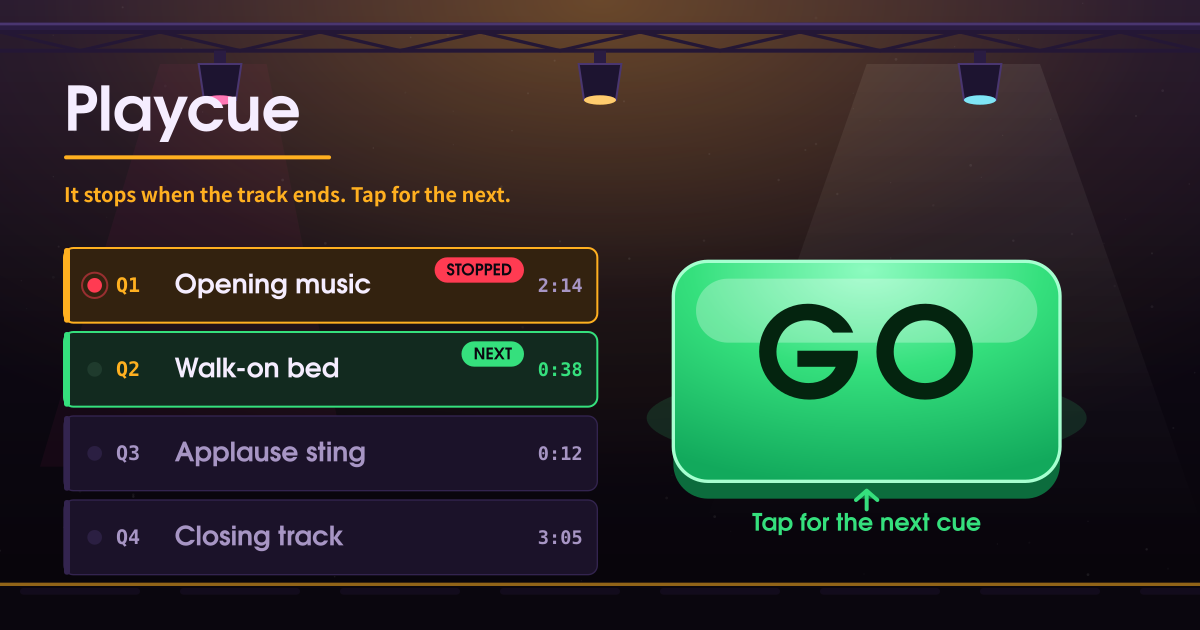
Playcue plays music one track at a time for a live moment — a show, a lesson, a rehearsal. You build a cue list out of audio files already on this device and start the current cue with the giant GO button. When the track ends, playback stops and the room goes quiet. The next track does not begin.
Apps like MusicPlay and notevibes keep rolling into the next item in the queue. For someone running a room, that is the opposite of the job. Here the only way to start the next track is to tap GO again.
The GO button and the cue list on screen
- A cue light and a state: standby / playing / held / stopped.
- The current track name is the biggest type on the page, with the elapsed time and the next cue beside it.
- One giant GO button under your thumb. It turns into play, pause, resume, or next depending on the state.
- The cue list: Q1, Q2, Q3… in order, with NOW and NEXT flags, how many are left, move up/down, and remove.
- A loop-this-cue switch. It is off by default.
- You can name the setlist and export it as a JSON file, and import that file back.
Loading tracks and running the cues
Tap “Add audio” and pick files from this device — several at once is fine. It takes mp3, m4a, wav, and ogg. Reorder with the up and down keys.
Tap GO and the current cue plays. Tap it again to pause, once more to resume. When the track ends, GO lights up green with the next cue’s name on it. Tap it then and the next cue starts.
Tap any cue in the list to make it the current one. Stop rewinds the current cue to the top; the rewind key jumps back to the first cue.
Backstage, recitals and classrooms
Backstage when one phone is the whole sound desk, at a recital where each item gets its own track, in a class where the music has to stop when the activity does. The silence after a track is the point.
The person running it taps once with a thumb, often without looking. That is why the button is this big.
Where your audio stays
Every file you add is copied into this device and kept there with the cue order and names; nothing is uploaded, and there is no account, no streaming, no YouTube search and no casting. The player itself is deliberately plain — no auto-advance, no shuffle, no crossfade or fade-out — because silence between cues is the job.
Does it really not start the next track?
Correct. When a track ends, playback stops and the GO button lights up green. Nothing makes a sound until you tap it. There is no auto-advance setting to turn on.
Can it repeat one track?
Turn on “Loop this cue” and the current cue repeats. It is off by default, and even when it is on it never moves to a different track.
Does the list survive closing the tab?
Yes. The audio you add is copied into this device and the order and names are kept on this device too, so re-opening the app gives you the same cue list ready to play.
Clearing site data in the browser removes both the list and the copies. Keep your original files somewhere else.