When all you have is a flat seat map
The seat map on a ticket site is a flat drawing seen from above. It tells you the section and the row, but not whether the stage will be straight ahead or off to the side, or how far and how high up you will be. So many people hunt for photos other fans took from their seats. Those photos do not exist for every seat, and they depend on the phone that took them and on that night’s stage.
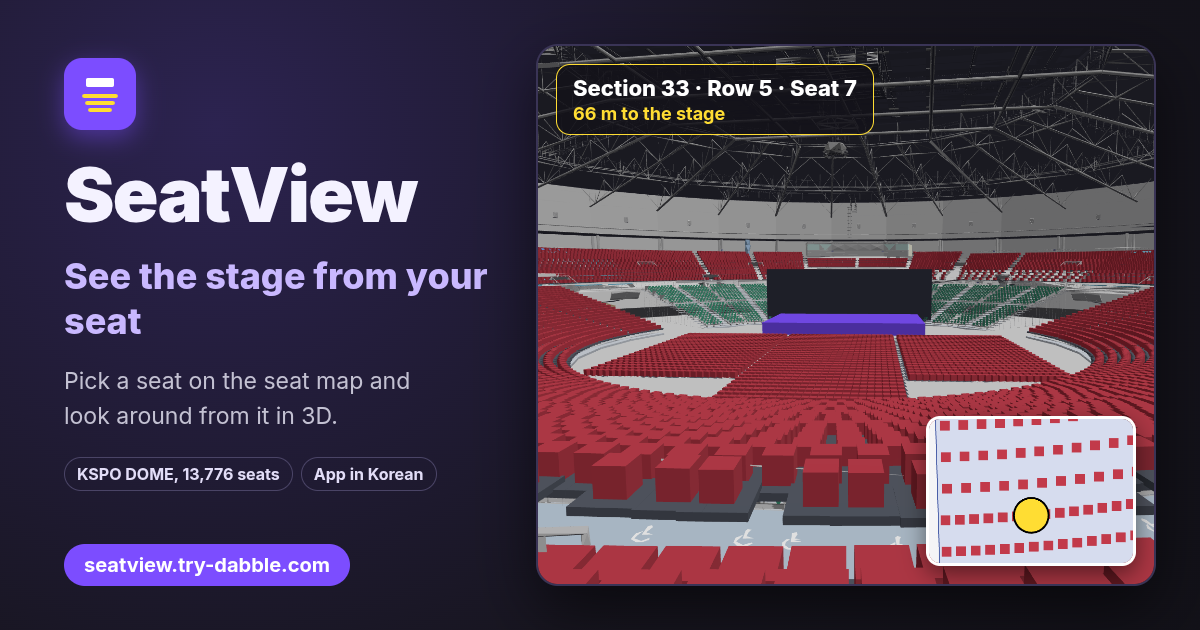
SeatView rebuilds the venue in 3D and shows the stage from any seat, at the eye height of someone sitting there. Tap a seat on the map and the 3D view next to it moves to that seat; drag to turn your head. It opens in the browser with nothing to install and nothing to sign up for. Two things to know up front: the view is drawn from a model, not taken from a photo, and the app’s screens are in Korean only.
What SeatView does
- The first screen lists the venues. There are two for now: “KSPO DOME (올림픽 체조경기장)”, the Olympic Gymnastics Arena in Seoul, with 13,776 seats and its building in 3D (“3D 외형 있음”), and “샘플 아레나”, a made-up sample arena with 2,888 seats to try things out.
- Open a venue and the screen splits in two: the 2D seat map seen from above on one side, the 3D view on the other. On a narrow screen such as a phone, the map sits on top and the 3D view below it.
- Pick a seat and the 3D view glides there and looks at the middle of the stage from a seated eye height. The bar at the bottom shows the seat’s name, such as “1층 7구역 10열 4번” (floor 1, section 7, row 10, seat 4), and the distance, such as “무대까지 48.0 m” (48.0 m to the stage).
- For KSPO DOME, the building itself is drawn too, roof trusses, walls and stands, made from the venue’s official 3D model. Its source is credited at the bottom of the screen: the model is published by KSPO & CO and the Korea Culture Information Service Agency under Korea’s open licence (KOGL Type 1).
How to use it, step by step
- Open https://seatview.try-dabble.com and choose a venue. Nothing to install, nothing to sign up for. “← 목록” at the top left takes you back to the list.
- Tap a section on the map once and it zooms in until every seat shows. Then tap a seat: it gets a yellow dot and the 3D view moves there. While zoomed in, tapping another section jumps to that one.
- On a computer, use the mouse wheel over the map to zoom in and out and drag to move it. On a phone, drag with a finger to move it and tap a section to zoom in (pinching to zoom is not there yet).
- If you already know the seat, type it in the search box at the top, for example “33구역 5열 7번”, and press “이동” (Go). The Korean words are optional: “33 5 7”, that is section, row and seat separated by spaces, works just as well. A seat that does not exist gets “좌석을 찾을 수 없습니다” (seat not found).
- Floor seats use the section name as it is, as in “FLOOR-C 10 12”. Box seats are “BOX-1” and so on, and wheelchair seats are “WHEEL”. Upper or lower case does not matter.
In the 3D view: look around, field of view, next seat
- Drag the 3D view to look up, down and around, as if turning your head without leaving the seat. Picking another seat points you back at the middle of the stage.
- The “시야각” (field of view) slider at the top goes from 30° to 100°, starting at 60°. Narrow it and the stage looks bigger, as through opera glasses; widen it to take in the whole hall. No single value matches the human eye exactly, so try a few.
- “앞열” (row in front), “뒷열” (row behind), “◀ 좌” (left) and “우 ▶” (right) at the bottom move you one seat at a time within the same section, so you can see at once how much one row makes. At the edge of a section, the button with nowhere to go is greyed out.
- The “무대까지” (to the stage) distance is measured across the floor plan, from the seat to the very middle of the stage, in metres. Height is left out, so from an upper level the stage is actually a little further from your eyes.
Sending a seat as a link
- Each time you pick a seat, the address in the address bar changes to that seat, for example https://seatview.try-dabble.com/#/v/kspo-dome?s=33&r=5&n=7 (s is the section, r the row, n the seat number).
- Copy that address and send it to whoever is coming with you; it opens straight on the view from the same seat. There is no separate share button, so copy it from the address bar.
The venue data and how accurate it is, honestly
- KSPO DOME has 58 sections and 13,776 seats: sections 1–15 on the first level, 23–52 on levels 2 and 3, the box seats, 84 wheelchair seats, and three floor blocks, B, C and D, with 1,776 seats. Seat positions and the building come from the official 3D model, matched to the section numbers of the published seat map.
- The floor is one typical layout only. As its section names say, “(공연별 상이)” (varies by show), the real floor layout and the shape of the stage change from show to show. The stage is drawn as a plain purple block; screens, sets and the people in front of you are not shown.
- First-level sections 5–11 have no chairs in the model, so they copy the neighbouring sections. Sections 16–22 on the stage side are left out. In twelve sections on levels 2 and 3 (29, 30, 33, 34, 37, 38, 45–47 and 50–52), aisles and entrances mean a seat can be off by more than a metre.
- It has not yet been checked against real photos from fans. Use it for the big picture: whether the stage is in front of you or to the side, and how far and how high up you are.
- “샘플 아레나” is not a real venue. It is a practice arena with two floor sections, 101–103 on the first level, 201–204 on the second and one box.
Phones and older browsers
- It opens on a phone too: the map and the 3D view stack one above the other, a finger moves the map and drags the 3D view around. A bigger screen is more comfortable.
- A browser or device that cannot draw 3D shows a notice (“2D 좌석도만 제공합니다”, only the 2D seat map is available) and keeps the map, the search, the seat name and the distance to the stage.
- The KSPO DOME building is about 1.6 MB, so on a slow connection it appears a little later. If it cannot be loaded, a notice says only the basic structure is shown (“기본 구조만 표시합니다”) and you still get the seats and the stage.
Privacy: nothing is stored or sent
SeatView has no account, no login and no ads. It does not store the seats you pick or any setting on this device, and it sends them nowhere. All the app loads is itself and the venue files (the seat lists and the KSPO DOME building model) from seatview.try-dabble.com. The seat you pick only goes into the part of the address after the #, which browsers do not send to the server; it reaches someone else only when you send them the link yourself.
What it does not do
- Not affiliated with any venue, promoter or ticket seller. It does not sell tickets or show which seats are left or what they cost.
- Not a photo. It is an approximation drawn from a model and can differ from the real view; stage sets, screens, lighting rigs and the height of the people in front are not included.
- Only KSPO DOME and the sample arena for now; no other venues yet.
- It does not save favourite seats or keep a list of them. To keep a seat, save its link.
- The app’s screens are in Korean only; there is no English version of the interface yet.
Is it a real photo from that seat?
No. The venue is built as a 3D model and the view is drawn from that seat’s eye height. It is simpler than a photo and has some error, but it covers seats nobody has photographed and lets you compare the next seat straight away.
Does the floor match my concert?
Probably not exactly. Only one typical floor layout (blocks B, C and D) is included, and the real one changes with every show. The fixed seats in the stands on levels 1, 2 and 3 stay the same from show to show, so they are the more reliable part.
Is there an account or a paid tier?
No. Everything is free and needs no account. There are no ads in the tool.
Can I use it without reading Korean?
Yes, with a little help. The screens are in Korean only, but you mostly tap the map and drag the 3D view. This guide gives each button’s Korean label with its meaning: “이동” is Go, “시야각” is field of view, “앞열” and “뒷열” are the rows in front and behind, “◀ 좌” and “우 ▶” are left and right, and “← 목록” goes back to the list. In the search box, “33 5 7” (section, row, seat) works without any Korean.