What this app does
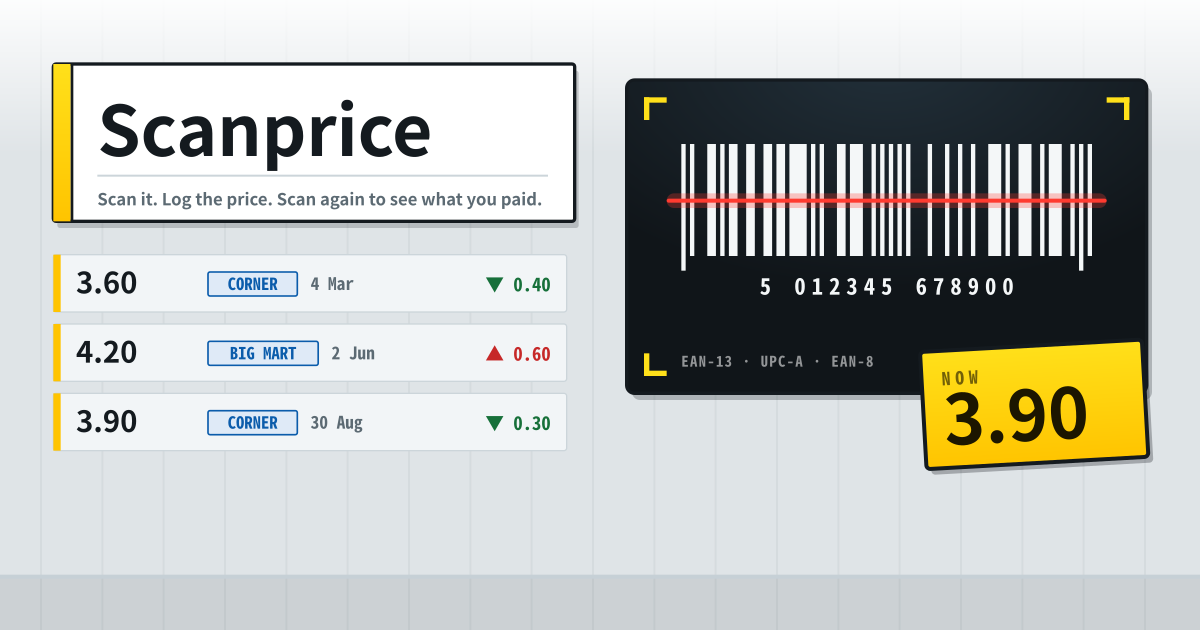
Scanprice hangs price rows off a barcode. In front of the shelf you scan the code, type the price printed on the edge, and write a short tag for the shop. The product name is optional — the barcode already points at the thing.
The payoff is the second scan. A month later, in front of the same product, scanning it puts last time’s price, shop and date at the top of the screen, with one big button underneath to add today’s. Once added, the rows stack by date and each one carries how far it moved from the row before it.
How to use it
- Tap the scan window and hold the back camera over the bars. The moment it reads, the window closes and the price sheet opens. It reads EAN-13, UPC-A and EAN-8 where the browser supports it.
- Sometimes the camera cannot read it — shrink wrap reflecting, a dim aisle, or a browser without live detection. In that case the same window will read it from a photo, or you can just type the digits under the bars. The typed number is checked against its check digit, so a single mistyped figure will not slip through.
- The price is just a number. There is no currency picker and no per-100g box. You copy the figure on the shelf edge, and that is it.
- The store is a short tag. “Corner Mart”, “the one by the station”, “Costco” — whatever you recognise. Once typed, it comes back as a recent-store chip you tap instead of typing again.
- Show history on a code unrolls its prices, newest first. Each row carries the price, the shop, the date, and the move from the row before it.
- One search box runs over the name, the barcode digits and the store at once. The first four digits of a number are enough to find it.
- A price typed wrong is deleted one row at a time. Deleting the code itself takes its price rows with it, and asks once before it does.
- Before you change devices, download a JSON or CSV copy. The JSON export imports back, and the CSV opens straight in Excel or Google Sheets.
What is not here
- No crowd prices. There is no community-reported going rate and no live feed from a supermarket. Every number here is one you read off a shelf yourself.
- No sign-up and no login. Open the address and the first scan is right there.
- It is not a unit-price calculator. Other apps divide by weight to tell you the price per 100g. This one just keeps the figure you saw and the day you saw it.
- The camera picture goes nowhere. Frames are looked at inside this page only; none is recorded and none is sent. Closing the scan window turns the camera off.
- No live shared view. There is no server, so there is no sync either. This is one notebook on one device.
When people open it
It gets used by people who have stopped in front of a shelf and wondered. Was this milk the same last month? Wasn’t it cheaper at the other shop? The memory is gone, the receipt is binned, and the price apps in the store ask you to sign in before you can write anything.
So you scan the barcode where you are standing. Next time you are in front of the same product, one scan brings the old price back. That is the whole job.
FAQ
The repeating questions are about the camera, which barcodes work, other people’s prices, and where things are kept. Below is the actual scope.
What if the camera cannot read the barcode?
Two fallbacks sit inside the same window. One reads a photo: take one close enough that the bars fill the frame, and it is decoded inside this page. The other is a box for the digits printed under the bars, which works in any browser at all. The typed number is checked against its check digit, so a wrong one is refused rather than saved. Live reading uses the browser’s own barcode support, so it is best on Chrome for Android; where that is missing, the window falls back to the photo and the typed number by itself.
Which barcodes work, and can one product end up saved twice?
The three actually printed on a shelf: EAN-13, UPC-A and EAN-8. UPC-A is twelve digits and looks like a different number from its EAN-13 form, so it is stored widened with a leading zero. That way the same tin files itself once whether the scanner reports the North American form or the other one. QR codes are ignored on purpose — a promotional QR stuck on the same box must not become a product number.
Do I see prices other people logged?
No. There is not one price here from anyone else — no crowd-sourced going rate and no official feed from a retailer. Every figure on screen is one you read off that shelf and typed yourself. Nobody else’s mistake can move your numbers; the trade-off is that the first few days look empty, and it starts earning its keep after the second or third scan.
Does it disappear when I close the tab, and is anything uploaded?
It does not disappear and nothing is uploaded. It saves the moment you type, which is why there is no save button — close the tab at the till, come back next month, and it is still there. The barcodes, names, prices, store tags and dates stay on this device. There is no account sync, no cloud backup and no share link, and the camera picture never leaves the page either. To move it, export JSON or CSV; those files are built in this page and handed straight to your download. The trade-off is that switching devices or clearing site data clears it too, so export anything you have spent months collecting. Google AdSense ads may appear.