When money does not arrive on payday
Freelance invoices, delivery payouts, tutoring, a side shop, royalties that show up twice a year. This kind of money does not land on a fixed day in a fixed amount. Some months it arrives three times, some months not at all, and the figure is different every time. Yet most budget apps open by asking for your “monthly income”. If that first box is the one you cannot fill, the whole app is useless to you.
Envelope budgeting runs the other way round. You decide the envelopes first: 20% to savings, rent as a fixed amount, 15% set aside for tax, the rest flexible. Then, each time money lands, you write down that amount and the envelopes split it on the spot. You never need to know your income in advance. You divide it after it arrives.
This is a different job from setting a weekly spending cap. A spend-cap tool like Weekpad answers “how much can I spend this week”. Paypad answers “where does this money that just landed go”. Mixing the two questions on one screen blurs both, so Paypad sticks to earnings and envelopes.
Web paycheck planners that do this already exist. But they speak only English, they put up an “upgrade to Plus” wall once you have made about ten envelopes, and they ask you to create an account and sync to their cloud. If you want the tool in Korean, Japanese or German, want twenty envelopes, and do not want your earnings list uploaded anywhere, there was no option.
What Paypad does
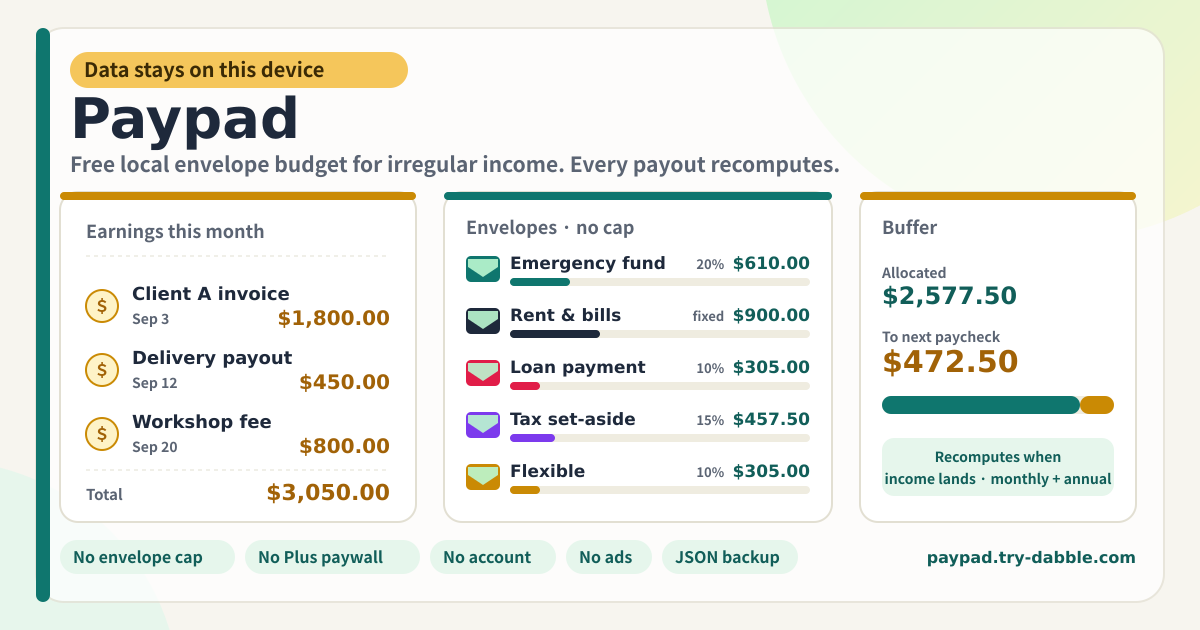
Paypad is that small envelope ledger. Pick a plan, make as many envelopes as you want, and press “Add earning” each time money lands. Type the amount, the date and an optional label, and the % envelopes, the totals and the leftover buffer recompute right away. An envelope can be a percent of income or a fixed amount, and carries one of five categories: savings, debt, bills, sinking fund, flexible.
You can keep several plans: one for the day job, one for freelance income, one for a partner’s share. Rename them, duplicate one with its envelopes as a template for the next quarter, delete what you no longer need. Each plan has an income mode (biweekly, monthly or irregular) and a currency. Earnings in another currency are totalled separately and never mixed into the envelopes. No exchange rate is invented.
The monthly view shows that month’s earnings and the envelopes sized to them; the annual view adds twelve months together with a bar per month and the year’s envelope totals. When envelopes add up to more than the income you get a coral warning, not a payment wall. There is no envelope cap and no Plus.
Banner, plan, views, totals, earnings, envelopes, backup
- Amber banner at the top: the promise that data stays on this device, with no login, no ads, no envelope cap and no Plus paywall. Change the language (ko/en/ja/de) at the top right.
- Plan card: plan picker, New plan, Rename, Duplicate, Delete. Income mode (biweekly pay, monthly pay, irregular) and plan currency, with a one-line hint per mode.
- Monthly | Annual tabs and the period arrows: step to the previous or next month (or year), jump back with “Today”.
- Totals card: income (gold), allocated (mint), buffer (leftover, to next paycheck) or over-allocated (coral warning). Allocated vs buffer bar, per-category bars, other-currency totals, and in the annual view a row per month.
- Earnings card: “Add earning” with amount, date, label and currency. The period’s list with Edit and Delete on each row.
- Envelopes card: “Add envelope” with name, % or fixed, value and category. Each envelope shows its category chip, rule, resolved amount, share bar and Edit / up / down / Delete. A note that there is no cap, plus the sum of % envelopes.
- Backup card: Export JSON, Import JSON, Delete everything. Below it the row of promise chips and the footer (Privacy, Terms, Guide, try-dabble.com). The “Guide & Feedback” button at the bottom right opens this guide page in a new tab.
Where your data stays
Plans, earnings, envelopes and settings all live inside this browser on this device. Nothing is sent to a server, there is no account, and no bank or card is connected. The app fetches nothing from the internet beyond its own files. That is also why opening it in a different browser on the same device shows an empty pad.
Before you switch devices or clear browser data, press “Export JSON” and keep the file. “Import JSON” on the new device brings plans, earnings and envelopes back exactly. The file is created on this device and sent nowhere.
Do the envelopes really change the moment I add income?
Yes. Envelope amounts are not stored numbers; they are computed from the period’s income total every time. Add, edit or delete an earning and the % envelopes, the allocated total, the buffer and the bars change on the same screen immediately. Fixed envelopes keep their amount, but the buffer moves with them. With no income yet, % envelopes are 0 and only fixed envelopes are allocated, so an over-allocation warning may show until the first earning goes in.
How do the monthly and annual views compute differently?
The monthly view adds up only the earnings received that month and sizes the envelopes to that total. On biweekly pay, the two or three paychecks that landed that month are combined. The annual view adds twelve months together: % envelopes run on the year’s income, and fixed envelopes are counted once for every month that had income. A month with no income keeps its envelopes at 0 so the year is not inflated.
How many envelopes can I make? And plans?
There is no limit. Ten, thirty, a hundred envelopes all work. The code has no maximum-count constant at all, and no payment screen appears at envelope number eleven. Plans are unlimited in the same way. Duplicating a plan copies its envelopes fresh and leaves earnings empty, which makes it a handy template for the next period.
What happens to earnings in another currency?
Each plan has a default currency, and you can pick another currency when logging an earning. Envelopes are split only from income in the plan currency; other currencies appear separately on the totals card, like “KRW 500,000 · 1 entry”. No exchange rate is invented to merge them into one figure. Once you actually convert the money, log it again in the plan currency for an accurate split.
Can I import data from another paycheck planner?
JSON that Paypad exported is read as-is. JSON from other apps is mapped when the income array is called something like incomes, earnings or paychecks, the envelope array something like buckets, envelopes or categories, and each row has a name and an amount or a percent. If there is no plan list, one plan is created to hold everything, and unknown fields are ignored. A confirmation appears before import to say the current data will be replaced.
Is it free? Any ads, account or locked features?
Everything is free. No feature sits behind a payment, envelope count, plan count, annual view and JSON backup included, and there is no “upgrade to Plus”. No ads, no account, no login. The tool page loads no ad script; the domain serves an ads.txt only so the publisher record matches the rest of try-dabble. If you have thoughts, use “Send feedback” on this page.