When you want Samsung Notes’ “lock just this note”, but store apps bring IAP, ads and wipes with it
The lock a notepad needs is not grand. Leave the grocery list alone, put the diary and the account note behind a PIN — that is all. Samsung Notes does that well, but only on a Samsung phone, and the store’s “private notepad” apps either lock photo and voice attachments behind a purchase, slide an ad in while you type, ask for a login, or threaten to wipe everything after a few wrong passwords. Backup goes to their cloud or nowhere.
On the web, local notepad PWAs like notes.idrix.fr exist and even offer a per-note password. But they are English-only, and the backup that would move a locked note to another browser is not something you can rely on. The ask is simpler: keep it on this device, lock note by note, make a wrong PIN wait, re-lock when you step away, and carry locked notes in one JSON file that opens on a new browser with the same PIN.
What Lockpad does
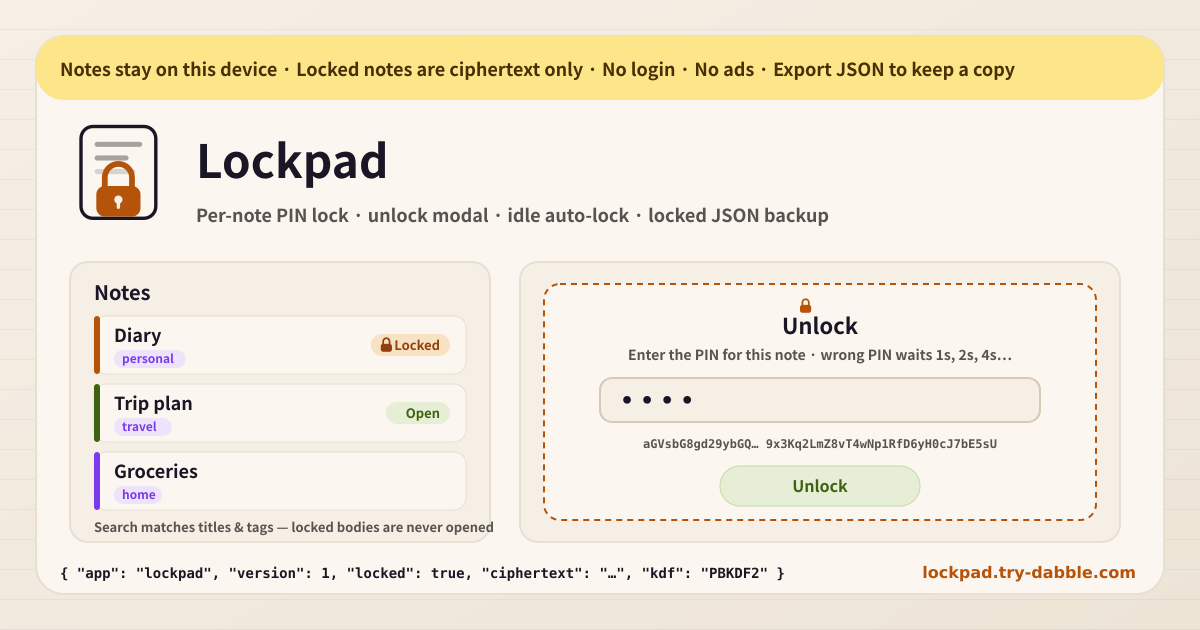
Lockpad is a local notepad with no login. Create a note, write a title, a body, optional tags and a colour. Tap the lock and choose a PIN or password, and only that note’s body is encrypted on this device with the browser’s Web Crypto (PBKDF2 + AES-GCM) and stored as ciphertext. Title and tags stay as they are, so the list and the search keep working. Tapping a locked note opens an unlock modal; every wrong PIN makes the next try wait 1s, 2s, 4s and so on. Optional auto-lock re-locks every open note after idle time or when the tab is hidden. The JSON backup carries locked notes as ciphertext, salt and KDF params, and importing brings them back still locked. The tool page loads no ad script.
What you see on screen
· Amber local-only banner — notes stay on this device; locked notes are ciphertext only · Note list — new note, Locked / Open badges, colour stripe, tag chips, note and locked counts · Editor — title, body (autosaved), tags, colour, edited time · Lock — enter the PIN twice, with a clear “no recovery” warning · Unlock modal — PIN entry, wrong-PIN countdown before the next try · Lock now · Lock all · Remove lock · Auto-lock settings — idle 1 / 5 / 15 / 60 minutes or off, lock when the tab is hidden · Title & tag search — locked bodies are never opened · Export / Import JSON (merge) · Delete all only behind a typed confirmation · Promise chips — Android & web · no login · no ads on tool · portable locked JSON backup · no attachment paywall · no wipe · Footer Privacy / Terms / Guide / hub, Guide & Feedback FAB
Where your data stays
Notes and the auto-lock settings stay on this device and this browser. Nothing is uploaded and nothing is tied to an account. A locked note exists on this device only in its encrypted form, and the PIN is never stored anywhere. An opened body lives in memory for this session and is gone again on re-lock or auto-lock. In the JSON backup, locked notes are written exactly as stored, as ciphertext — anyone who opens the file still cannot read the body without the PIN. Export before you change phones or clear site data; import on the new device and the locked notes come back still locked.
Do I need an account?
No. There is no login, email, or social sign-up. Open the page and the note list is ready. There is no cloud sync. To move between devices, a JSON backup is enough.
What if I forget the PIN?
It cannot be recovered. To be plain about it: a locked note’s body exists only as ciphertext made with a key derived from the PIN; the PIN is stored nowhere and there is no server copy. There is no reset link and no hint recovery. That is why the app shows a “no recovery” warning before you lock, and keeps the title in the clear so you at least know which note it was. Choose a PIN you will remember, and for anything truly important keep a backup taken while the note was unlocked.
How does the backup restore locked notes on a new browser?
The export is a JSON file shaped `{ app: "lockpad", version: 1, notes, prefs }`. Locked notes go in exactly as stored — ciphertext, iv, salt and the KDF params (PBKDF2-SHA-256 with its iteration count) — and have no body field. Choose “Import JSON” on a new browser or device and those notes appear in the list still locked; enter the same PIN and they open. Import is a merge: a note with the same ID is replaced by the file’s copy and everything else stays. No purchase, no account — one file does it.
What about photo or voice attachments?
There are none, on purpose. This is exactly where the store’s private-notepad apps sell “attachments are premium”, and Lockpad avoids building that wall by not having attachments at all. Text notes, tags, colours, locks and backup — that is the whole product, and all of it is free.
Does it work on Android and the web?
Yes. It is a web app, so the same address opens on Android Chrome, Samsung Internet, desktop Chrome, Edge, Firefox and Safari, and iPhone Safari. Add it to the home screen and it opens like an app; after the first visit it works offline. The lock uses the Web Crypto built into the browser, so there is nothing extra to install. Data is per browser, so to move between a phone and a PC use the JSON backup.
Is it free? Any ads, account or purchase?
Everything is free. Note count, locks, auto-lock, tags and colours, and JSON backup never sit behind a payment. No ads on the tool UI, no account, no login, no in-app purchase. “Delete all” only works after typing a confirmation word, and a wrong PIN never deletes anything. If you have thoughts, use “Send feedback” on this page. Open the app at https://lockpad.try-dabble.com/?lang=