No more calculator after every hanchan
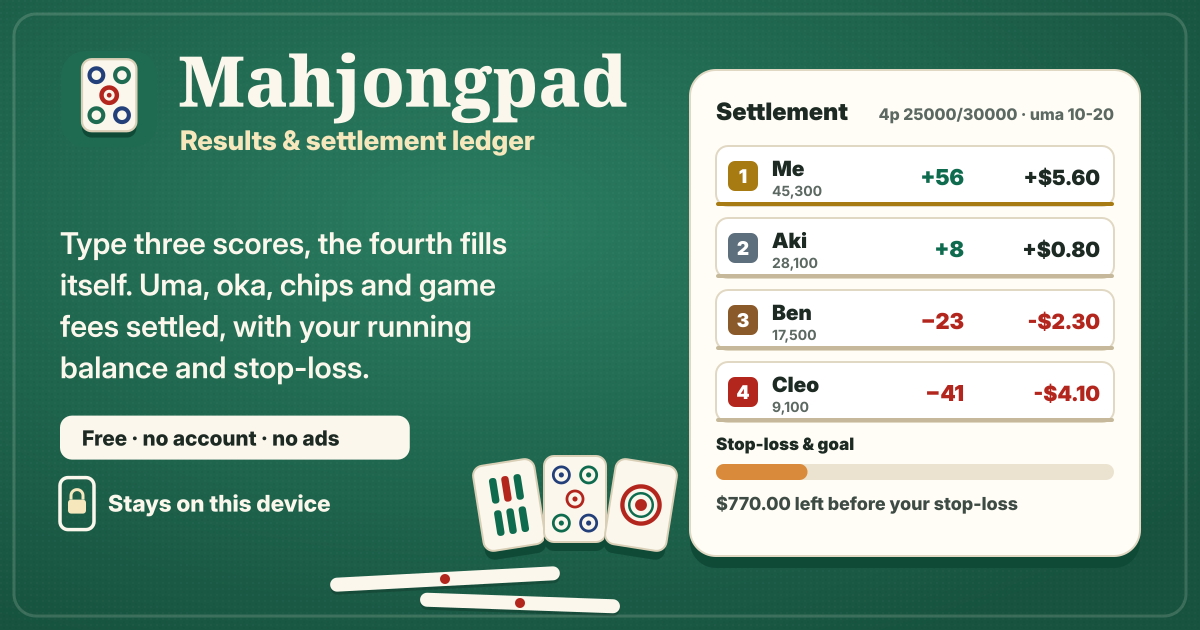
After every hanchan someone has to round the scores to the thousand, add uma and oka, then work out chips and the game fee. Mahjongpad is a personal score and settlement notebook: type three final scores and the fourth fills itself, then places, scores, money and “Who pays whom” are there at once. Over time it shows your average place, how you do against each opponent and a running balance.
Most mahjong score tools on the web are Japanese-only, or keep the full history and stats behind a paid plan. Mahjongpad is free, stats and history included, with no account and no ads. It opens in the browser without installing anything, and your ledger stays in this browser on this device. It speaks English, Japanese, Korean and German.
1. Start a session
- Under “Start a session”, pick the “Game type”: “Set game (friends)” or “Free game (parlour)”. “What you note” is either “Whole table” or “My result only”.
- Choose the “Players” in seat order from the first dealer: East, South, West, North. Someone new? Use “New player…” right there. A tie in points goes to the earlier seat.
- Pick a preset under “Rules”, or change it with “Edit rules…”. A “Group” (e.g. Friday club, office league) lets you make a monthly report per group. Add the date and a memo if you like, then press “Start session”.
2. Entering a hanchan: three scores, the fourth is automatic
- When a hanchan ends, press “Add hanchan” and type three final scores. The empty one is filled “auto” to the table total (starting points × players), and the places are set for you. If all four are typed and they don’t add up, you see by how much.
- Turn on “Type points in hundreds (352 = 35,200)” in Settings and 352 means 35,200, -12 means −1,200.
- Open “More: riichi sticks left, yakuman” to note “Riichi sticks left on the table (go to the top)”. Those points go to the top, and the auto field leaves them out of the total.
- If someone ends below zero, a “busted by” choice appears, and the bust bonus from the rules is paid automatically. For a yakuman, use “Add yakuman”, pick “Who” and “How” (Tsumo or Ron from a player), and the yakuman bonus chips are added.
- “Save & next hanchan” saves and keeps the sheet open, cleared for the next one. No pop-ups, no ads — nothing interrupts the table.
3. Rules: presets, uma, oka, rounding, rate, chips
- Built-in presets: 4 players 25000/30000 (10-20, 10-30, 5-10), 4 players 27000/30000 5-10, 4 players 25000/25000 with no uma, and 3 players (sanma) 35000/40000 (+20/0/−20 and +30/−10/−20). Under “Rule presets” in Settings you can make a “New preset”, “Copy” a built-in one, edit or delete yours and choose the “Default for new sessions”.
- Set “Starting points” and “Return points”; “Oka (to the top)” is (return − start) × players and goes to the top. “Uma per place (points)” comes from “Quick uma” or your own numbers — a negative 2nd place as in sanma +30/−10/−20 is fine. Uma must add up to 0.
- “Rounding to the thousand”: 5 down, 6 up (35,500 → 35, 35,600 → 36), round half up, round down, or no rounding (one decimal). Remainders and the oka land on the top, so the table always adds up to zero.
- With “Rate: money per 1,000 points” at 0, only points are counted. “Chip value”, “Bust bonus (points, 0 = off)”, “Yakuman bonus by tsumo: chips from each player” and “Yakuman bonus by ron: chips from the discarder” are set here too. Pick the currency in Settings.
- Changing the rules of a session recalculates every hanchan in it.
4. Game fees and prizes
- In the rules, “Game fee” is None, “Per hanchan” or “Per session”, and “Who pays” is “Everyone”, “Top pays” or “Last pays”. The amount is per player, or what the top or last pays.
- In the session, “Fees & prizes…” sets a “Fixed game fee” per player: empty means the normal share, 0 means that player pays nothing (e.g. the host).
- In the same dialog, “Prize & other” takes other money for the session, such as prize money at a friends’ tournament: + received, − paid. Game fees go to the venue, so the settlement lists them separately as “Game fees to the venue”.
5. Free games: “My result only”
At a parlour free game you don’t need anyone else’s score. Start the session with “My result only” and each hanchan asks just for “My place”, “My points”, “My chips (net)”, “I went below zero” and “Players I busted”. Opponents are not recorded; uma, oka and game fees are worked out with the same rules and count in your balance and stats.
6. Settlement and sharing
- The session shows each hanchan’s places and scores, the “Total” and the “Settlement” per player (score, chips, game fee, prize & other, money), updated live.
- “Who pays whom” turns the balances into the fewest transfers between players.
- “Copy as text”, “Share” (the share sheet on phones) and “Save as image” send the result to your group chat. “End session” files it in History; “Reopen” lets you carry on.
7. History and stats — all free
- The History tab groups sessions by month with a total per month, filtered by period (“All time”, “This month”, “This year”, “From – to”), group and “Set & free”.
- The Stats tab: sessions and hanchan, “Average place”, “Top rate”, “Last-avoid rate”, “Total score”, “Balance”, “Game fees paid”, chips, “Best session” and “Worst session”, place bars for 4-player and 3-player games, a “Running balance” chart and daily and monthly totals.
- “With each opponent” shows, per opponent, the hanchan played together, my average and theirs, how many times I placed above them, and my balance (from whole-table sessions).
- “Monthly report per group” makes a table of each player’s places (1st–4th) and totals for the month and group you pick; “Copy report” sends it straight to the group.
8. Stop-loss and goal
Under “Stop-loss & goal”, press “Set stop-loss…” and enter “Stop-loss: the most I'm willing to be down”, an optional “Win goal (optional)” and “Count from”. Tick “Game fees count (fees included)” to count the fees you paid in the balance. A progress bar and “… left before your stop-loss” follow every session, and when you reach it you’re told so, with “Time for a break?”. It is a line you set for yourself; it blocks nothing and sends nothing.
9. Backup, restore and CSV
- Your ledger is only in this browser on this device. Closing a private window, clearing browser data or a new phone would lose it, so press “Save backup (.json)” under “Backup & files” in Settings now and then.
- “Restore from backup…” merges and never wipes: new sessions are added, identical ones skipped, and only newer edits replace yours. A damaged file, another app’s file or one from a newer version is refused with the reason, and nothing is changed.
- “Export CSV” writes a spreadsheet file with one row per hanchan; “Import CSV…” shows a preview first and lists any skipped rows with the reason.
- After 10 hanchan or edits, or 7 days of unsaved changes, a small backup reminder card shows on the Table tab. “Later” waits 3 days, and saving a backup clears it. “Delete everything” offers “Save backup first”.
Privacy: the ledger never leaves the device
Players, sessions, hanchan, rules, your stop-loss and settings are stored only in this browser on this device and are never uploaded or sent anywhere. There is no account and no login. Backup and CSV files are made and read on the device. Text and images go only where you send them, when you tap “Share” or “Copy as text”. The only network use is the anonymous counter of the shared Guide & Feedback button (app name, event name and UI language only), as in the other apps, and Cloudflare — never scores or names.
What it does not do
- No online play: it records games played at a real table.
- No hand, fu or yaku calculator: you type the final scores.
- No sync between devices and no login; move to another device with a backup file.
- No betting and no money transfers: every number is one you typed, and Mahjongpad is only a personal notebook.
Does it handle 3-player mahjong (sanma)?
Yes. Choose “3 players (sanma)” in the rules: type two scores and the third fills itself, and uma with a negative 2nd such as +30/−10/−20 works. Stats show a separate place spread for 3-player games.
Are the stats or the history a paid extra?
No. Everything is free, including the results with each opponent, the monthly report per group and the running balance chart, with no limit on sessions or time.
How do I move my ledger to a new phone?
Press “Save backup (.json)” on the old device, move the file to the new one and press “Restore from backup…”. Restoring merges, so sessions already on the new device stay.
Do my friends need the app too?
No. One person notes the whole table and sends the result and “Who pays whom” with “Copy as text” or “Save as image”. Nothing to install either.