Three ways a friendship goes quiet
Almost nobody decides to stop being friends with someone. A friendship that mattered rarely ends with a fight; it goes quiet, and the quiet is only noticed months later, usually by accident — a name on a birthday reminder, a photo, someone else asking whether you still see them. If you look at how it happened, the same three patterns come up again and again, and each one has a signal you can catch early.
- A move or a job change. The shared setting that did the work — the office, the neighbourhood, the school gate — disappears, and it turns out the setting was doing most of the scheduling. The signal: you cannot remember the last time you spoke anywhere other than that place.
- One unanswered message that turns awkward. Someone writes; the other reads it at a bad moment and means to reply properly later. A week passes, and now a reply needs an apology attached, so it gets heavier, so it waits longer. The signal: you feel a small flinch when their name comes up. That flinch is about the message, not the person.
- “I’ll call next week.” The intention is real; it simply never gets a day. Weeks pass in units of “soon”. The signal: you have thought “I should call them” more than twice without a date attached.
A contact cadence: three tiers, and why it is a floor
None of the three patterns involves anyone doing anything wrong, which is exactly why they are hard to notice: there is no event to react to. The only defence is to look at the list on purpose, at intervals, rather than waiting for a reason. To do that, first sort people into three tiers by how close you want to stay — not by how close you once were — and give each tier a rough interval: weekly, monthly and quarterly.
The important word is floor. A cadence is not a schedule that says “call on the first of the month”; it is the longest gap you are willing to let happen. If you see someone twice in a month, nothing needs recording. The cadence only does its work when life gets busy: it is the line that tells you a gap has gone on too long, before the gap becomes a lapse.
Tiers move. Someone who was weekly in university may honestly be quarterly now, and writing that down is kinder than pretending otherwise and then failing at it. It works the other way too: an old colleague in the quarterly tier who moves to your neighbourhood can be promoted to monthly. Assigning a tier is not a verdict; it is an honest note about what is possible for you right now.
- Weekly: the handful of people whose ordinary week you want to know about — a partner, a parent, one or two friends. Most people cannot hold more than four or five here without it turning into a chore, and a chore is the first thing dropped.
- Monthly: friends you would call with news, and who would call you. A phone call or a real conversation once a month keeps the thread warm enough that neither side needs to catch up before talking. Ten to fifteen people is realistic.
- Quarterly: people you are glad to know and do not want to lose — an old colleague, a friend from a previous city, a cousin. Four touches a year is enough to stay someone they can call without preamble. Twenty to thirty is manageable here, since each touch is small.
A 30-minute year-end contact review
Once a year, spend half an hour on the list. Late December works, but so does a birthday or the first week of a new job. It is not the list of everyone you know; it is the list of people you want to still know in five years. It goes like this:
- 1. Scroll the phone. Open the contacts or the messaging app and go from top to bottom without stopping to read anything. You are only watching for the names that make you pause.
- 2. Write down everyone you paused on. The pause is the data. Do not judge it yet; a pause can mean “I miss them” or “I owe them a reply”, and both belong on the list.
- 3. Next to each name, mark the last real contact. Not the last time you saw their post — the last time you actually spoke. If you cannot remember, write “long”, which is an answer in itself.
- 4. Pick a tier and a next date. Weekly, monthly or quarterly, honestly. Then a concrete date for the next touch, which is what turns an intention into something that can be overdue.
- 5. Send three short messages that day. Choose the three that felt most overdue and write two lines each, before the review closes. Not “we should catch up”, which asks the other person to do the scheduling, but a specific question or a specific memory. Three is enough to change the feeling of the whole list.
What to write down after a call
The reason people stop calling is often not distance but the effort of the opening. “How are you?” after a long gap is hard to answer — where would they start? — so it gets a polite “fine, you?” and the conversation dies there. A specific question gets a real answer: “Did Minho’s exams go all right?” “Did you take the job in the end?” A specific question shows that you were listening last time and that you remember. That is the entire point of writing things down: not to keep a file on a friend, but to make the next opening easy.
After a call or a meet-up, a few lines are enough:
- Names: their kids, partner, the dog, the colleague they keep mentioning. Getting a name right the second time is noticed far more than you would expect.
- What they are worried about right now: a health thing, a decision at work, a parent. This is what you ask about next time, and it is what you will forget first.
- What they asked you. If they asked about your move or your interview, they will want the ending. Telling them unprompted closes the loop.
- One thing to follow up: a book you promised, an introduction, a date they mentioned. One, not five; the note should produce a single action.
- The next date, set while the conversation is still warm.
Keeping the book in Kinlog
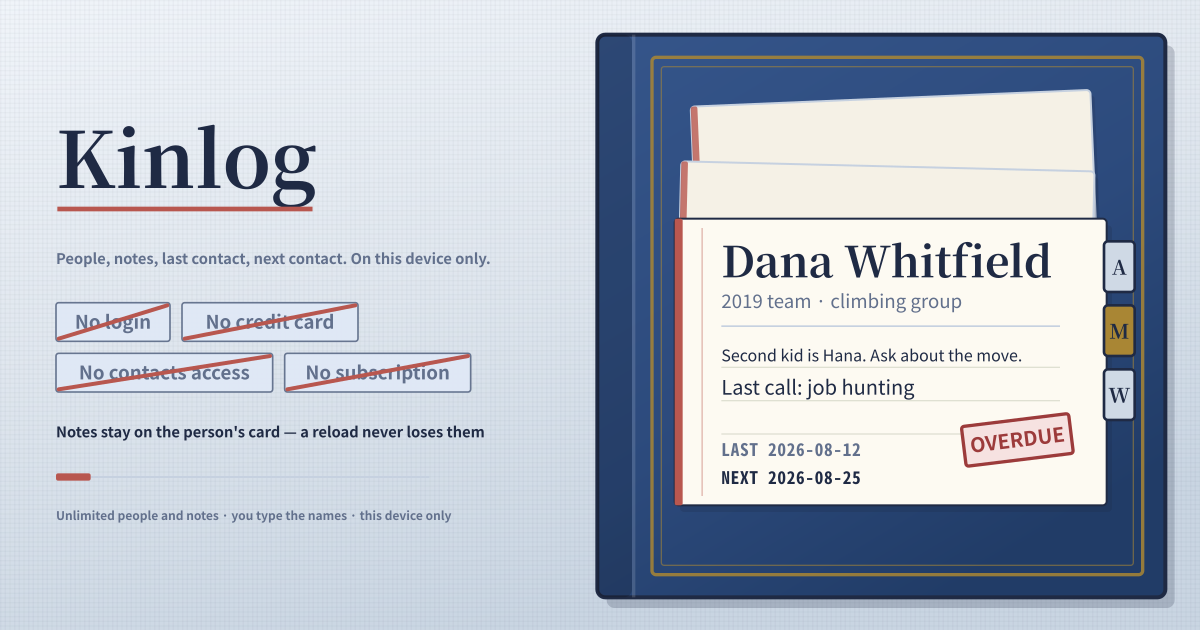
Kinlog is a personal book for exactly this list. You type a name, add one line about how you met, and write notes on that person’s card; there is no Save button, and notes stay on the card as you type them, still there after a reload. Each card holds the date you last spoke and the date you want to speak next, and anyone past their next-contact date gets a red stamp and rises to the top of the list, so you never have to remember who you have gone quiet on.
- Type a name and add it. A name is all it takes — no import step and no invitations.
- Tap a card to write notes: their kids’ names, what they are worried about, what you talked about last time. It saves as you type.
- After a call or a meet-up, tap “talked today” and the last-contact date jumps to today.
- Set the next contact date by hand, or with the one-week, one-month and three-month buttons — the same three tiers as above. Once set, the app never changes it behind your back.
- If the name escapes you, search by a word from the notes. Sort by next contact, longest since last contact, name, or recently added; your choice is still there the next time you open it.
Where the book stays
People, notes and contact dates stay on this device; nothing is synced to an account or sent anywhere. It never asks for your phone’s contacts and never sends invitations, so the only way someone enters the book is you typing their name. Switching devices or clearing the browser’s site data clears the book too, so keep a separate copy of anything you cannot lose.
How often should I contact a friend I want to keep?
Decide by how close you want to stay, not by how close you once were. Roughly: weekly for the few people whose ordinary week you want to know about, monthly for the friends you would call with news, quarterly for the people you simply do not want to lose. Treat the interval as a floor, not a schedule: more often is fine, longer is the signal. If you feel a flinch when you see their name, you are already past the floor, so send one specific question that day instead of an apology.
What do I say after a year of silence?
Do not apologise at length. A long apology makes the other person responsible for managing your guilt. One line that acknowledges the gap, then a specific question or a specific memory: “It has been ages — I walked past the old office yesterday and thought of you. Did you end up moving?” People mostly reply to the question, not to the apology. When the answer comes, mark the last contact that day and set the next date, so the second gap is shorter than the first.
Is it strange to keep notes about friends?
It feels odd the first time. But what you are writing is what you would simply remember if you knew fewer people: a kid’s name, the thing they are worried about, what to ask next time. A note that says “ask how the surgery went” is care, not a file. The test is simple: write only what you would be comfortable with them reading. Kept like that, notes are just what a good friend does naturally when the list is short, done on purpose once the list has grown longer than memory.