
How it works
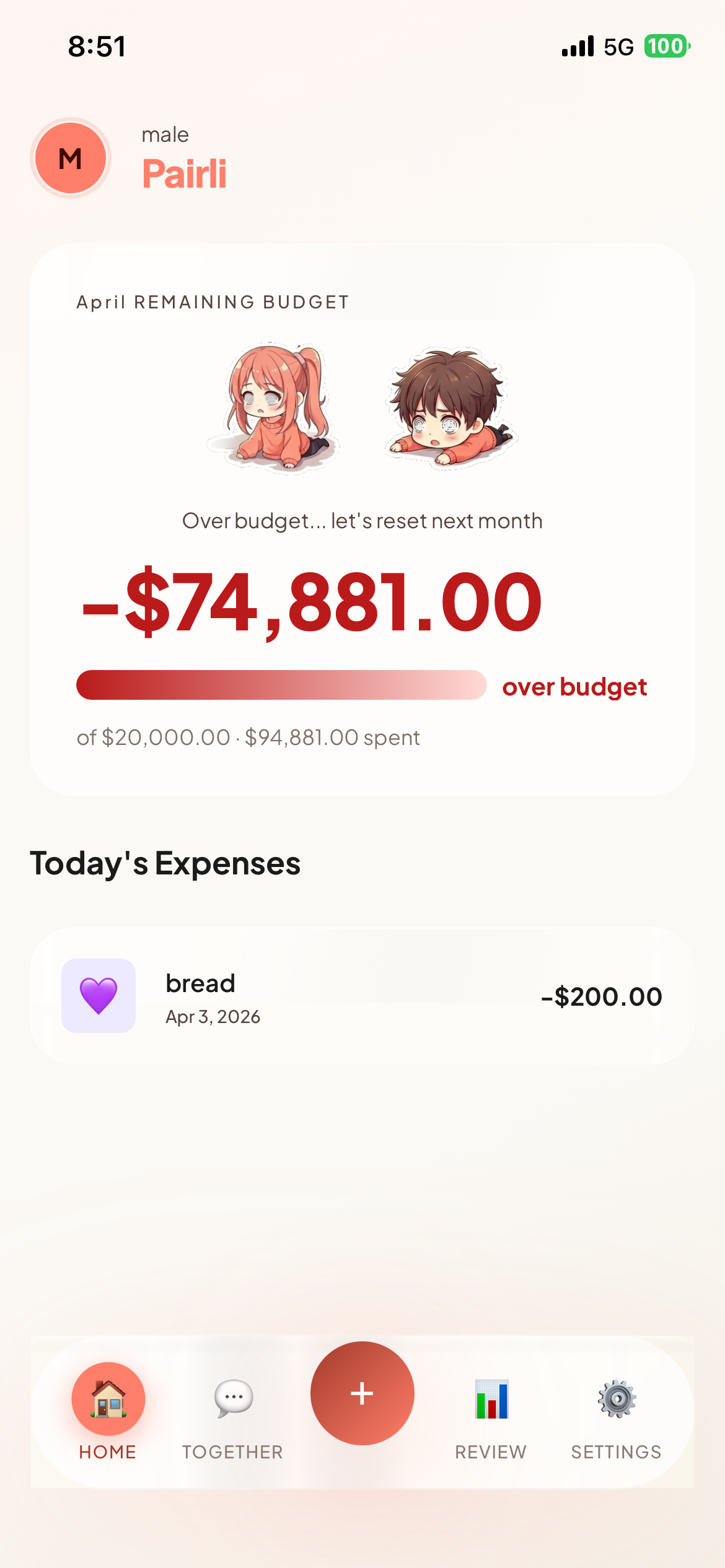
Pairly is a couple’s budget book you fill in by hand, with no bank link. The two of you set one monthly budget and watch it shrink like a game’s health bar on the same screen every time an expense goes in. Entries save to the device first, so you can log without a connection.
- The first launch walks through five steps: language and currency (detected from the device), a nickname up to 20 characters, email sign-in, and an introduction to the four categories. Sign-in is a link in your mail, valid 15 minutes, with no password.
- Set this month’s budget under Settings > Monthly Budget. Until you do, the home screen shows a “Set a budget” card instead of the bar.
- The + button in the middle of the tab bar adds an expense or income: amount, category (expenses only), a memo up to 100 characters, and the date.
- The top of the home screen is the budget bar: the amount and share left, what you have spent this month, and the two characters. The bar turns red below 20% remaining or when you go over budget. Today’s expenses are listed underneath.
The four categories
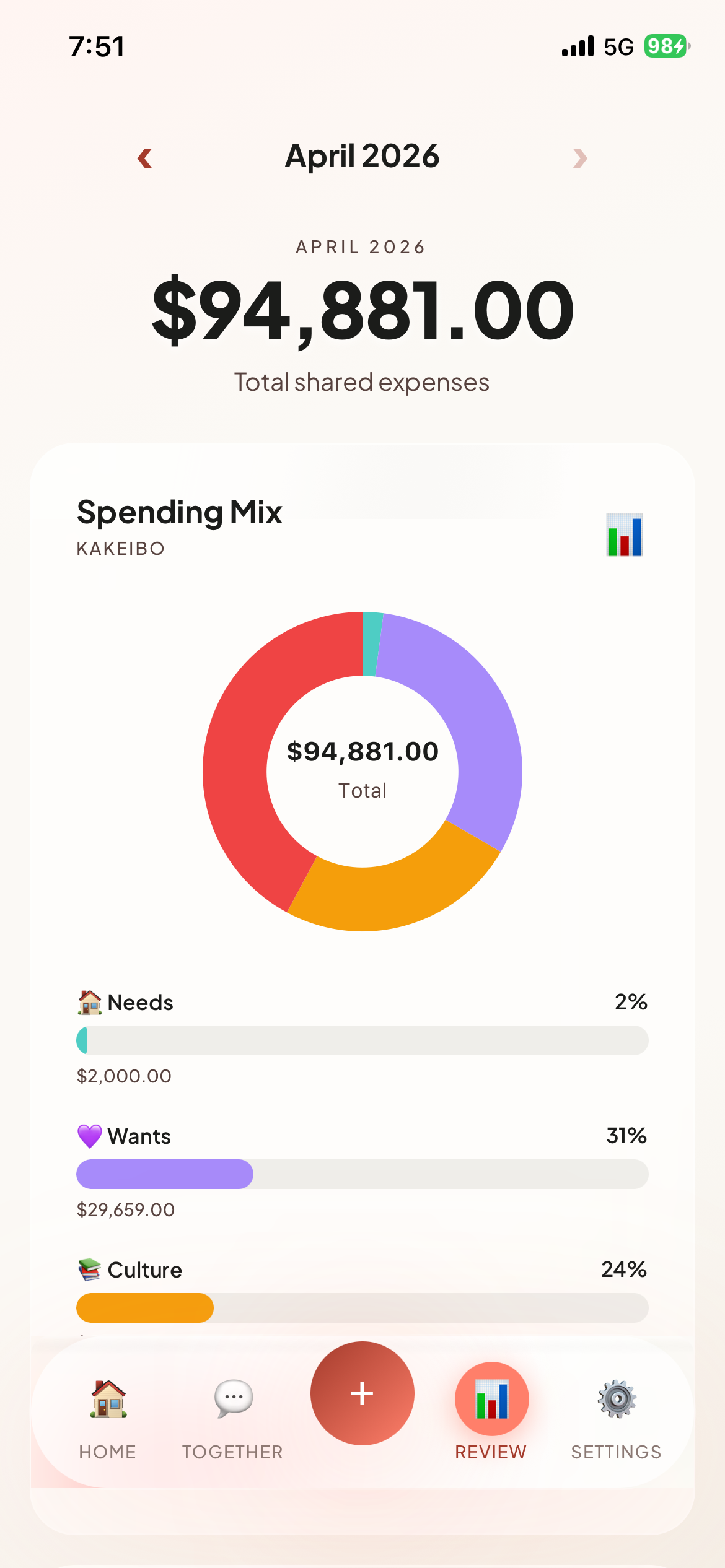
The categories are the four of the Japanese kakeibo method and cannot be extended. You pick one for every expense, and the monthly review’s donut chart is drawn from the same four.
- 🏠 Needs: essential living expenses such as rent, food and transport.
- 💜 Wants: non-essential spending such as dining out, shopping and hobbies.
- 📚 Culture: personal growth such as books, courses and experiences.
- ⚡ Unexpected: unplanned costs such as repairs, medical bills and emergencies.
Characters and budget rules
The two characters on the home screen always appear together and share one mood, set by how much of the budget is left: happy at 70% or more, normal between 40 and 70%, worried between 10 and 40%, desperate under 10%, and knocked out once you are over budget. There is no way to choose or buy characters.
- When this month’s spending reaches 80% of the budget, a “Budget Warning” notification fires on the device, once per month.
- The first budget change in a calendar month is free. From the second one, a confirmation dialog appears and you watch one rewarded ad. The rule exists to discourage moving the goalposts, and it applies to Plus users too.
- The budget is one monthly total. There are no per-category budgets.
Together
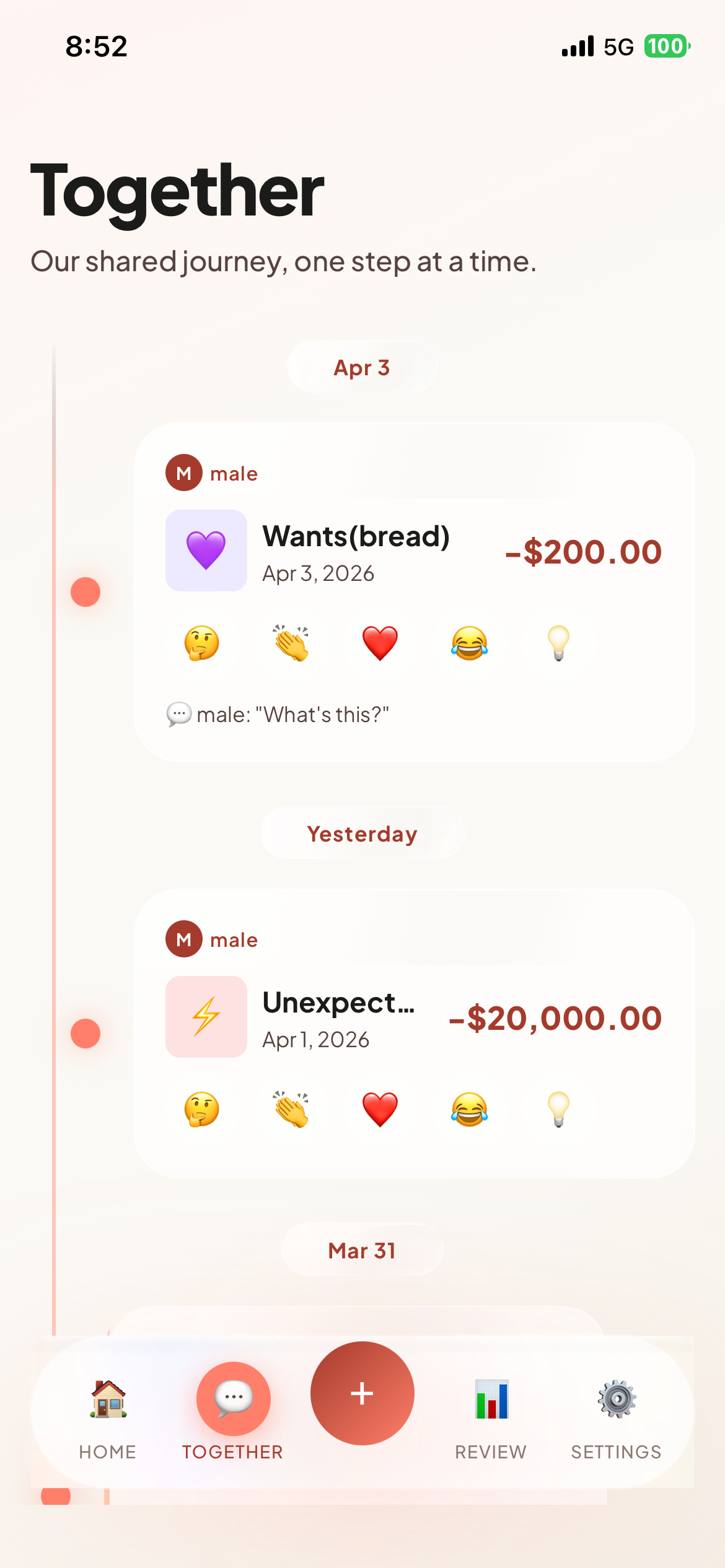
Under Settings > Invite Partner you get a six-character invite code to send, or enter your partner’s code to connect. Codes expire after 24 hours and skip look-alike characters (0, O, 1, I, L). Once connected, the “Together” tab shows both people’s expenses in a timeline, and every card takes reactions.
There is deliberately no free-text chat. Instead of nagging, you send one of twelve preset phrases in four groups (🤔 curious, 👏 supportive, ❤️ empathy, 😂 playful), and on the expense detail screen you react with one of six emoji: 👍 ❤️ 🎉 😂 🙏 ✨. A sent phrase shows in the reader’s own language.
The “Review” tab shows the month’s total, the change against last month, and a donut chart plus bars for the four categories. Below it, the exchange diary asks two questions, “What went well?” and “What was unexpected?”; each of you writes your own and sees the other’s as a bubble. Entries save automatically a second after you stop typing.
Free and Plus
Logging, the four categories, the budget bar and characters, partner pairing, reactions, the monthly review and the exchange diary are all free. On Free, the review reaches back to this month and last month, and ads are shown. Pairly Plus is a monthly subscription; the price appears in the app’s Settings screen as the store lists it, and “Restore Purchases” on the subscription screen brings it back on a new device.
- Plus: no ads.
- Plus: unlimited review history, as far back as you like.
- Plus: a three-month trend chart with one line per category.
- Plus: export a month as a CSV file (date, type, category, amount, currency, memo).
Data and privacy
No bank or card is ever connected, so account details never enter the app. Entries are written to a database on the device first, and the monthly budget stays on the device only. What the server (Cloudflare) stores: your email, nickname, language and currency, the couple link, and the expenses, reactions and diary entries you share with your partner. If you allow notifications, a push token is stored as well.
Ads are Google AdMob and are requested as non-personalized only. They sit in a banner above the tab bar and in every fifth card of the “Together” tab, and all of them disappear on Plus. There is no analytics SDK.
Deleting the account is done inside the app under Settings > Delete Account. Your records on the server and the couple link are removed, the device data is wiped with them, and it cannot be undone.
Can I link a bank or card?
No. It was built as a manual-entry app from the start. You never hand over banking credentials, and you decide what you share with your partner at the moment you write it down.
Can I add categories or set a budget per category?
Neither. The categories are fixed at Needs, Wants, Culture and Unexpected, and the budget is a single monthly total. Keeping the categories few is what lets two people log by the same yardstick.
Can I unpair from my partner?
There is no separate unpair button. To break the link you delete your account in Settings, which removes your records and the couple link together.
Which languages and currencies are supported?
Korean, English and Japanese for the language; won (₩), dollar ($) and yen (¥) for the currency. The two are set independently, so an English screen with won works. One currency at a time, with no exchange conversion. Both start from the device settings and can be changed in Settings at any time.
Does it work without a connection?
Logging and viewing work offline. Expenses and income go straight into the on-device database and the budget bar updates on the spot. Anything exchanged with your partner catches up once you are back online. If both of you edited the same item, the later save wins.